EasyManua.ls Logo

Hussmann ISLA IM-H Series - User Manual

Hussmann ISLA IM-H Series
82 pages
Print Icon
To Next Page IconTo Next Page
Loading...
Installation &
Operation Manual
Shipped with Technical Data Sheets
September 2020
®
Æ
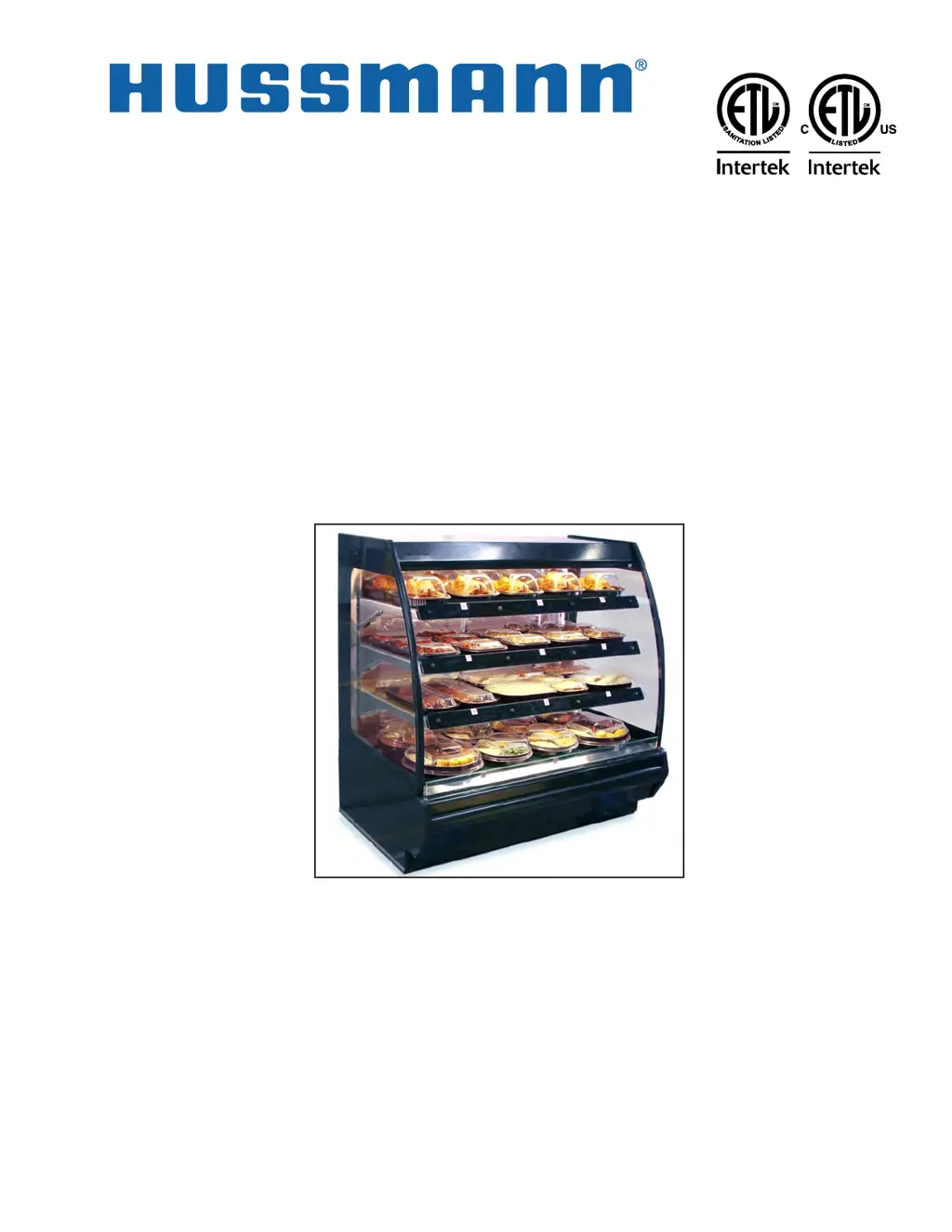
I/O Manual for IM-H
ISLA
IM-H
Multi-Deck Display
Hot Merchandisers

Questions and Answers

  • D
    driddleAug 5, 2025
    Why is my Hussmann ISLA IM-H product not holding temperature?
    • M
      Michael GutierrezAug 5, 2025
      If the Hussmann Merchandiser isn't holding temperature, several factors could be at play. First, check the case's location. It should be at least 15 feet away from doors, windows, or air vents, as ambient conditions can affect its operation. Cases operate best at 55% Relative Humidity and 75°F. Also, ensure the shelf control isn't set too low and that you're using approved containers. Preheat the case before loading products, and make sure the internal product temperature is 160°F or greater when placed in the case. Load product in a single layer, in direct contact with shelves and hold product for the recommended time. If low voltage is suspected, dispatch a Hatco authorized service agent.
  • J
    jillbennettAug 10, 2025
    How to fix no shelf heat in Hussmann Merchandiser?
    • S
      Samuel RamirezAug 10, 2025
      If there's no shelf heat in your Hussmann Merchandiser, first ensure the temperature setting isn't turned 'Off'; increase the shelf heat setting if needed. If the problem persists, it could be due to a faulty shelf heater, faulty control, or loose wiring on the heater. In these cases, dispatch a Hatco authorized service agent.
  • D
    Darryl PetersonAug 16, 2025
    What to do if Hussmann ISLA IM-H Merchandiser controller flashes a “PR1” error code?
    • C
      Christopher LeeAug 16, 2025
      If the controller of your Hussmann Merchandiser flashes a 'PR1' error code, it means the shelf might not be installed or is unplugged. Ensure all shelves are properly installed and securely plugged in inside the case. If the LED controller continues to flash, dispatch a Hatco authorized service agent. Note that if a heated shelf was removed at the factory, a static cling label 'NOT IN USE' should be placed over the flashing controller.
  • M
    mirandaerinAug 21, 2025
    Why don't the lights come on in my Hussmann ISLA IM-H?
    • J
      jenniferhannaAug 22, 2025
      If the lights on your Hussmann Merchandiser do not come on, the lamp may need to be replaced. For ballast/light socket wiring issues, if the ballast needs to be replaced, if the lamp socket needs to be replaced, or if the light switch needs to be replaced, dispatch a Hatco authorized service agent.
  • C
    Cassandra PerezAug 29, 2025
    What to do if Hussmann ISLA IM-H Merchandiser is inoperative with the power switch on?
    • L
      Laura JohnsonAug 29, 2025
      If the main power switch is on but the Hussmann Merchandiser case is inoperative, check to see that the cord is plugged in if a plug is provided. The cause may be an open circuit.

Summary

Before You Begin

ANSI Z535.5 Definitions

Explanation of safety symbols used in the manual (Danger, Warning, Caution, Notice).

Personal Protection Equipment (PPE) Warning

Requirement for qualified personnel to wear appropriate PPE during installation and servicing.

Lock Out; Tag Out Warning

Procedure to disconnect power to prevent electrical shock during servicing.

Field Wiring and Grounding Warning

Ensures safe installation by requiring qualified personnel and adherence to electrical codes.

General Instructions

Shipping Damage Handling

Procedures for inspecting and reporting shipping damage to the carrier.

Hussmann Product Control

Information on serial numbers for warranty and parts ordering.

Installation Procedures

Unloading Cases From Trailer

Safe methods for removing the merchandiser from the transport trailer.

Removing Shipping Skid and Crate

Instructions for unpacking the unit from its protective packaging.

Serial Plate Locations

Identifies where to find model and serial numbers on the unit.

Environmental Location Requirements

Specifies ideal store conditions for optimal unit performance.

Leveling Procedures

Critical steps to ensure proper unit operation, alignment, and drainage.

ISLA Body Panel Removal and Installation

Guide for removing and reinstalling body panels for service access.

ISLA Lifting and Transport Instructions

Safe methods for lifting, moving, and transporting the ISLA unit.

Electrical Information

Wiring Color Code

Standard color assignments for case wiring components.

Electrical Circuit Identification

Description of standard lighting circuits and their switches.

Field Wiring and Amperage

Guidelines for sizing field wiring based on serial plate amperage.

Ballast Location

Indicates the access panel where ballasts are located.

Operation and Adjustments

Startup Instructions

Initial steps to power on and prepare the merchandiser for use.

Temperature Adjustment

Procedure for modifying the shelf setpoint temperature.

Holding Temperature Guide

Recommended internal product temperatures for various food items.

Heated Shelves Operation

Specific operating procedures for units with heated shelves.

Maintenance and Cleaning

General Cleaning Directions

Daily cleaning recommendations to preserve the unit's finish.

Cleaning Instructions

Step-by-step guide for cleaning the unit's surfaces.

Stainless Steel Care

Tips to prevent corrosion and maintain the stainless steel finish.

Electrical Wiring Diagrams

Troubleshooting Guide

Heated Shelves: Product Not Holding Temperature

Troubleshooting steps when the unit fails to maintain product temperature.

Heated Shelves: No Shelf Heat

Diagnosing and resolving issues where shelves are not heating.

Heated Shelves: Inoperative Case

Steps to take when the unit has power but does not function.

Heated Shelves: PR1 Error Code

Interpreting and resolving the 'PR1' error code on the controller.

Heated Shelves: Lighting Issues

Steps to diagnose and fix issues with the unit's lighting system.

Hatco Limited Warranty

Product Warranty Coverage

Information on the duration and scope of Hatco's product warranty.

Limitation of Remedies and Damages

Exclusions and limitations on warranty claims and liability.

Hussmann Warranty

Service Record

Hussmann ISLA IM-H Series Specifications

General IconGeneral
CategoryMerchandiser
TypeIsland
SeriesISLA IM-H Series
ApplicationGrocery, Convenience
RefrigerantR-290
Case Lengths6', 8'
FeaturesAdjustable shelving, LED lighting
LightingLED lighting

Related product manuals