Product Description
DOCUMENT HQI-J-FC1-001
ES_DATE 2019-07-19
Fundus camera
HFC-1
RE_DATE 2020-06-08
REV R-3 PAGE 23 / 36
Q-I-300-02(R1):2018/06/04 Huvitz Co.,Ltd
8.2.3 Light Paths of the System
A: Color Fundus Observ at ion channel
(○
1
à ○
2
à ○
6
à ○
7
à ○
14
à ○
15
à ○
13
à ⑩ )
B: IR Fundus O bserv at ion channel
(○
1
à ○
2
à ○
6
à ○
7
à ○
14
à ○
15
à ○
12
à ⑪ )
C: W or ki ng Dot Im aging channel
(○
8
à ○
6
à ○
2
à ○
1
à ○
2
à ○
6
à ○
7
à ○
14
à ○
15
à ○
12
à ⑪ )
D: Cornea Ob serv ati on channel
(○
1
à ○
2
à ○
6
à ○
3
à ○
4
à ○
5
)
E: Color Ill um i nati on channel
(○
24
à ○
23
à ○
22
à ○
21
à ○
20
à ○
17
à ○
7
à ○
6
à ○
2
à ○
1
)
F: IR Illuminat ion channel
(○
25
à ○
23
à ○
22
à ○
21
à ○
20
à ○
17
à ○
7
à ○
6
à ○
2
à ○
1
)
G: Spli t Foc us System
(○
19
à ○
18
à ○
17
à ○
7
à ○
6
à ○
2
à ○
1
à ○
2
à ○
6
à ○
7
à ○
14
à ○
15
à ○
12
à ⑪ )
H: Fix ation target
(○
16
à ○
15
à ○
14
à ○
7
à ○
6
à ○
2
à ○
1
)
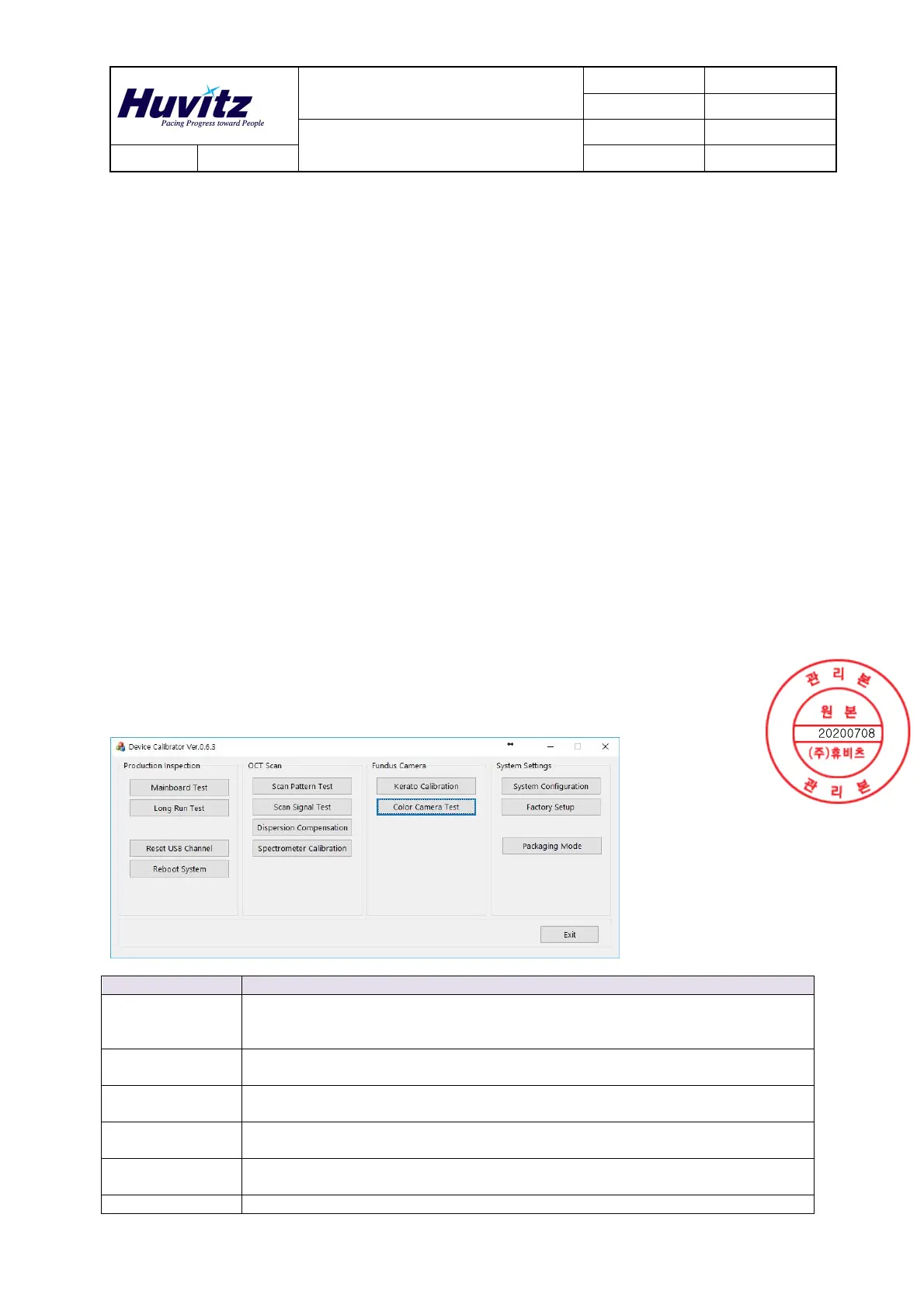
9. Calibration Method
9.1 Fundus Device Calibrator
Categories Contents
Mainboard
Test
Mode for testing the USB communication channels between PC and HOCT main
board, and testing the devices connected to HOCT main board such as motors,
fixation, LED lights, and etc..
Long Run
Test
Mode for long-running tests of major operations such as Auto Tracking, OCT
scans, Fundus photography, and etc..
Reset USB
Channel
Initialize the USB communication channel between PC and HOCT main board
and reconnect
Reboot
System
Reset HOCT main board, reconnect the USB communications channel after
initialization is completed
Scan Pattern
Test
Configure the profiles for measurement, preview, and Enface pattern of the OCT
scan, and test the results of scanning.
Scan Signal Test Mode for checking the quality of raw data taken from OCT scan.


 To Next Page
 Loading...