Product Description
DOCUMENT HQI-J-FC1-001
ES_DATE 2019-07-19
Fundus camera
HFC-1
RE_DATE 2020-06-08
REV R-3 PAGE 25 / 36
Q-I-300-02(R1):2018/06/04 Huvitz Co.,Ltd
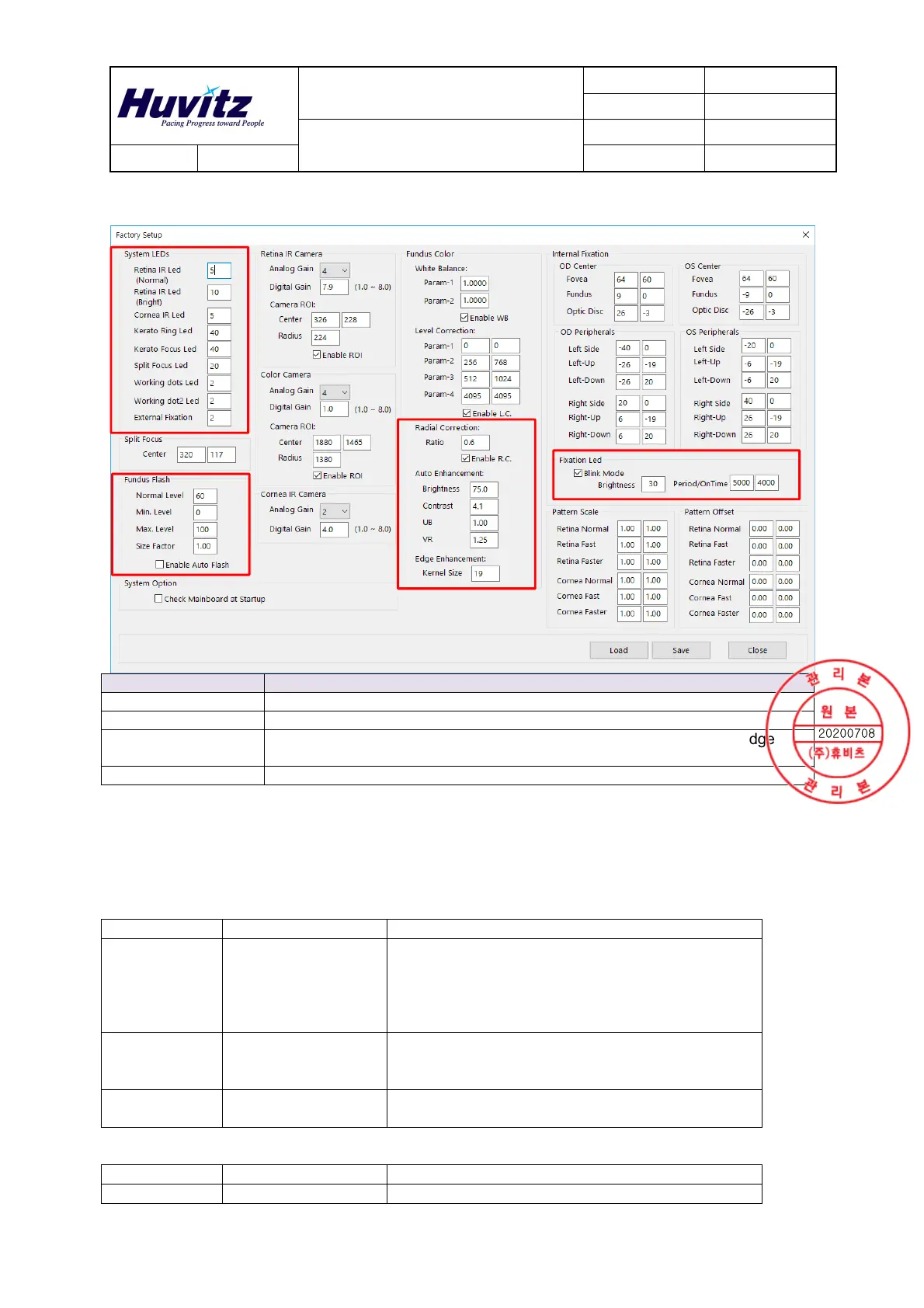
9.3 Factory Setup
Categories Contents
System LEDs Set the System LED’s parameters
Fundus Flash Set the Fundus Flash Level and Auto flash
Auto Enhancement
Set the parameters for Fundus Auto Enhancement and Kernal Size(Edge
Sharpen)
Fixation Led Set the parameters for Fixation Led, such as Brightness, Period.
10. Maintenance
Maintenance Items
To ensure safe and correct use of the HFC-1, the following must be checked before and after use.User
Maintenance Items
Item Period Description
Check up Before using l Power cord and plug for damage
l Connection to AC outlet
l Function of Safety lock
l Defect of Main unit include outside cover,
objective lens’s surface and etc.
Cleaning When the part is
stained
l Outside cover, LCD
l Surface of Objective lens
l Etc.
Replacement As required l Fuse
l Chin rest paper
Manufacturer Maintenance Items
Item Period Description
Calibration When necessary l Auto Tracking


 To Next Page