Product Description
DOCUMENT HQI-J-FC1-001
ES_DATE 2019-07-19
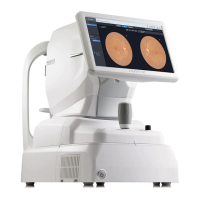
Fundus camera
HFC-1
RE_DATE 2020-06-08
REV R-3 PAGE 26 / 36
Q-I-300-02(R1):2018/06/04 Huvitz Co.,Ltd
Within 1 year
Device When necessary
Within 1 year
l Check the main unit operation
Calibration
We recommend that calibrate the HFC-1 periodically.
If working dots isn’t fine after auto tracking, the calibration for auto tracking is needed. .
Calibration is not allowed by a user because of the technical issues.
Contact to the Huvitz’s authorized distributor or Huvitz Co.,Ltd.
If the period of calibration is resticted by the local law, follow up the local law.
Before calling for serviceman
In case that abnormality happens or the machine operates abnormally, a warning sign is to be indicated.
In this case, perform the settlements below.
If the machine does not return to the normal condition in spite of the measures below, contact to the
agent where you bought the machine after switching the power off.
Symptom and solution
Symptom Cause / solution
The touch screen
does not turn on
ü The power cord may not be connected.
Check the connection of the power cord.
ü The power switch may not be turned on.
Check if the power switch is turned on.
ü The system may be in Sleep mode.
Restore the system from Sleep mode by
touching the screen.
The main unit cannot
be moved
horizontally
ü The main unit may be locked with the
Stage
fixation lever. Pull the lever to unlock the
main unit..
Troubleshooting Guide
The screen does not turn on.
The power cable may not be
connected.
Check the connection of the
power cable.
The power switch may not be
turned on.
Check whether the power
switch is turned on.
The screen does not turn on
even though the system
power is on
The system may be in sleep
mode.
Restore the system from
sleep mode by touching the
screen.
The screen suddenly turns
off
The image of the intended
part cannot be captured.
The patient may not be
looking at the fixation target
Instruct the patient to focus
on the fixation target.


 To Next Page
 Loading...