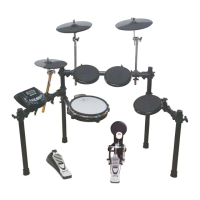
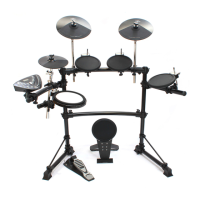
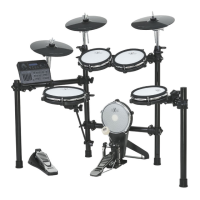
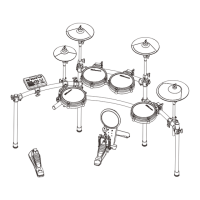
The HD-005 Digital Drum is an electronic drum kit designed for both enjoyment and exercise, offering a range of features for playing, recording, and customization.
Function Description:
The HD-005 serves as a digital drum set, allowing users to play various drum sounds, practice with built-in patterns, record their performances, and connect to external devices. It features a sound module that acts as the central control unit, managing drum kits, voices, patterns, tempo, and recording functions. The drum kit can be connected to a computer via USB, allowing it to be recognized as an Audio Device for MIDI communication, enabling users to edit their playing on a computer or play back MIDI songs while using the drum. It also includes Line Out for external amplification and Line In for mixing with external audio sources like CD or MP3 players.
Important Technical Specifications:
- Configuration: The drum kit includes 3 x 8" Tom pads (without rim), an 8" Snare pad (with rim feature), a 12" Crash cymbal (with choke feature), a 12" Ride cymbal, an 8" Hi-Hat pad, a 2" Kick pad, and a Hi-Hat pedal.
- Voice: It offers 184 different instrument voices.
- Drum Kit: Comes with 20 preset drum kits, all of which are editable and savable.
- Pattern: Features 50 built-in patterns with both "Full" and "Mute drum" modes for practice.
- Pad Button: Provides visual feedback with LED blink when a drum sound is played.
- Pad Edit: Allows for editing of Voice and Volume for individual pads.
- Tempo: Default tempo is 120, with an adjustable range of 40 to 240.
- Metro: Metronome function is On/Off.
- Record: Capable of recording 1 editable song in overwrite mode.
- Easy Reset: Factory settings can be restored by holding the "+" and "-" buttons simultaneously when powering on.
- Display: Features a 3-digital 7-Segment LED display.
- Power: Operates on 9V DC.
- Aux. Socket: Includes Headphone, Line In/Out, USB, and Power In DC9V.
- MIDI Application Chart:
- Basic Channel: Transmitted on 10, Recognized on 1-16.
- Note Number: 0-127 (Transmitted and Recognized).
- Velocity: Note ON (1-127), Note OFF (64) (Transmitted and Recognized).
- Major Controls:
- B9h 04h xxh (Hi-Hat pedal control): Transmitted Yes, Recognized X.
- Bxh 79h 00h (Reset All Controller): Transmitted Yes, Recognized Yes.
- Bxh 7Bh 00h (All Notes OFF): Transmitted Yes, Recognized Yes.
- Program Change: Transmitted X, Recognized Yes (Chanel 10 supports Bank 0 only).
- System Exclusive: Transmitted Yes, Recognized Yes.
- RPN: Transmitted X, Recognized Yes.
- NRPN: Transmitted Yes, Recognized Yes.
- Transmitted Note through Channel 10 for each pad: Tom1 (48), Tom2 (45), Tom3 (41), Snare (38), Snare Rim (37), Crash (55), Ride (51), Hi-Hat Open (46), Hi-Hat Close (42), Hi-Hat Pedal (44), Kick (36).
Usage Features:
- Installation: The manual provides detailed instructions for assembling the rack system and installing individual components like Hi-Hat, Crash, Ride, Tom, Snare, and the Sound Module. Each component has a part number for easy reference.
- Power On/Off: Users are advised to turn down external audio devices before powering on the drum and to wait at least five seconds after turning off before turning it back on to allow electronic circuits to reset.
- Playing Pads: All pads are force-sensitive, allowing for varied volume based on striking force. The Snare pad produces head and rim sounds, while the Hi-Hat pad offers open, closed, and gradually changing sounds depending on pedal pressure. The Crash cymbal has a choke feature, allowing the sound to be muted by squeezing the edge.
- Master Volume: A dedicated knob controls the overall output volume.
- Drum Kit Selection and Editing: Users can select from 20 preset drum kits using the +/- buttons. In "Kit Edit" mode, individual pad voices (1-184) and volumes (0-127) can be adjusted. The selected pad button blinks, and pressing it twice for Snare or Hi-Hat allows selection of alternative parts (head/rim, open/close). Settings can be saved to make them nonvolatile.
- Pattern Playback and Exercise: The drum offers 50 built-in patterns for practice. Users can play patterns, adjust tempo (40-240), and mute drum sounds within patterns to play along with background music. Pattern volume is also adjustable.
- Metronome: A metronome function with adjustable tempo (40-240) can be activated for practice.
- Recording: The drum allows recording one performance as pattern 51. Users can record free performance or accompanied by a pattern, with options to mute drum sounds in the pattern. Recording can be started automatically after a count-in or synchronously by striking a pad. Recordings can be stopped, saved, or discarded. Saved recordings are nonvolatile.
- USB & MIDI Connectivity: The USB port enables connection to a computer for MIDI communication, compatible with Windows XP/Vista, Windows 7, and MAC, recognized as a USB Audio device. This allows for advanced editing and integration with music software.
- Audio Connections: Headphone jack for silent practice, Line Out for connecting to external amplification, and Line In for mixing with external audio sources.
Maintenance Features:
- General Care: Users are advised not to open the unit or modify its circuits.
- Cleaning: The unit should be cleaned with a dry or lightly damp soft cloth, avoiding paint thinner or petrochemical-based polishes.
- Location: The drum should not be exposed to direct sunlight, high temperatures, rain, excessive humidity, dust, or strong vibration to prevent deformation, discoloration, or damage. It should also be kept away from radio or television receivers to avoid interference.
- Handling: Excessive force should not be applied to controls, connectors, pads, or other parts. Cables should be unplugged by gripping the plug, not the cable. Physical shocks should be avoided.
- Power Management: Only the attached power adapter should be used. The power switch should be turned off when not in use. Power switches of all related devices should be turned off before connecting or disconnecting audio cables. The power should be turned off if the main cable is damaged or the instrument is exposed to liquid. Rapid on/off cycling should be avoided. The AC adapter should not be plugged into the same outlet as high-consumption appliances.
- Service: The product should be serviced by qualified personnel if the power supply cord or adapter plug is damaged, liquid has entered the unit, it has been exposed to rain, it does not operate normally, exhibits a marked change in performance, or has been dropped or the cabinet damaged.
- Reset Function: A factory reset feature is available by holding down the "+" and "-" buttons during power-on, which restores factory settings and erases recorded content.

 Need help?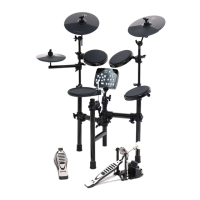

 To Next Page
 General