PAGE 7
USER MANUAL – HYBRID DSP24 PROFESSIONAL SPEAKER MANAGEMENT PROCESSOR
PAGE 7
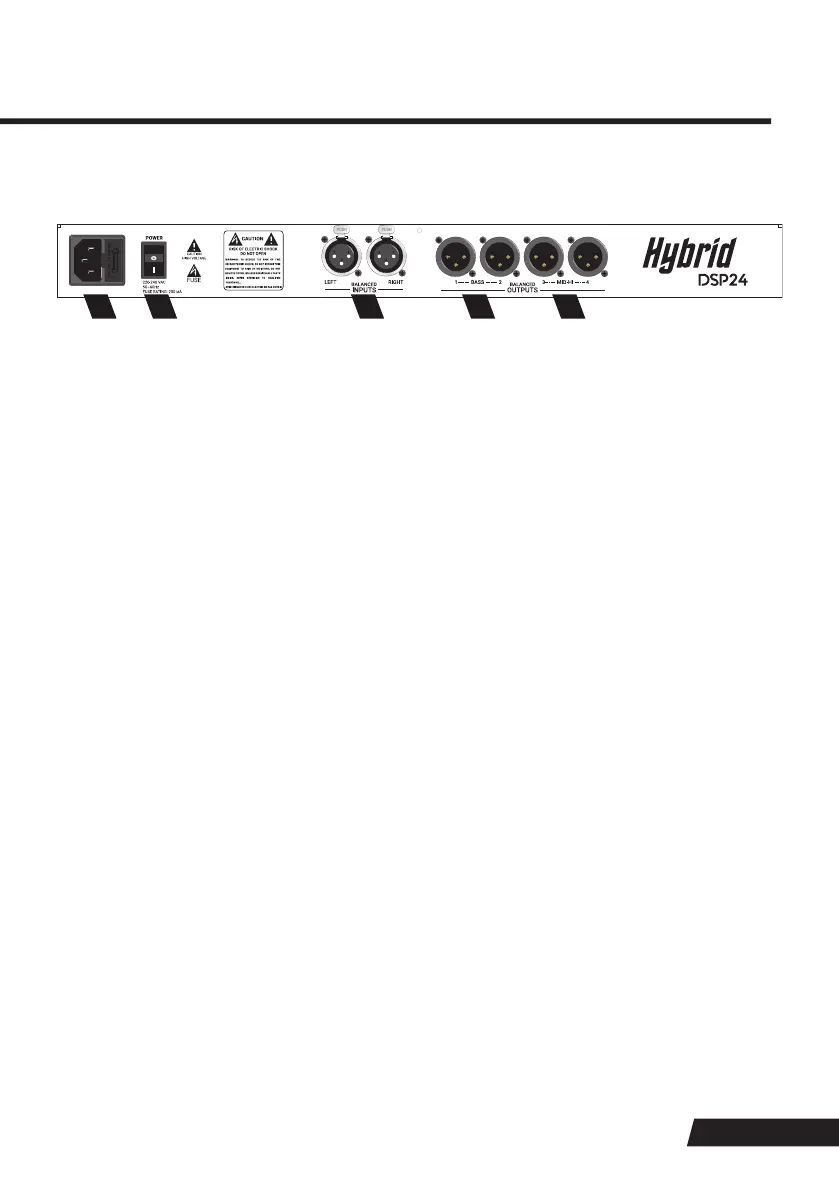
BACK PANEL CONTROLS AND FEATURES
5.
6.
7.
8.
9.
IEC CONNECTOR
POWER ON-OFF SWITCH
LEFT AND RIGHT INPUTS
BASS: OUTPUTS 1 AND 2
MID-HI: OUTPUTS 3 AND 4
The mains 220–240 Vac connector. Only use the cable supplied with this processor to power up the unit
(IEC 3-pin mains South African plug).
DO NOT modify the cable in any way. Inspect the cable before use. Should any sign of damage be
visible, replace the cable with the exact same type, available from your nearest authorised retailer.
Main power switch, which turns the processor ON or OFF. Once the processor is switched ON, the
Hybrid logo (1) and LCD screen (2) on the front panel will illuminate.
XLR Configuration for both the INPUTS and OUTPUTS:
Pin 1 – Ground
Pin 2 – Non-inverting (Positive)
Pin 3 – Inverting (Negative)
Balanced XLR female connectors.
The balanced XLR male output connectors are configured and locked as linked bass outputs for
presets 01 to 30. For presets 31 and 32, the bass outputs can be set to any frequency.
The balanced XLR male output connectors are configured and locked as mid–high outputs for presets
01 to 30. For presets 31 and 32, the mid–high outputs can be set to any frequency.
5 6 7 8 9


 To Next Page