The Hybrid OPAL22 is a dual-channel USB audio interface designed to connect analog audio signals to a computer for recording and monitoring. It features two professional-quality mic preamps and 24-bit/96kHz analog-to-digital and digital-to-analog converters, ensuring high-resolution and pristine signal quality. The device is bus-powered via USB 2.0, making it convenient for portable setups, though users should ensure their PC can supply sufficient power, especially when multiple bus-powered USB devices are connected.
Function Description
The OPAL22 allows users to pre-amplify and record two analog audio signals into a connected PC using a USB 2.0 connection, leveraging low-latency ASIO technology (PC only) for efficient performance. It includes branded converters that contribute to its high resolution and sampling rate, ensuring clear and untainted signal quality. Before recording, input signals can be directly monitored, and a dedicated monitoring level control is provided for precise adjustments. The interface also integrates a MIDI interface, allowing for the connection of compatible MIDI equipment to send and receive MIDI information from and to the connected PC.
Usage Features
The OPAL22 offers a range of features for flexible audio input and output:
- USB 2.0 Port: A standard Type B connector for connecting the device to a PC using the supplied USB cable.
- Main Output: This consists of a pair of ¼" (6.35 mm) balanced TRS jack sockets. These outputs carry the same signal as the monitor jack but are not locally volume-controlled and are unaffected by the direct monitor switch.
- MIDI Interface: Equipped with standard 5-pin DIN connectors, enabling the connection of MIDI equipment for sending and receiving MIDI data with the PC.
- Microphone Inputs (Channels A & B): Standard female balanced XLR connectors for connecting dynamic or condenser microphones. Phantom power (+48V DC) can be activated via a dedicated switch for condenser microphones. It is crucial to keep phantom power off when using dynamic microphones to prevent damage.
- Instrument Inputs (Channels A & B): ¼" (6.35 mm) balanced TRS jacks. The impedance of these inputs is switchable via a dedicated switch to match high- or low-impedance sources, accommodating various instruments.
- Impedance Switch: For instrument inputs, this switch allows users to select the appropriate input impedance (high or low) to match the connected instrument, ensuring optimal signal capture.
- Instrument/Mic Input Selector: A switch that determines whether the microphone input or the instrument input is the active input for each channel.
- GAIN Control: This knob sets the input gain for the selected active input. Users should observe the Overload ("OVL") LED while adjusting the gain to ensure it only lights up occasionally at the highest peak levels of the input signal, achieving the best gain setting without clipping.
- OVL (Overload) LED: This indicator illuminates when the GAIN control is set too high, signaling that internally safe signal levels are being exceeded.
- Monitor Output: This output carries the same signal as the main output but its volume can be adjusted via the monitor volume control. Additionally, input signals can be routed directly to the monitor output when the D-MON (direct monitoring) switch is pressed.
- Monitor Level Control: A dedicated knob to determine the volume at the monitor output.
- D-MON Switch (Direct Monitoring): This switch adds the input signals of both input sections (A and B) to the monitor output signal. If only monitoring of the input signals is desired, users can mute the audio replay from their Digital Audio Workstation (DAW) on the PC.
- USB Bus Activity LED: Indicates ongoing data traffic on the USB bus, confirming active communication with the computer.
- MIDI Bus Activity Indicator: Illuminates to show ongoing data traffic on the MIDI bus.
Maintenance Features
The OPAL22 is built with robust components to ensure reliability. However, certain parts common in audio products, such as potentiometers, faders, and switches, are subject to wear over time due to operation cycles.
- Dust Contamination: Malfunctions of electro-mechanical parts often occur due to dust contamination. While cleaning fluids in spray form are a common practice for inaccessible internal parts, users should be aware that many such fluids contain chemicals that can wash away dust but may also corrode or damage contact surfaces and cause cosmetic damage. The manufacturer explicitly excludes claims for damaged parts resulting from mechanical or chemical impact caused by such cleaning methods.
- No User-Serviceable Parts: The product should not be opened for service purposes as there are no user-serviceable parts inside. Opening the device for unauthorized service will void the warranty.
- Cleaning: The device should only be cleaned with a dry cloth. Always unplug the device from its power supply before cleaning.
- Environmental Considerations: Avoid using the product near water or exposing it to moisture. Position the product in a safe and stable place, out of reach of unauthorized persons.
- Cable Management: Ensure all cable connections to and from the product are secure and not subject to mechanical impact or present a tripping hazard.
- Volume Control: Audio equipment can generate sound pressure levels that may cause permanent hearing damage. Always start with low volume settings and avoid prolonged exposure to sound pressure levels exceeding 90dB.

 Need help?
 General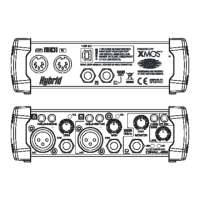

 To Next Page