EasyManua.ls Logo

Hydro-Pro 7024525 - Connection of PCB Illustration

Hydro-Pro 7024525
41 pages
Print Icon
To Next Page IconTo Next Page
To Previous Page IconTo Previous Page
Loading...
4.Use and Operation Instruction of Wire Controller
25
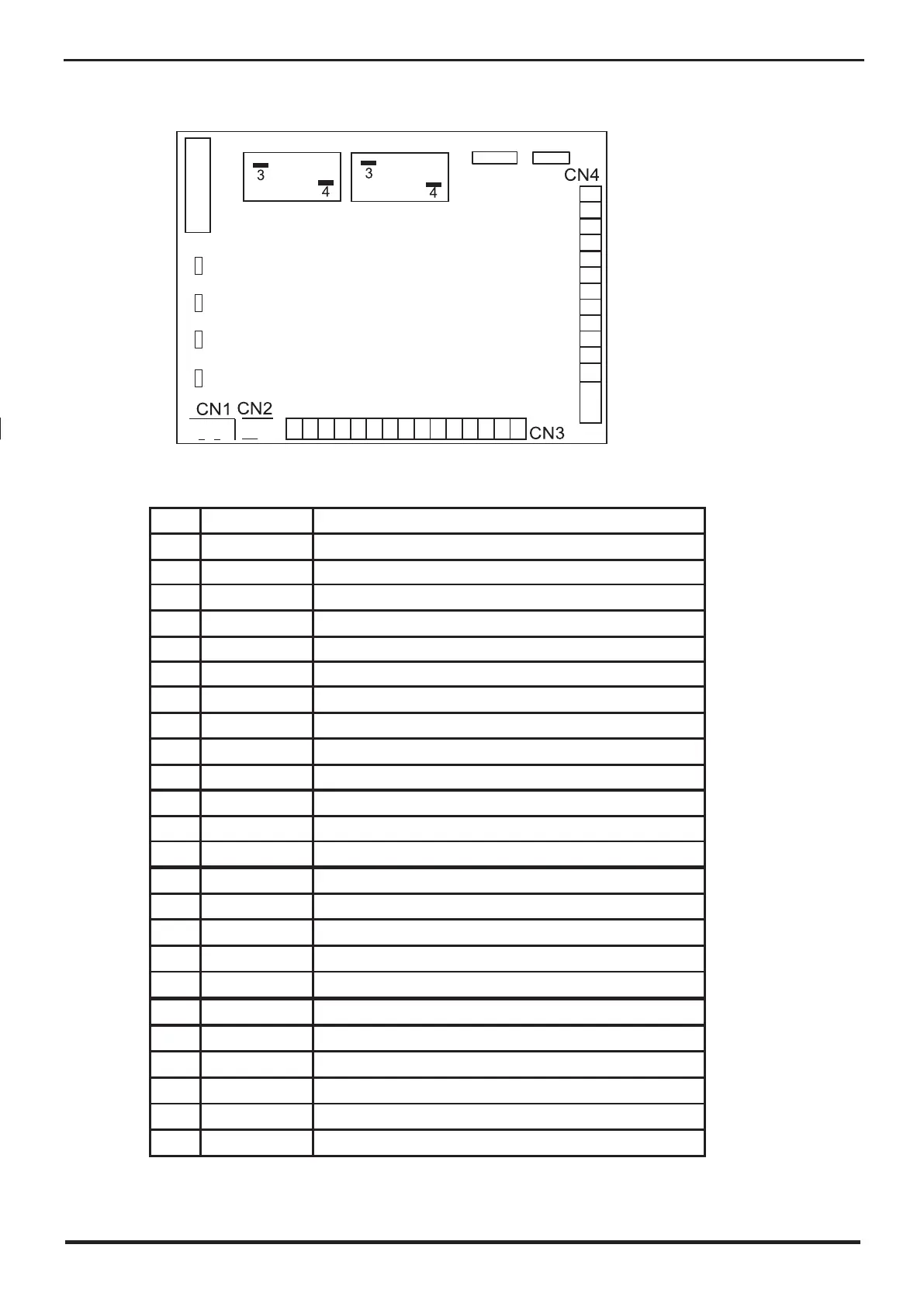
4.4. Connection of PCB illustration
Connections explanation
No.
Symbol
Meaning
1
OUT1
Compressor of system1220-230VAC
2
OUT2
Water pump220-230VAC
3
OUT3
4way valve 220-230VAC
4
OUT4
High speed of fan motor220-230VAC
5
OUT5
Low speed of fan motor220-230VAC
6
AC-N
Neutral wire
7
NET GND 12V
Wire controller
8
DI01 GND
On/Off Switch(input)(no use)
9
DI02 GND
Flow switch (input)( normal close)
10
DI03 GND
Low pressure protect
11
DI04 GND
High pressure protect
12
DI05 GND
No use
13
DI06 GND
No use
14
AI01 GND
Suction temp.(input)
15
AI02 GND
Water in temp.(input)
16
AI03 GND
Water out temp.(input)
17
AI04 GND
Temp. Of coil ( input)
18
AI05 GND
Ambient temp.(input)
19
AI06 GND
Adjustable fan speed/Exhaust temperature
20
CN1
Primary transformer
21
CN2
Secondary transformer
22
CN6
Without use
23
CN19
Electronic expansion valve
24
5V CN16 GND
Flow meter
OUT1
OUT2
CN19
OUT3
OUT4
Pc1001
OUT5
AC-N
CN6
GND
AI06
GND
AI05
GND
AI04
GND
AI03
GND
AI02
GND
AI01
+5V
CN16
GND
T5AL250V
FUSE
12V
NET
GND
DI01
GND
DI02
GND
DI03
GND
DI04
GND
DI05
GND
DI06
GND

Related product manuals