EasyManua.ls Logo

Hydrofarm Phantom Photobio - User Manual

Hydrofarm Phantom Photobio
4 pages
Print Icon
To Next Page IconTo Next Page
Loading...
USER MANUAL
LGBQM2
Advanced Quantum PAR Meter

Questions and Answers

  • S
    Shawn JohnsonAug 4, 2025
    How to fix no display on Hydrofarm Phantom Photobio LCD screen?
    • B
      Brian OrtizAug 5, 2025
      If there is no display on the LCD screen of your Hydrofarm Measuring Instruments, it may be due to several reasons: * **No power:** Press the Power button to turn on the PAR meter. * **Bad Batteries:** Replace the battery. * **Cable error:** Check the cable for electrical shorts and replace the sensor cable if needed.
  • M
    Melissa ReedAug 15, 2025
    What to do if the battery icon is flashing on Hydrofarm Phantom Photobio?
    • M
      Michael ReedAug 16, 2025
      If the battery icon is flashing on the LCD screen of your Hydrofarm Measuring Instruments, it means the battery is running low. Replace the batteries to resolve this issue.
  • A
    Amanda AlexanderAug 25, 2025
    Why does Hydrofarm Phantom Photobio LCD display show '----'?
    • S
      schroederemilyAug 25, 2025
      If the LCD main display of your Hydrofarm Measuring Instruments shows "----", here are a couple of things you can check: 1. **Sensor unit:** Ensure the sensor cable is securely connected to both the PAR meter main body and the sensor unit. 2. **RJ11 port:** Inspect the RJ11 port for any foreign materials that could be causing interference, and clean the port if necessary.

Summary

Advanced Quantum PAR Meter

Overview

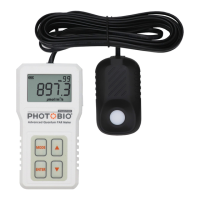
Describes the Quantum PAR meter's function in measuring Photosynthetically Active Radiation and its importance in plant studies.

Parts List

Details the components included with the PHOTOBIO by Phantom Quantum PAR meter, such as the main unit, sensor, cables, and batteries.

Getting Started

Provides step-by-step instructions for connecting the sensor unit to the main unit and preparing the device for initial operation.

Operating Instructions

Explains basic operations like powering on/off, logging data, holding measurements, and accessing mode functions.

Advanced Operating Modes

Details specific modes for meter calibration (CALI), data logging (LOG), and resetting device to factory settings (RCFS).

Specifications

Lists the technical specifications of the Quantum PAR meter, including measurement range, resolution, wavelength, and power requirements.

Troubleshooting

Offers solutions for common issues encountered with the Quantum PAR meter, such as no display, LCD errors, or battery problems.

Warranty Information

Outlines the 1-year warranty terms and conditions for the PHOTOBIO by Phantom Quantum PAR meter.

Safety Warnings

Alerts users to potential risks of injury from hazardous optical radiation and recommends protective measures.

Hydrofarm Phantom Photobio Specifications

General IconGeneral
BrandHydrofarm
ModelPhantom Photobio
CategoryMeasuring Instruments
LanguageEnglish

Related product manuals