Home
Hyper
Docking Station
HyperDrive Thunderbolt 3
Page 11 (Windows 10 Connection Steps)
Hyper HyperDrive Thunderbolt 3 - Windows 10 Connection Steps
14 pages
Manual
Save Page as PDF
To Next Page
To Next Page
To Previous Page
To Previous Page
Loading...
9
Windows
®
10
1.
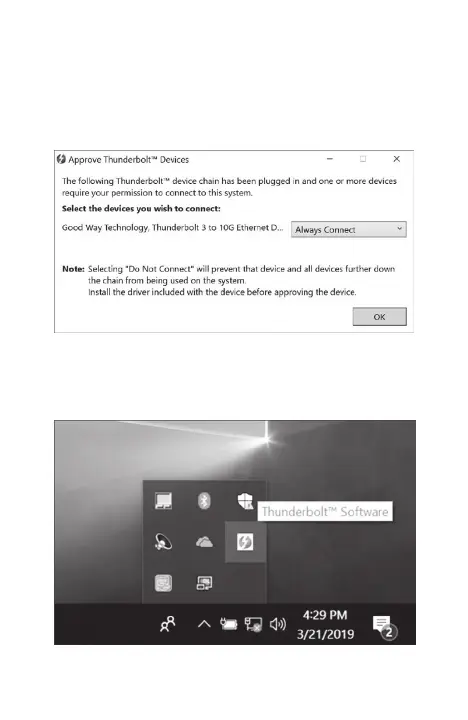
Select Always Connect to approve the device
you wish to connect, then click OK.
2.
T
o make sure your device has been connected,
click on the bottom corner of your desktop and
open Thunderbolt™ Software.
10
12
Table of Contents
Main Page
Table of Contents
2
Safety Instructions
3
Copyright
3
Trademarks
3
Regulatory Compliance
4
FCC Conditions
4
WEEE Information
4
Introduction
5
Package Contents
5
System Requirements
6
Features
6
Product Overview
7
Connection
10
Audio Configuration
13
Specifications
14
Related product manuals
Hyper HYPERDRIVE NEXT
14 pages
Hyper HYPERDRIVE HDM1H
16 pages



 To Next Page