EnCrypt PLUS from Hypertec - User Guide
4
Using EnCrypt PLUS The First Time
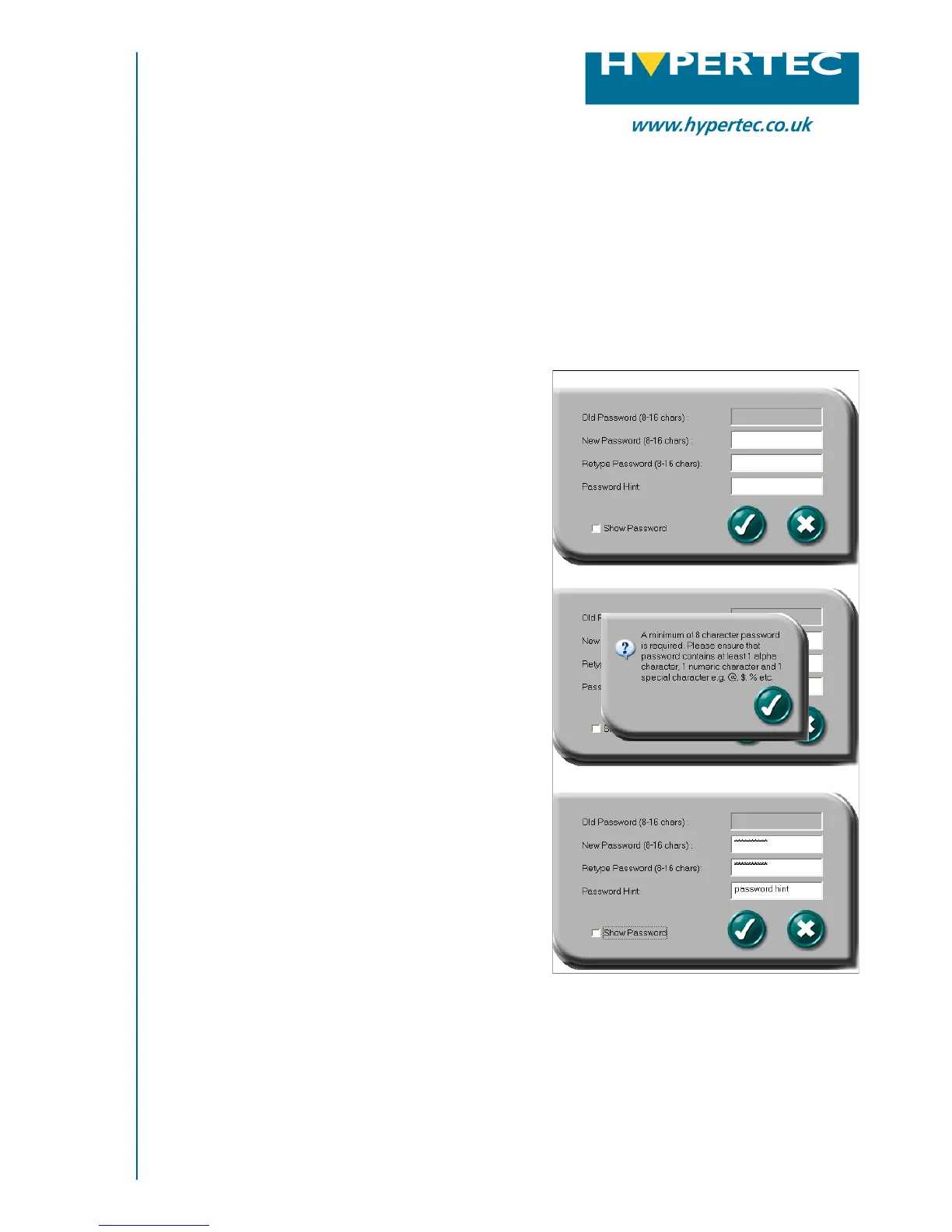
The first time you use the device the user will
need to enter a password. The password setup
screen will be displayed, you will not be able to
use the device until you have set a password.
Setting The Password
Enter a password of your choice (between 8
and 16 characters). This password must
contain at least one numerical character and
one special character.
*Warning* - Do not forget your password, if
you do loose the password there is no way to
recover your data. You may enter a password
hint (maximum of 32 characters) as an aid to
help you remember your password.
If you wish to see the password as you type it,
check the ‘show password’ selection box
When ready, click to save the password and the
password hint. You will see a message telling
you that the password has been changed or a
message box telling why the password or hint
is not acceptable.
The device will become locked when it is
removed from the USB port. You can also lock
the drive using the lock tool without removing
the device from the machine.
USB Flash Memory
Hardware Implemented AES Encryption
On first use you must set a password
The requirements have not been met
Password and hint entered
Please contact Hypertec Ltd for more information:
t: 0870 243 5603 e: info@hypertec.co.uk w: www.hypertec.co.uk


 To Next Page