19 Using your Charger LED Statuses
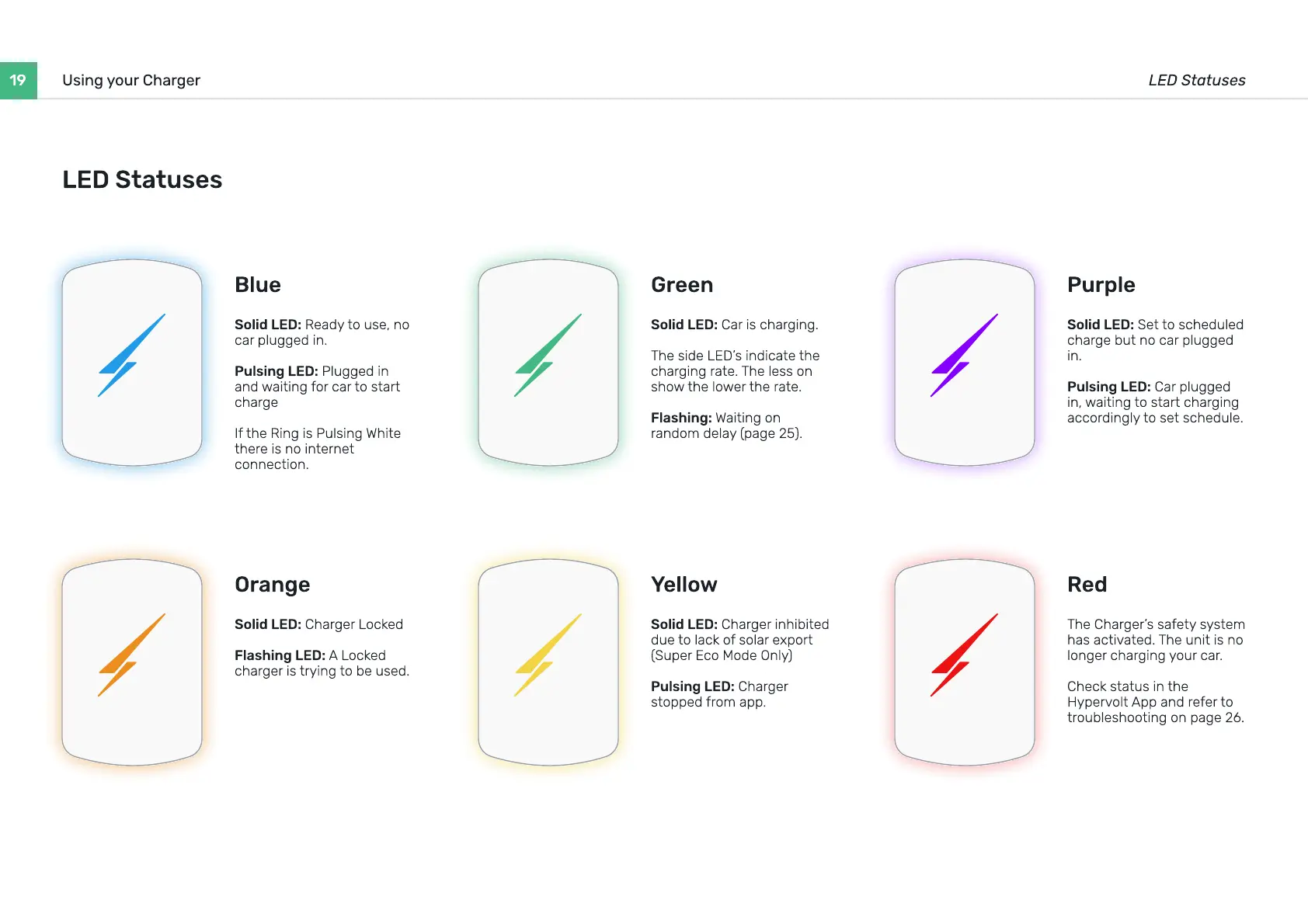
Solid LED: Ready to use, no
car plugged in
Pulsing LED: Plugged in
and waiting for car to start
charg
If the Ring is Pulsing White
there is no internet
connection.
Blue
Solid LED: Charger Locke
Flashing LED: A Locked
charger is trying to be used.
Orange
Solid LED: Car is charging
The side LED’s indicate the
charging rate. The less on
show the lower the rate
Flashing: Waiting on
random delay (page 25).
Green
Solid LED: Charger inhibited
due to lack of solar export
(Super Eco Mode Only
Pulsing LED: Charger
stopped from app.
Yellow
Solid LED: Set to scheduled
charge but no car plugged
in
Pulsing LED: Car plugged
in, waiting to start charging
accordingly to set schedule.
Purple
The Charger’s safety system
has activated. The unit is no
longer charging your car
Check status in the
Hypervolt App and refer to
troubleshooting on page 26.
R
ed
LED S
t
a
t
uses


 To Next Page