20 Using your Charger Setting up the App
We recommend installing the Hypervolt App, this enables you to control and monitor the charger. The app is free and can be downloaded from either the Google
Play Store (Android) or App Store (Apple). Follow the instructions below to get set up for the rst time.
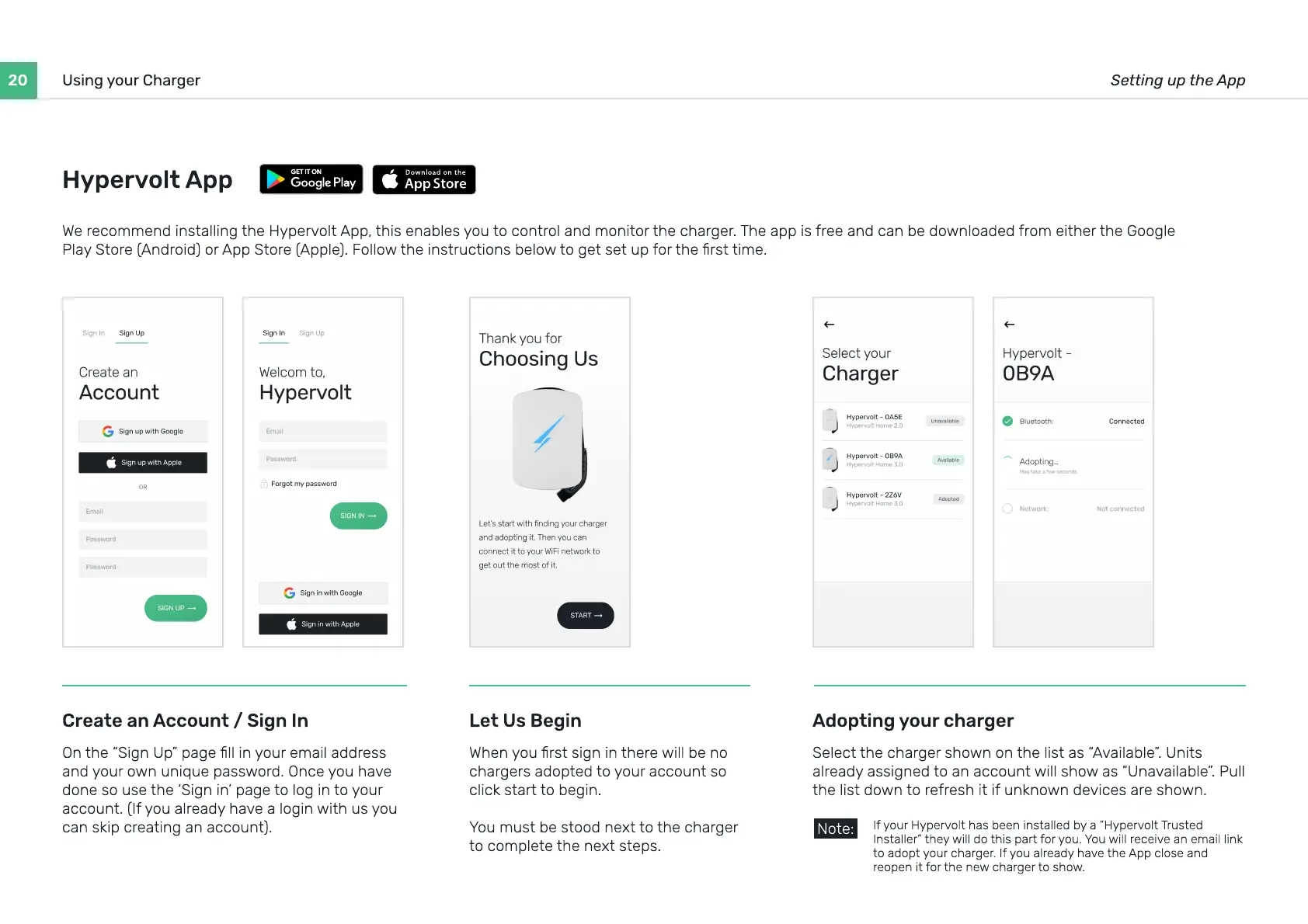
Create an Account / Sign In
On the “Sign Up” page ll in your email address
and your own unique password. Once you have
done so use the ‘Sign in’ page to log in to your
account. (If you already have a login with us you
can skip creating an account).
Adopting your charger
Select the charger shown on the list as “Available”. Units
already assigned to an account will show as “Unavailable”. Pull
the list down to refresh it if unknown devices are shown.
Let Us Begin
When you rst sign in there will be no
chargers adopted to your account so
click start to begin
You must be stood next to the charger
to complete the next steps.
If your Hypervolt has been installed by a “Hypervolt Trusted
Installer” they will do this part for you. You will receive an email link
to adopt your charger. If you already have the App close and
reopen it for the new charger to show.
Note:
Hypervolt App


 To Next Page