EasyManua.ls Logo

Hytera BP51 Series - User Manual

Hytera BP51 Series
26 pages
Print Icon
To Next Page IconTo Next Page
Loading...
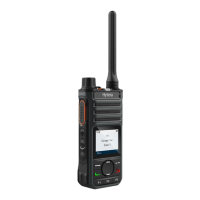
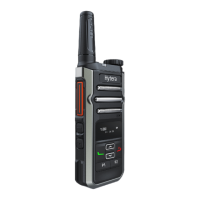
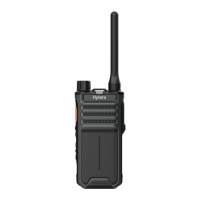
BP51X Digital Portable Radio
User Manual
Hytera Communications Corporation Limited

Questions and Answers

  • C
    Carrie GarciaAug 7, 2025
    What to do if Hytera BP51 Portable Radio cannot be turned on?
    • A
      Alex EstesAug 7, 2025
      If your Hytera Portable Radio won't turn on, there are a few potential causes. First, the battery might be improperly installed; try removing and reattaching it. Second, the battery may be drained, so recharge or replace it. Finally, the battery contacts could be dirty or damaged; try cleaning them.
  • M
    Michelle AliAug 14, 2025
    Why is the voice weak or discontinuous during receiving on my Hytera Portable Radio?
    • L
      Lisa CampbellAug 14, 2025
      If the voice is weak, discontinuous, or totally inactive during receiving on your Hytera Portable Radio, the signal may be weak. Ensure the radio is within the signal coverage area. Also, the volume may be set too low; increase the volume. Finally, the speaker may be blocked or damaged; clean the surface of the speaker.
  • C
    Christine CohenAug 19, 2025
    What to do if Hytera BP51 battery fails to be charged?
    • A
      Alicia Turner MDAug 19, 2025
      If the battery of your Hytera Portable Radio fails to charge, it might be due to the power adapter plug not being properly inserted into the socket; reconnect the radio to the power adapter. Alternatively, the USB Type-C cable may be poorly connected; try reconnecting the USB Type-C cable.
  • J
    johnsonpatriciaAug 25, 2025
    What to do if the keys do not work on Hytera Portable Radio?
    • P
      Patricia DuarteAug 26, 2025
      If the keys on your Hytera Portable Radio do not work, the keys may fail to function temporarily. In that case, try restarting the radio.
  • D
    Dana EspinozaAug 31, 2025
    What to do if the LED indicator is abnormal on Hytera BP51?
    • A
      Ann McdonaldAug 31, 2025
      If the LED indicator on your Hytera Portable Radio is abnormal, the indication may be abnormal. Try restarting the radio.

Summary

Copyright Information

Disclaimer

FCC Statement

Compliance with RF Exposure Standards

RF Exposure Guidelines and Operating Instructions

Outlines procedures for controlling RF exposure and ensuring compliance with safety standards.

EU Regulatory Conformance

ISEDC Statement

Documentation Information

Instruction Conventions

Explains icons used in the manual for clarity and understanding.

Notation Conventions

Defines symbols used for items, messages, commands, and navigation within the text.

Key Operations

Details how to perform basic key presses like short and long presses on the device.

Packing List

Product Overview

Product Layout

Identifies and labels all physical parts and components of the radio unit.

Programmable Keys

Explains the function and customization options for the radio's programmable keys.

Before Use

Charging the Battery

Provides step-by-step instructions and status indicators for charging the radio's battery.

Attaching the Belt Clip

Details the procedure for securely attaching the belt clip to the radio for carrying.

Attaching the Battery

Step-by-step guide for correctly installing the battery into the radio unit.

Attaching the Antenna

Instructions for securely connecting the antenna to the radio for optimal signal transmission.

Attaching the Audio Accessory

Guides on properly connecting audio accessories to the radio's accessory connector port.

Checking the Battery Power

Explains how to check the remaining battery level using LED indicators and Text-To-Speech.

Basic Operations

Turning On or Off the Radio

Instructions for powering the radio on and off using the designated On-Off key.

Adjusting the Volume

How to increase or decrease the audio volume using the dedicated volume keys.

Selecting a Zone

Procedure for choosing a zone, which is a group of channels, on the radio.

Selecting a Channel

Method for changing radio channels within the current zone using the selector knob.

LED Indicator

Call Services

Group Call

Details on initiating, answering, and ending group calls to multiple users.

Private Call

Explains the process for making and receiving one-to-one private calls.

All Call

How to initiate, answer, and end an all-user call on a digital channel.

Call on Analog Channel (Without Signaling)

Procedure for initiating calls to all users on an analog channel.

Supplementary Features

VOX

Enables voice-activated transmission without pressing the PTT key for hands-free operation.

Power Level

Allows adjustment of transmission power between high and low settings for varied communication needs.

Scan

Feature to monitor activities on other channels, keeping track of team members.

Squelch Level

Adjusts the signal threshold required to activate the speaker, filtering out noise.

Scrambler

Encrypts audio signals for private communication, preventing eavesdropping.

Monitor

Allows reception of weak signals and recognition of weak voices in the speaker.

Squelch Off

Keeps the speaker unmuted, allowing background noise to be heard, useful for monitoring.

Troubleshooting

Care and Cleaning

Product Care

Tips to ensure optimal performance and longevity of the product through proper handling.

Product Cleaning

Instructions for safely cleaning the radio and its components without causing damage.

Optional Accessories

Abbreviations

Hytera BP51 Series Specifications

General IconGeneral
IP RatingIP54
Frequency RangeUHF: 400-470MHz
Channel Spacing12.5kHz/25kHz
Battery2000 mAh
Battery Life (5-5-90 Duty Cycle)Up to 12 hours
Operating Temperature-20℃ ~ +60℃
Ingress ProtectionDust and splash resistant

Related product manuals