EasyManua.ls Logo

Hytera BD305 - User Manual

Hytera BD305
16 pages
Print Icon
To Next Page IconTo Next Page
Loading...
Preface
Thanks for your favor in our product. This manual provides guidance for you to use the product. To avoid
body injury or property loss caused by misoperation, please carefully read the Safety Information
Booklet before using the product.
This manual is applicable to the following product:
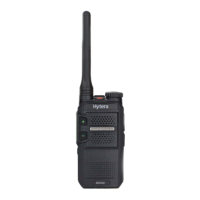
BD30X Digital Portable Radio (X may represent 2, 5, 6 or 8)

Other manuals for Hytera BD305

Questions and Answers

  • H
    Heidi FigueroaAug 16, 2025
    What to do if I can't communicate with other Hytera Portable Radio users?
    • K
      Kimberly FullerAug 16, 2025
      If you are unable to communicate with other group members, there might be a few reasons. First, ensure that your TX/RX frequency and signaling are consistent with those of other members. Second, verify that all members are using the same channel type, either digital or analog. Finally, you may be too far away from other members, so try moving closer.
  • C
    Carla MooreAug 18, 2025
    Why is the voice weak or discontinuous on my Hytera BD305?
    • A
      amy12Aug 18, 2025
      If the voice is weak, discontinuous, or totally inactive during receiving, several factors could be the cause. The battery voltage may be low, so recharge or replace the battery. The volume level may be set too low, so increase the volume by rotating the Volume Control Knob. The antenna may be loose or improperly installed; turn off the radio, then remove and reattach the antenna. Finally, the speaker may be blocked, so clean the surface of the speaker.
  • M
    Mark HarveyAug 21, 2025
    How to fix loud noise on Hytera BD305?
    • J
      Jorge RussellAug 21, 2025
      If the noise is too loud, it could be due to several reasons. You may be too far away from other members, so move towards them. Alternatively, move to an open and flat area, and restart the radio to try again. Also, consider your location, as communication may be blocked by high buildings or underground areas.
  • J
    John GonzalezAug 25, 2025
    What to do if my Hytera BD305 won't turn on?
    • T
      Tonya WatkinsAug 26, 2025
      If your radio won't turn on, there are a few potential causes. The battery may be installed improperly, so remove and reattach it. The battery power may have run out, so recharge or replace the battery. The battery may suffer from poor contact caused by dirtied or damaged battery contacts, so clean the battery contacts or replace the battery.
  • J
    Julie BeckAug 27, 2025
    Why am I hearing irrelevant voices on my Hytera BD305?
    • L
      lisaashleyAug 28, 2025
      If you are hearing irrelevant voices or noise on the channel, it could be due to a few reasons. You may be interrupted by radios using the same frequency, so change the frequency or adjust the squelch level. If the radio is in analog mode, it may be set with no signaling, so set signaling for all radios operating at the same frequency to avoid interference. You may also be too far away from other members, so move towards them.
  • S
    Sally MartinezAug 31, 2025
    Why can't I communicate with other group members on my Hytera Portable Radio?
    • M
      Matthew BennettAug 31, 2025
      You may be unable to communicate with other group members on your Hytera Portable Radio due to several reasons. First, the transmit/receive frequency or signaling may be inconsistent with those of other members; ensure you set your radio to the same TX/RX frequency and signaling. Second, the channel type (digital or analog) may be set inconsistently; verify that all members are using the same channel type. Finally, you may be too far away from other members; try moving closer to them.
  • D
    donald76Sep 3, 2025
    What to do if the voice is weak during receiving on Hytera Portable Radio?
    • J
      Justin AndersonSep 3, 2025
      If you're experiencing weak or discontinuous voice during receiving on your Hytera Portable Radio, consider these potential causes. The battery voltage may be low; try recharging or replacing the battery. The volume level may be set too low; increase the volume using the Volume Control Knob. The antenna may be loose or improperly installed; turn off the radio, then remove and reattach the antenna. Lastly, the speaker may be blocked; clean the surface of the speaker.
  • B
    Barbara LeeSep 5, 2025
    Why is the noise too loud on my Hytera Portable Radio?
    • M
      monica95Sep 5, 2025
      Excessive noise on your Hytera Portable Radio can stem from a few factors. You might be too far from other members; try moving closer. Your location could be unfavorable, such as being blocked by buildings or underground; move to an open, flat area and restart the radio. Alternatively, external disturbances like electromagnetic interference could be the cause; move away from potential sources of interference.
  • M
    Melissa MorrisSep 9, 2025
    How to fix Hytera Portable Radio that cannot be turned on?
    • E
      elizabethproctorSep 9, 2025
      If your Hytera Portable Radio won't turn on, there are a few things you can check: * The battery might be installed improperly; remove and reattach it. * The battery power may be depleted; recharge or replace the battery. * The battery contacts may be dirty or damaged, causing poor contact; clean the battery contacts or replace the battery.
  • S
    Samantha WhiteSep 12, 2025
    What to do if I hear noise on the channel of Hytera Portable Radio?
    • K
      Kevin CollinsSep 12, 2025
      If you are hearing irrelevant voices or noise on your Hytera Portable Radio channel, it could be due to radios using the same frequency; try changing the frequency or adjusting the squelch level. Also, if the radio is in analog mode, it may be set with no signaling; set signaling for all radios operating at the same frequency to avoid interference.

Summary

FCC Statement

Compliance with RF Exposure Standards

RF Exposure Compliance and Control Guidelines and Operating Instructions

Before Use

Charging the Battery

Guide on how to charge the radio's battery before initial use and during operation.

Checking the Battery Power

How to check the current battery level and interpret the indicators.

Basic Operations

Call Services

Call on Digital Channel

Instructions for initiating and responding to calls on digital channels, including group and private calls.

Troubleshooting

Care and Cleaning

Hytera BD305 Specifications

General IconGeneral
BrandHytera
ModelBD305
CategoryPortable Radio
LanguageEnglish

Related product manuals