EasyManua.ls Logo

Hytera BP56 Series - User Manual

Hytera BP56 Series
28 pages
Print Icon
To Next Page IconTo Next Page
Loading...
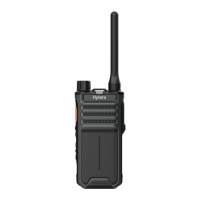
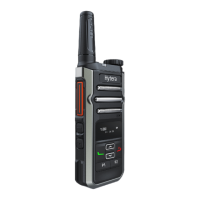
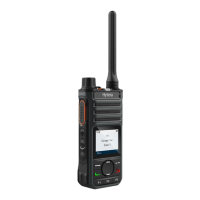
BP56X Digital Portable Radio
User Manual
Hytera Communications Corporation Limited

Questions and Answers

  • P
    Patrick GardnerAug 5, 2025
    Why won't my Hytera BP56 Portable Radio turn on?
    • T
      Theresa SmithAug 5, 2025
      Your Hytera Portable Radio might not be turning on due to several reasons: * The battery might be installed improperly. Try removing and reattaching it. * The battery's power may have run out. Recharge or replace the battery. * The battery contacts could be dirty or damaged, causing poor contact. Clean the battery contacts to resolve this.
  • R
    Regina RomeroAug 9, 2025
    What to do if the voice is weak during receiving on Hytera BP56 Portable Radio?
    • T
      timothyparkerAug 10, 2025
      If the voice during receiving is weak, discontinuous, or totally inactive on your Hytera Portable Radio, consider the following: * The signal may be weak. Make sure that the radio is within the signal coverage area. * The volume may be set too low. Increase the volume. * The speaker might be blocked or damaged. Clean the surface of the speaker.
  • K
    Kristi MoralesAug 14, 2025
    What to do if Hytera BP56 Portable Radio battery fails to charge?
    • B
      Brian FrancoAug 14, 2025
      If the battery of your Hytera Portable Radio fails to charge, check these possible causes: * The power adapter plug may not be properly inserted into the socket. Reconnect the radio to the power adapter. * The USB Type-C cable may be poorly connected. Reconnect the USB Type-C cable to ensure a secure connection.
  • C
    Crystal SimmonsAug 20, 2025
    What to do if the keys do not work on Hytera Portable Radio?
    • M
      Mary JonesAug 20, 2025
      If the keys on your Hytera Portable Radio are not working, it could be due to the following reasons: * The keys may have temporarily failed to function. Try restarting the radio. * The keys may be damaged. Contact your dealer or Hytera technicians for maintenance.
  • U
    upowellAug 25, 2025
    What to do if the LCD does not display any information on Hytera BP56 Portable Radio?
    • T
      tony29Aug 25, 2025
      If the LCD on your Hytera Portable Radio isn't displaying any information, it might be because: * The LCD may have temporarily failed. Try restarting the radio to see if that resolves the issue. * The screen may be damaged. Contact your dealer or Hytera technicians for maintenance.
  • C
    Carrie TaylorAug 30, 2025
    What to do if the LED indicator is abnormal on Hytera BP56?
    • D
      Daniel RothAug 30, 2025
      If the LED indicator on your Hytera Portable Radio is behaving abnormally, it could be due to these reasons: * The indication may be temporarily abnormal. Restart the radio. * The LED indicator may be damaged. Contact your dealer or Hytera technicians for maintenance.

Summary

Preface

Copyright Information

Disclaimer

FCC Statement

Compliance with RF Exposure Standards

ISEDC Statement

EU Regulatory Conformance

Documentation Information

Instruction Conventions

Explains icons used for notes and cautions.

Notation Conventions

Details how text elements like menus, commands, and filenames are represented.

Key Operations

Short Press Operation

Defines the action of pressing and quickly releasing a key.

Long Press Operation

Defines the action of pressing and holding a key for a preset time.

Press and Hold Operation

Defines the action of keeping a key pressed, as a continuation of long press.

1. Packing List

2. Product Overview

2.1 Product Layout

Illustrates and lists the parts of the radio.

2.2 Programmable Keys

Explains how to customize key functions with a dealer.

3. Before Use

3.1 Charging the Battery

Provides instructions on how to charge the radio's battery and status indicators.

3.2 Attaching the Belt Clip

Details the procedure for attaching the belt clip to the battery.

3.3 Attaching the Battery

Explains how to correctly attach the battery to the radio.

3.4 Attaching the Antenna

Advises on the proper method for attaching the antenna to avoid damage.

3.5 Attaching the Audio Accessory

Guides on connecting audio accessories for optimal performance and protection.

4. Basic Operations

4.1 Turning On or Off the Radio

Instructions on how to power the radio on and off using the On-Off key.

4.2 Adjusting the Volume

Explains how to control the audio volume using dedicated keys.

4.3 Selecting a Zone

Describes how to select a zone, which groups channels, via menu or keys.

4.4 Selecting a Channel

Details how to choose a specific channel within the selected zone using the selector knob.

5. Status Indications

5.1 LCD Icon

Explains the various icons displayed on the LCD screen and their meanings.

5.2 LED Indicator

Describes the status indicated by the LED light (e.g., charging, transmitting).

6. Call Services

6.1 Group Call

Explains how to make and answer group calls.

6.2 Private Call

Explains how to make and answer private calls.

6.3 All Call

Explains how to make and answer all calls.

6.4 Call on Analog Channel (Without Signaling)

Describes making calls on analog channels without signaling.

7. Supplementary Features

7.1 Backlight

Explains how to adjust the LCD backlight settings.

7.2 VOX

Details the Voice Operated Exchange feature for hands-free transmission.

7.3 Power Level

Explains how to adjust the transmission power level for range and battery saving.

7.4 Scan

Describes the scan feature for monitoring other channels and its LED indication.

7.5 Squelch Level

Explains how to set the squelch level for receiving signals.

7.6 Scrambler

Explains the scrambler feature for audio signal encryption and privacy.

7.7 Monitor

Describes the monitor feature for receiving weak signals.

7.8 Squelch Off

Explains how to disable squelch to hear background noise.

8. Troubleshooting

9. Care and Cleaning

9.1 Product Care

Provides general advice on how to care for the product to ensure longevity.

9.2 Product Cleaning

Details the proper procedures and precautions for cleaning the radio.

10. Optional Accessories

11. Abbreviations

Hytera BP56 Series Specifications

General IconGeneral
BrandHytera
ModelBP56 Series
CategoryPortable Radio
LanguageEnglish

Related product manuals