DRIVING
Quick Reference Guide I 3837 I Quick Reference Guide
KONA
HYUNDAI
The Forward Collision Avoidance (FCA)
system is designed to detect and
monitor the vehicle ahead and warn
the driver if a collision is imminent. On
vehicles equipped with both camera
and radar sensor, pedestrian detection
is also available.
To operate the system, select the FCA
(Forward Collision Avoidance Assist)
sub menu in the LCD cluster display
under User Settings. Please refer to your
Owner’s Manual for further information.
FORWARD COLLISIONAVOIDANCE ASSIST FCA
Please refer to your Owner's Manual for more information.
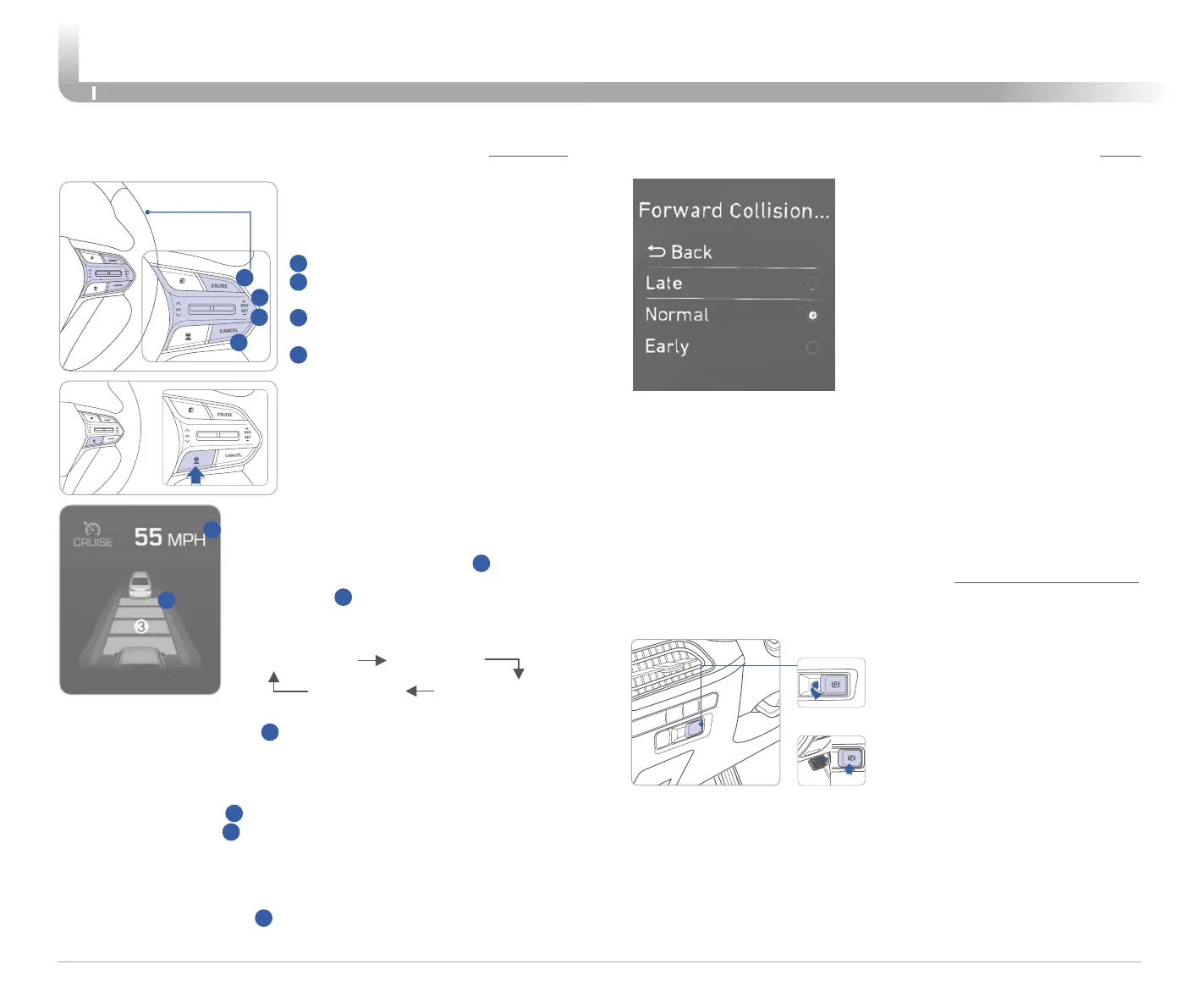
CRUISE CONTROL/SMART CRUISE CONTROL
2
3
1
4
Vehicle Following Distance
(if equipped with Smart Cruise)
The Cruise Control system allows
you to program the vehicle to
maintain a constant speed without
holding the accelerator pedal.
1
2
The Smart Cruise system will
automatically adjust your vehicle
speed to maintain the SET speed, or
maintain the set following distance
from the vehicle ahead of you.
1
To turn On/Off cruise control.
2
Toggle switch UP to Resume or
Increase the cruise control speed.
3
Toggle switch DOWN to Set or
Decrease the cruise control speed.
4
To Cancel the Cruise Control.
Press the button to set and maintain the
vehicle-to-vehicle distance without pressing
the accelerator or brake pedal.
The vehicle-to-vehicle distance
1
will
automatically activate when you set the
cruise speed
2
.
Each time the button is pressed, the vehicle-
to-vehicle distance changes as follows:
Distance 2
Distance 3Distance 4
Distance 1
Setting Cruise Control
1. Press the “CRUISE” button
1
to turn on Cruise Control. The icon will
illuminate in the instrument cluster.
2. Toggle “-SET” switch (3) DOWN to set cruising speed.
Adjusting the vehicle speed
1. Toggle “+RES” switch
2
UP to increase cruising speed.
2. Toggle “-SET” switch
3
DOWN to decrease cruising speed.
Note: Quick toggle up/down will change speed by 1 mph. Holding
switch up/down will change speed by 10 mph.
To Cancel Cruise Control
Press the “CANCEL” button
4
or depress the brake pedal.
Early:
This setting maximizes the amount of distance between the
vehicle or pedestrian ahead before the initial warning occurs.
Normal:
This setting allows for a nominal amount of distance between
the vehicle or pedestrian ahead before the initial warning occurs.
Late:
This setting reduces the amount of distance between the
vehicle or pedestrian ahead before the initial warning occurs.
ELECTRIC PARKING BRAKE EPB
Stop the vehicle then pull
the EPB switch.
Applying
Releasing
Press the EPB switch while
depressing the brake pedal.
To apply and release EPB manually
The EPB will automatically be applied when:
- Engine off while Auto Hold is enabled, parked on a slope,
or with the engine off in park but the vehicle still moves a bit.
To release the automatic EPB:
- With engine running, depress the brake pedal and shift into
R(Reverse) or D(Drive) and then depress accelerator pedal.
NOTE: Please see the owner’s manual for additional details







 To Next Page