STEERING WHEEL / STALK / PANEL
5
USING THE REMOTE START FUNCTIONS
StartingYourVehicle
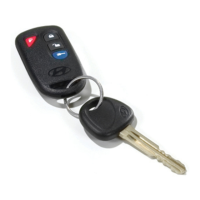
The remote start function is activated by pressing the button followed by pressing the button within 3 seconds on your
remote control transmitter. The system will check the vehicle to ensure that it is safe to start, and if all safety parameters are
correct, the engine will start within 5 seconds and run for up to 15 minutes. Press and hold the button again for 2 seconds
to turn off the vehicle.
RemoteStartSafetyFeatures
For safety and security reasons, the system will shut down the engine during remote start operation if any of the following occur:
• The brake pedal is pressed before the vehicle ignition key is turned on
• The vehicle hood or trunk/tailgate is opened
• The security system is triggered
As a safety precaution, the vehicle will shut off if left unattended after 15 minutes.
EnteringtheVehicleWhileitisRunningviaRemoteStart
1. Press the button on the remote control transmitter to unlock the doors and disarm the security system.
2. Enter the vehicle. Do not press the brake pedal.
3. Insert the key into the ignition and turn to the ON position.
4. Press the brake pedal. The remote start system disengages and the vehicle will operate normally.


 To Next Page