7
TV CONNECTIONS
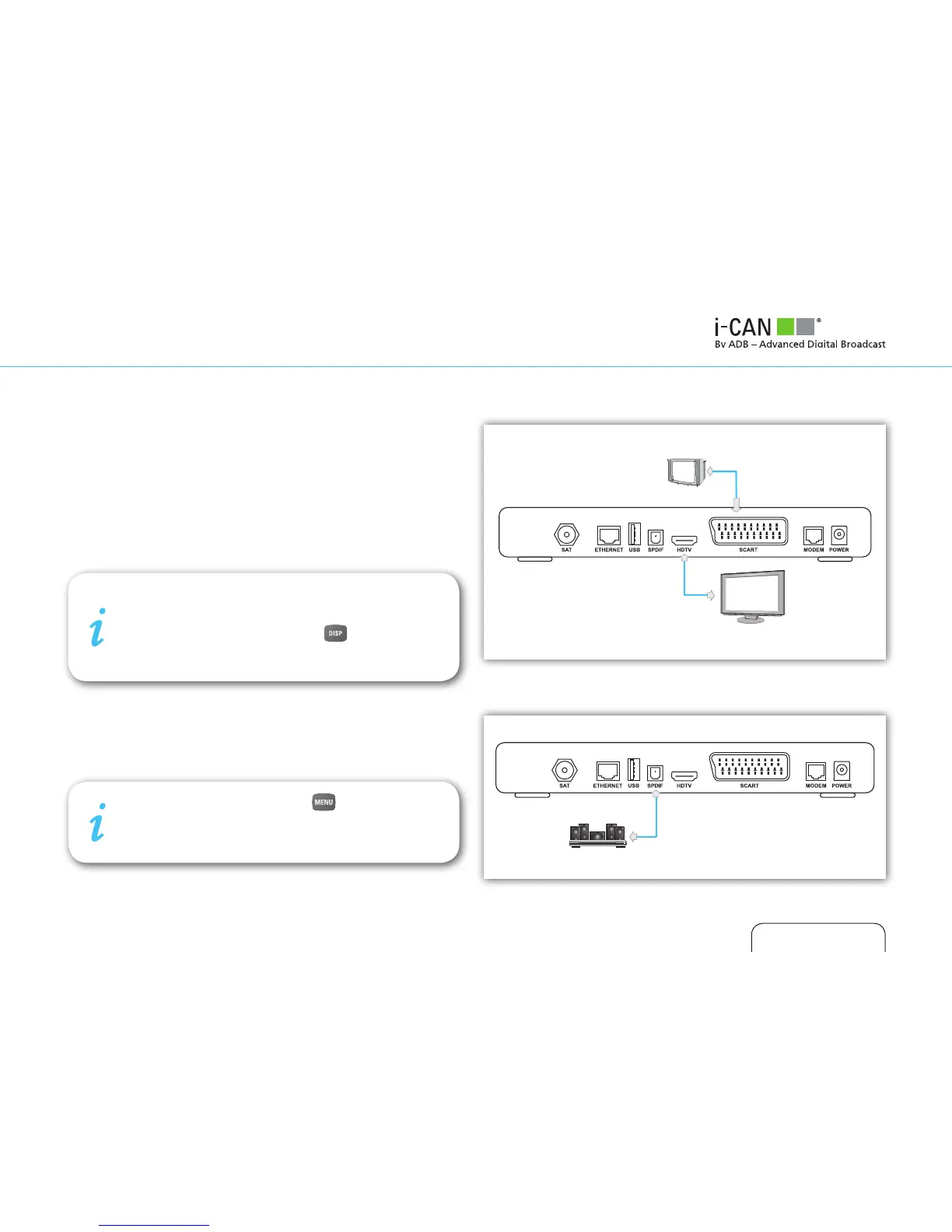
There are two ways of connecting the receiver to your TV set.
■ Connection with HDMI cable is the most recommended one.
It provides the highest picture and audio quality. The receiver
automatically detects the best resolution for your TV. But
this requires support for the High Bandwidth Digital Content
Protection (HDCP) standard from your TV set.
■ If there is no possibility of connecting the receiver with HDMI
cable, use SCART cable.
SURROUND SOUND
If you would like to enjoy Dolby surround sound, connect your
home cinema system to the receiver with S/PDIF cable.
To enjoy surround sound, press , select “Audio
Mode” in “Your Preferences” menu and choose “Yes”.
Surround sound will be audible only if it is broadcast
with the program.
SD TV
HD TV
Home Cinema
If your receiver is connected with SCART cable, please
make sure that the picture resolution is set to 576i. If
the reslution of the screen is different, then the graph-
ic is not displayed. Keep pressing on the remote
control unit of your i-CAN receiver until it switches on
to 576i mode and the graphic appears.



 To Next Page