DX90 User Guide
3
- Bit for bit playback, Support up to 24Bit/192kHz.
- Dual ES9018K2M DAC Chips.
- Built-in 10V Voltage Swing Headphone AMP.
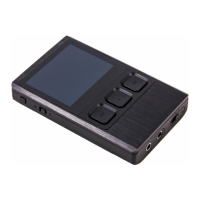
- 2.4" IPS Screen (320*240) with Capacitive Touch Panel, Which is
Bonded by OCA.
- Up to 24Bit/192kHz Mini Coaxial Output.
- 3.5mm Headphone Output, and Line Out.
- Three Physical Buttons (Previous, Play/pauses, Next) on The Top Panel.
- 256-Steps Digital Volume Control.
- 8GB Onboard Flash Memory.
- Support for SDXC and SDHC MicroSD Card, up to 2TB. (as They Become
Available).
- 3-Setting Gain Switch.
- Audio Formats Supported: APE, FLAC, WAV, WMA, AAC, ALAC, AIFF,
OGG, MP3, DSD.
- Support for M3U Playlist.
- User Replaceable Battery (Compatible With S**sung S3),
- 8 hours Play Time.
Main Features:
Micro USB cable: Connect the Micro USB cable to a computer for
charging and data transmission.
Burn-in cable: Plug the burn-in cable into the PHONE out socket,
and keep playing music to burn-in the DX90. The burn-in process
helps the DX90's sound reach its full potential by forming the
capacitors and stabilizing the electronic components used.
Coaxial cable: Connect the coaxial cable to an external DAC, to allow
the DX90 working as a digital transport.
Pouch: Use the pouch to protect the DX90 from scratches.
Screen protector: Use the screen protector to protect the DX90`s
screen from scratches.


 To Next Page