6
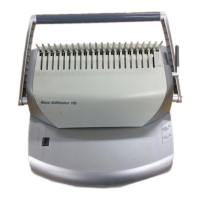
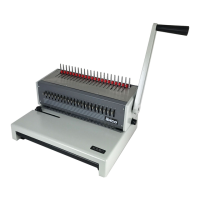
Instructions for use: ibiMaster 115
Please read these instructions carefully and keep them in a safe place for later reference.
Determine Sheet Width (fig. A)
• Rotate the edge guide to the paper / cover size you wish to bind:
- Letter (8-1/2" x 11")
- A4 (297mm x 210mm)
- Oversized (222mm x 286mm)
• When using oversized covers, rotate the edge guide to the oversize
position, punch all of the covers for your documents and set aside.
• Rotate the edge guide to either Letter or A4 position and punch the
paper for your document.
Punching Paper (fig. B)
Jog or align the sheets or covers and insert the edge to be punched
into the punch throat opening.
Fully insert the sheets into the throat opening and against the edge
guide.
To punch, pull the punching handle down towards you until the
handle bottoms and the punching is complete. The ibiMaster 115
will punch up to 15 sheets of 80 gsm paper. Do not punch more
than 1 clear cover at a time to prevent jams.
Determine Plastic Comb Size (fig. C)
Rotate the binding handle towards you to open the hooks away
from the comb support.
Place the document including the covers straight up against the
comb support to the right side aligning with the binding size scale.
Rotate the binding lever away from you to close the hooks until they
make contact with the document.
Read the line closest to the document follow it to the right to the
corresponding comb binding element size. This is the comb binding
element size required to bind the document. Your ibiMaster 115 can
bind books up to 330 sheets (38mm). For best results, always use
GBC/ibico brand covers with GBC/ibico color-coordinated binding
combs.
Binding (fig. D)
Before starting make sure hooks are in the home position.
Place the plastic comb binding element behind the vertical comb
with the open portion of the element facing you.
Rotate the binding lever toward you until the comb binding element
opens sufficiently to insert your document.
Place the front cover (finished side down) onto the opened binding
element fingers. Place the document pages (face down) onto the
element. Repeat for larger documents as required. Place the back
cover (finished side up) on the open binding element fingers last.
Rotate the binding lever away from you, back to its original position
to close the binding element.
Remove the book by lifting upward. Your document is now
complete.
Once you become familiar with your ibiMaster 115 you will find that
you can bind as you punch, increasing your productivity.
Empty Chip Drawer (fig. E)
• Your ibiMaster 115 has a chip drawer located on the right side of the
machine. When it is full of punched paper chips, gently pull the
drawer to open it and remove from machine, empty and re-insert the
drawer back in machine until it snaps in place.
ibiMaster 115/115e



 To Next Page