Installing a Microprocessor
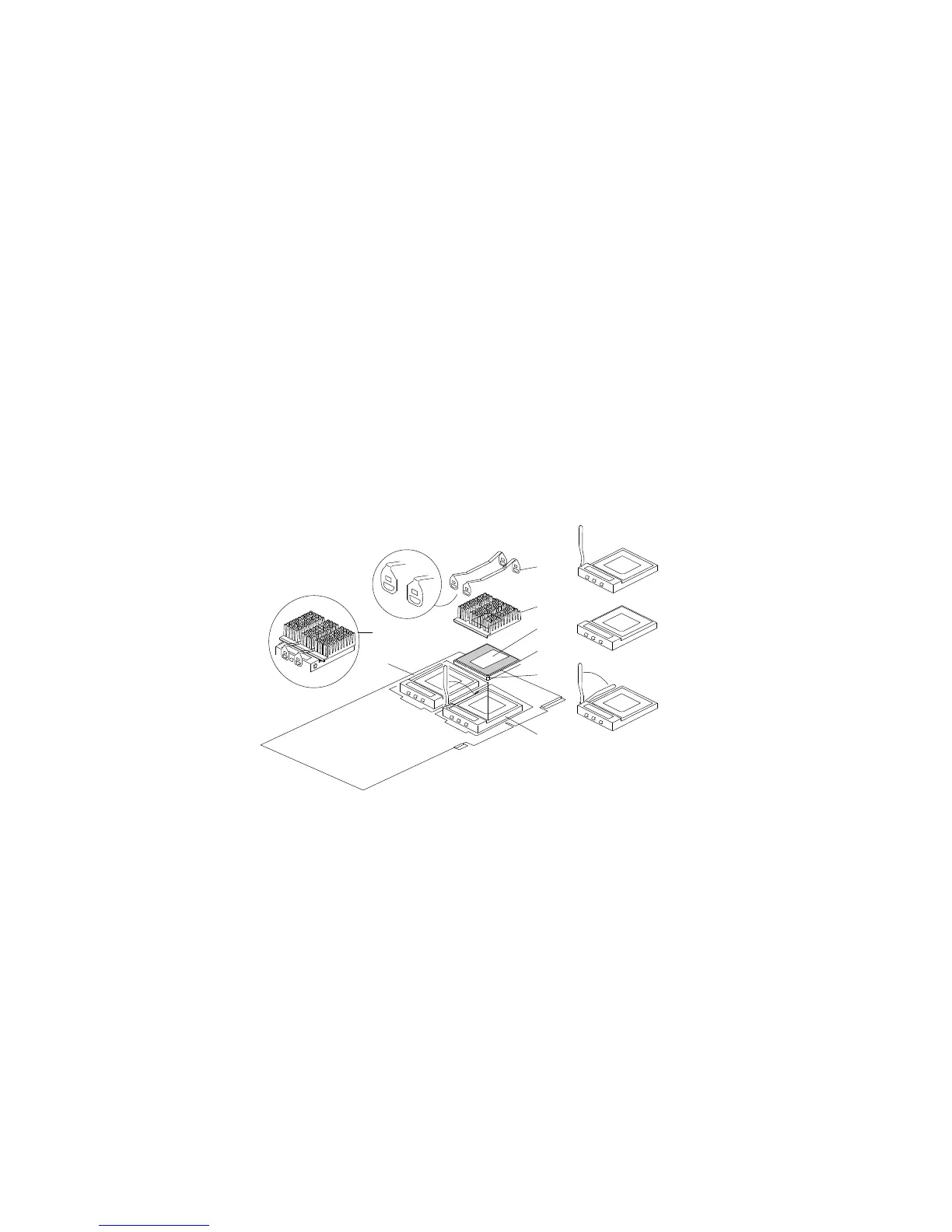
6. Locate the primary and secondary microprocessor sockets on the
processor boards, as shown in the following illustration. Your
server comes with a microprocessor preinstalled in the primary
socket. Therefore, you will install the new microprocessor in the
secondary socket (also known as an upgrade socket).
Note: Both microprocessors on a processor board must have the
same speed to ensure proper server operation.
1
2
3
4
5
6
7
8
.1/ Heat sink retention clips (two)
.2/ Heat sink
.3/ Thermal grease
.4/ Microprocessor
.5/ Pin 1 location
.6/ Lower processor socket, with lever (latch) in open
position
.7/ Upper processor socket, empty, with lever in closed,
locked position
.8/ Completed microprocessor/heat-sink assembly
7. While you are handling boards and microprocessors, place them
on a grounded, static-protective or conductive-foam surface.
8. Lift the lever on the secondary socket. Verify that the socket
lever is completely opened to the vertical position.
92 PC Server 704 User's Handbook






 To Next Page