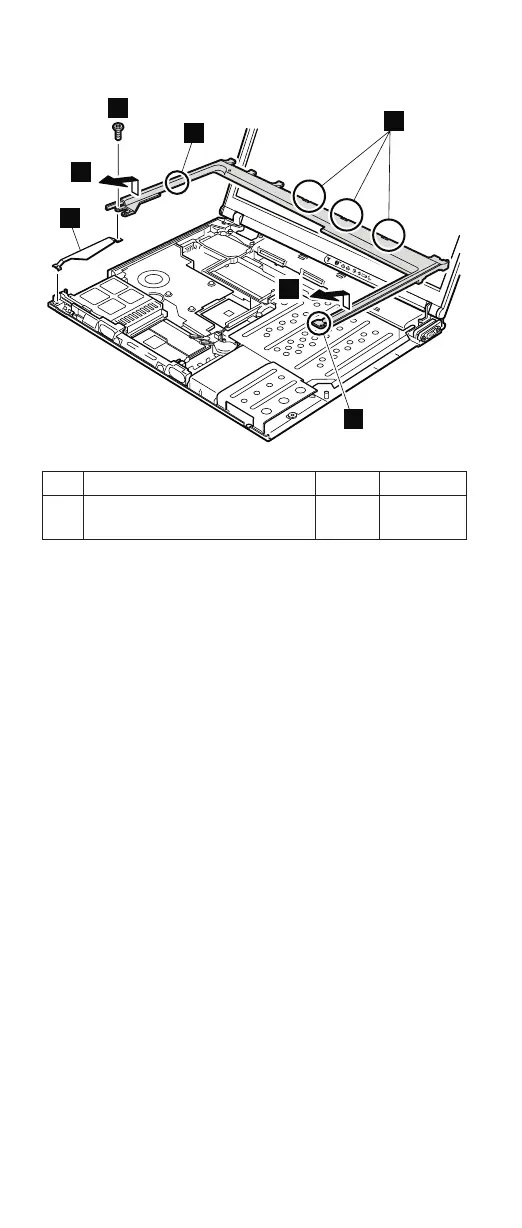
3
2
3
a
a
b
a
Step Screw (quantity) Color Torque
2 M2 × 4 mm, bind-head,
nylon-coated (1)
Black 0.245 Nm
(2.5
kgfcm)
In step 3, make sure that all the latches marked a are
detached, and then remove the bezel.
When installing: Make sure that all the latches marked
a are firmly attached. Attach harness
left (b), and then secure the keyboard
bezel with the screws.
Removing and replacing a FRU
110 MT 1871/1872/1875/1876









 To Next Page