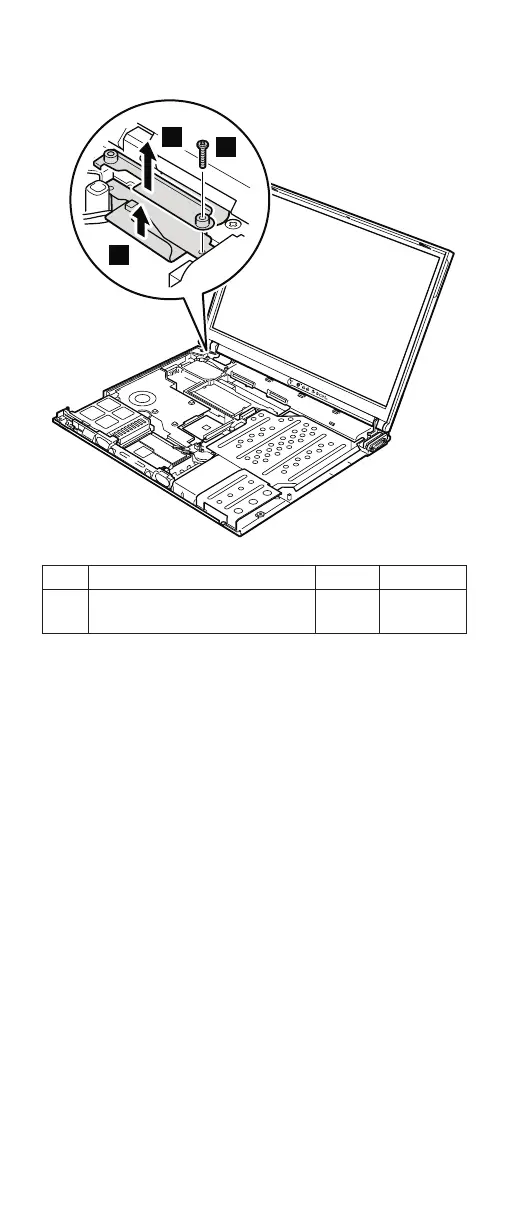
3
4
2
Step Screw (quantity) Color Torque
2 M2 × 14 mm, bind-head,
nylon-coated (1)
Black 0.245 Nm
(2.5
kgfcm)
After removing the screw, remove bracket 3. Then
detach the LCD connector 4.
When installing: Make sure that the bracket 3 and the
connector 4 are firmly attached, and
then secure them with the screw.
(continued)
Removing and replacing a FRU
116 MT 1871/1872/1875/1876









 To Next Page