EasyManua.ls Logo

IBM THINKCENTRE 8086 - Locating the Connectors on the Rear of Your Computer

IBM THINKCENTRE 8086
64 pages
Print Icon
To Next Page IconTo Next Page
To Previous Page IconTo Previous Page
Loading...
Locating
the
connectors
on
the
rear
of
your
computer
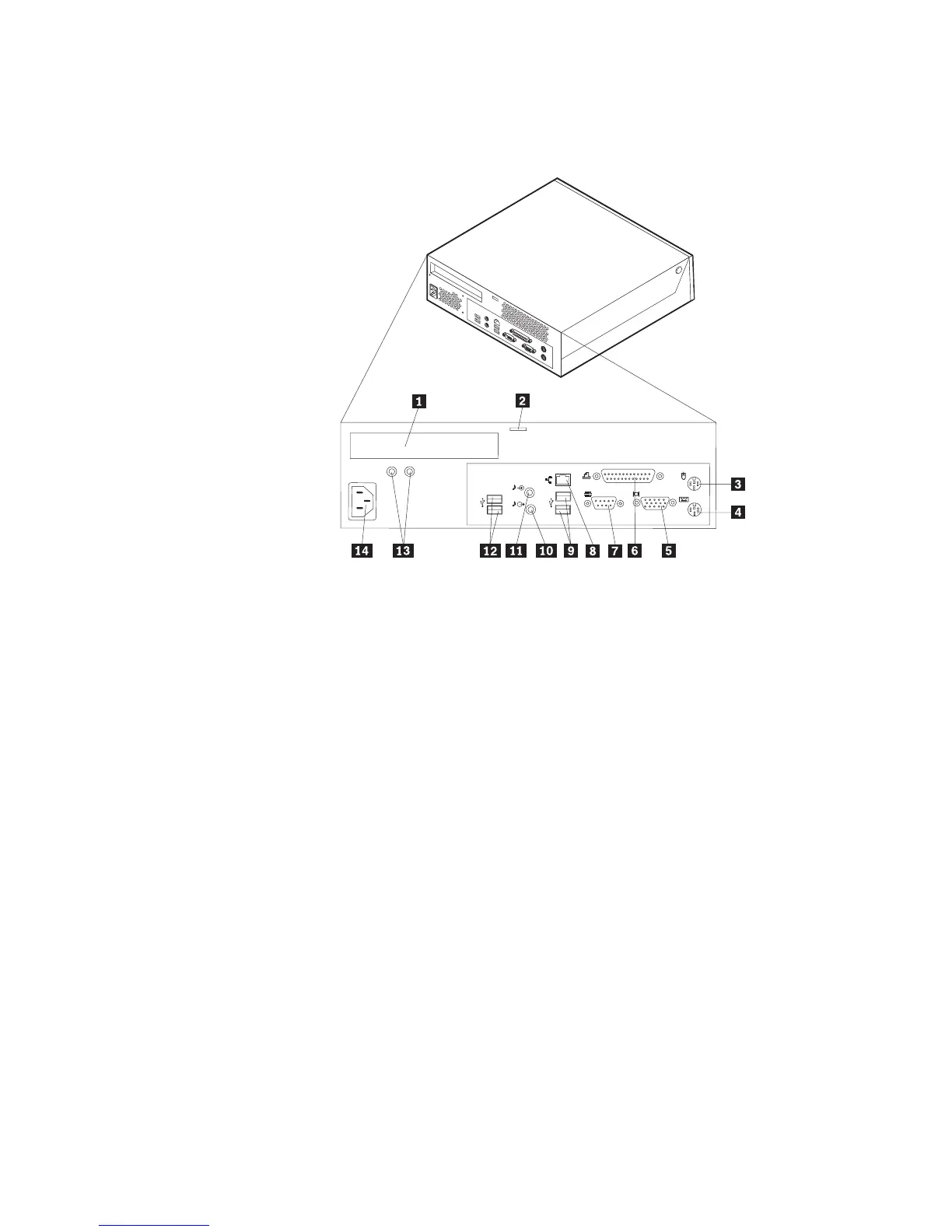
The
following
illustration
shows
the
locations
of
the
connectors
on
the
rear
of
the
computer.
1PCI
connector
8
Ethernet
connector
2Integrated
cable
lock
9
USB
connectors
3Mouse
connector
10Audio
line
out
connector
4Keyboard
connector
11Audio
line
in
connector
5VGA
monitor
connector
12USB
connectors
6Parallel
connector
13Diagnostic
LEDs
7Serial
connector
14Power
connector
Note:
Some
connectors
on
the
rear
of
the
computer
are
color-coded
to
help
you
to
determine
where
to
connect
the
cables
on
your
computer.
8
User
Guide

Table of Contents

Related product manuals