EasyManua.ls Logo

IBM THINKCENTRE 8086 - Installing Memory

IBM THINKCENTRE 8086
64 pages
Print Icon
To Next Page IconTo Next Page
To Previous Page IconTo Previous Page
Loading...
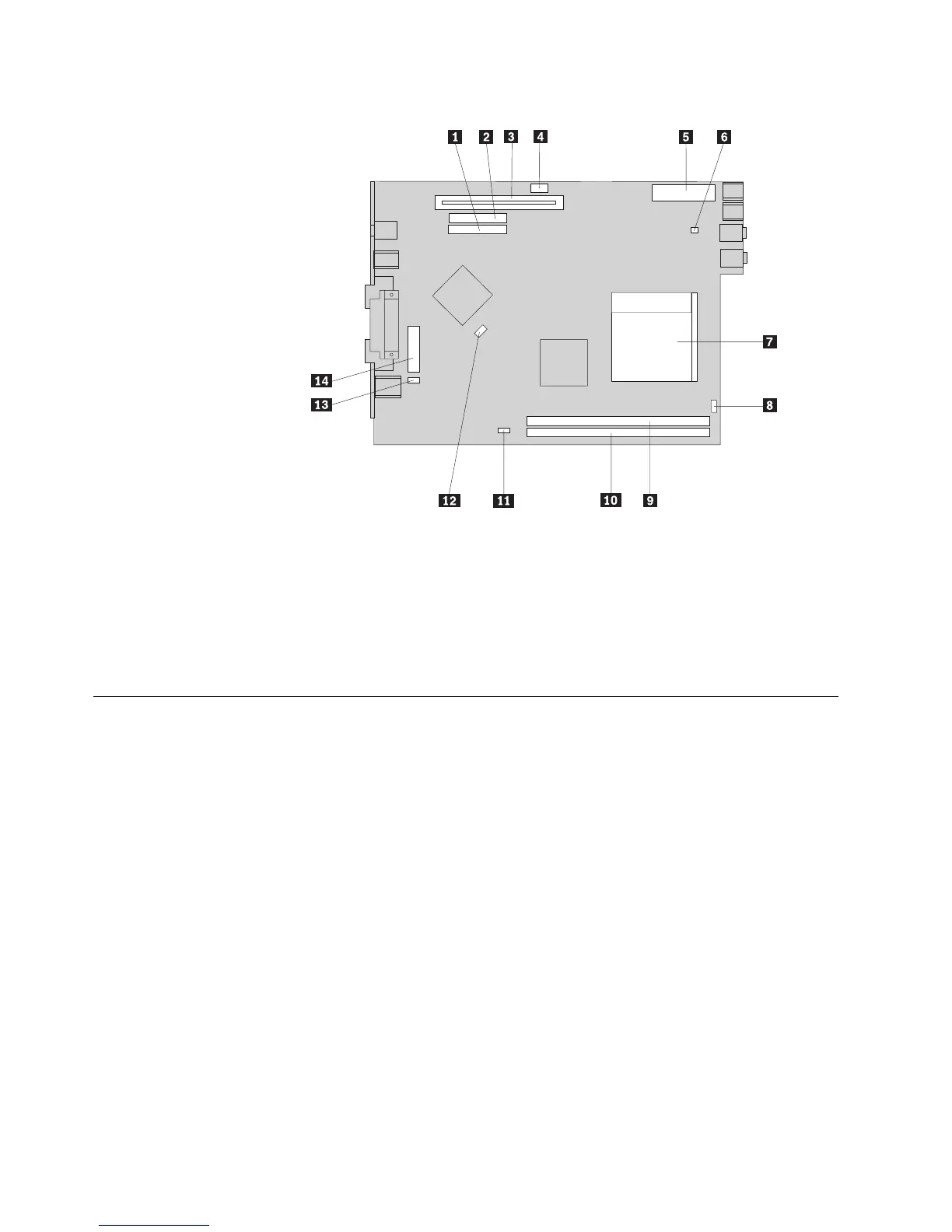
The
following
illustration
shows
the
locations
of
parts
on
the
system
board.
1
Hard
drive
cable
connector
8
Speaker
connector
2
Optical
bay
cable
connector
9
Memory
connector
1
3
PCI
riser
connector
10Memory
connector
2
4
12v
power
connector
11Rear
fan
connector
5
Power
connector
12SATA
connector
6
Fan
connector
13Clear
CMOS/Recovery
jumper
7
Microprocessor
14Battery
Installing
memory
Your
computer
has
two
connectors
for
installing
dual
inline
memory
modules
(DIMMs)
that
provide
up
to
a
maximum
of
2.0
GB
of
system
memory.
When
installing
memory
modules,
the
following
rules
apply:
v
Use
2.5
V,
184-pin
double
data
rate
synchronous
dynamic
random
access
memory
(DDR
SDRAM).
v
Use
128
MB,
256
MB,
512
MB
or
1.0
GB
memory
modules
in
any
combination.
Note:
Only
DDR
SDRAM
DIMMs
can
be
used.
To
install
a
memory
module:
1.
Open
the
cover.
See
“Opening
the
cover”
on
page
10.
12
User
Guide

Table of Contents

Related product manuals