10
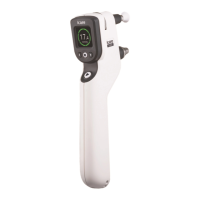
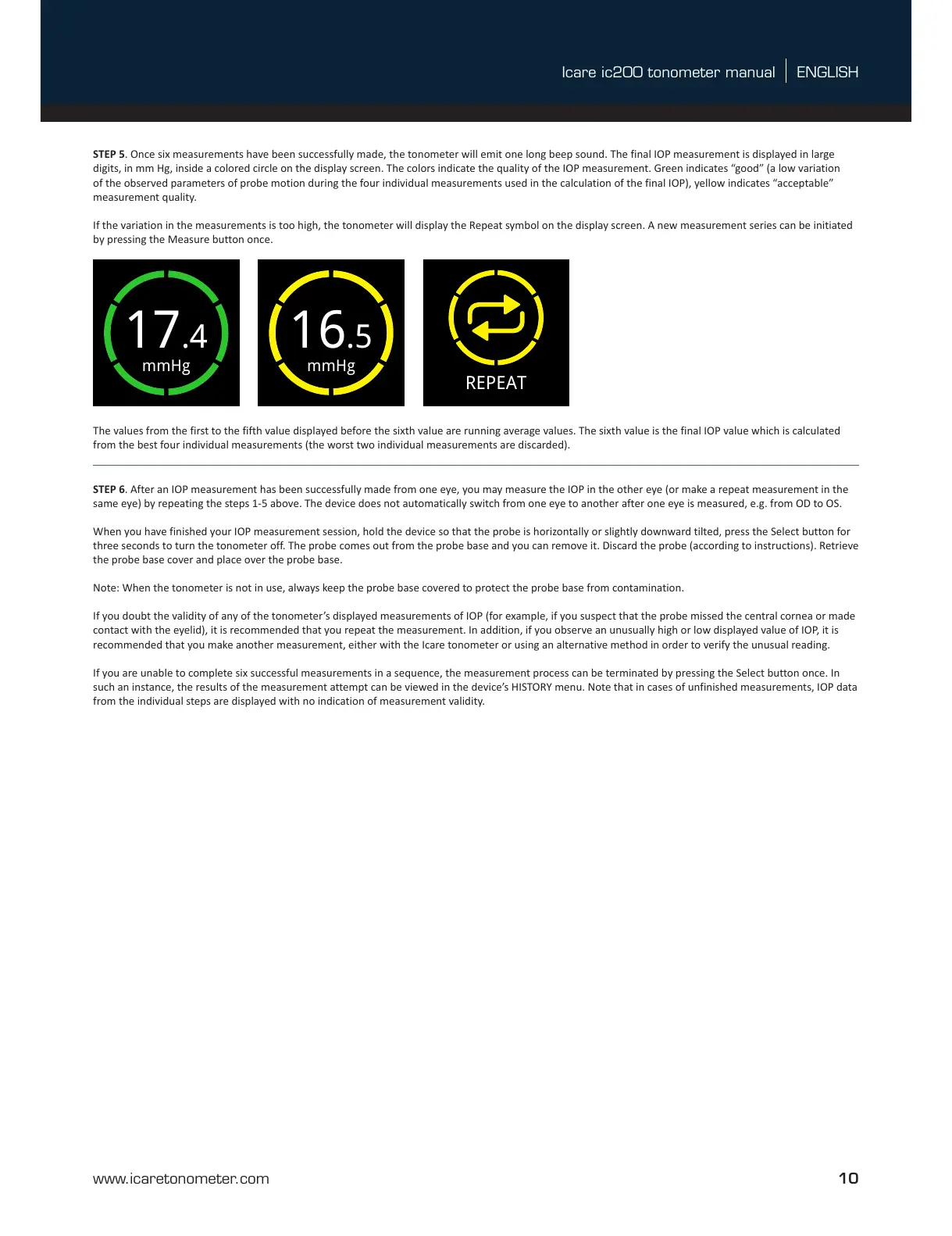
STEP 5. Once six measurements have been successfully made, the tonometer will emit one long beep sound. The final IOP measurement is displayed in large
digits, in mm Hg, inside a colored circle on the display screen. The colors indicate the quality of the IOP measurement. Green indicates “good” (a low variation
of the observed parameters of probe motion during the four individual measurements used in the calculation of the final IOP), yellow indicates “acceptable”
measurement quality.
If the variation in the measurements is too high, the tonometer will display the Repeat symbol on the display screen. A new measurement series can be initiated
by pressing the Measure button once.
LIGHTLIGHT
ME21
RECEIPT
OFF
TOO FAR
REPEAT
TOO NEAR
CHANGE
CHANGE
calibration
Sensor
CHANGE
CHANGE
14.0
14.1
14.2
14.4
14.6
14.3
14.5
14.7
14.9
14.8
14.10
14.11
REPEAT
LOAD LOAD
mmHg
mmHg
mmHg
mmHg
mmHg
mmHg
14: ERRORs & ALERTs
14.13
1.0
1.9
1.10
1.11
1.12
1.13
1.15
12.0
12.2 13.0
13.1
13.2
13.5
13.1
13.6
13.7
13.8
13.9
13.3
13.3
13.412.3
12.4
12.6
12.7
12.8
12.9
12.10
12.4
12.6
12.8
12.8
12.5
12.5
12.1
IF PRINTER
CONNECTED
1.14
1.16
2.1
2.2
2.3
2.0
0.1
0.2
0.3
Document name: GUI Flowchart TA031
Document number: TA031-GUI
Revision: 04
Date: 11.14.2017
Author: Tomi Lonka (Desigence)
1.17 1.18
SERVICE
14.12
MEASURE
1.8
1.7
PATIENT IDHISTORY
INFO
ID 1mmHg
5.2
5.3
5.4
5.5
5.0
BLUETOOTH
740A
4.3
4.4
4.6
4.1
BLUETOOTH
OFF
4.2
BLUETOOTH
EXPORT
4.0
3.1
3.0
3.2
3.3
9.0
DATE
16.03.2017
TIME
17:15
10.0 11.0
10.1
10.2
10.3
8.0
8.1
8.3
8.4
LANGUAGE
ENGLISH
8.2
17.6
23.9
20.8
16.5
17.6
17.4
23.8
1.1 1.2
1.4
1.51.3
EYE EYE
OFF
PATIENT ID BLUETOOTH
BLUETOOTH
RETURN
2.4
BACK
ID 1
PATIENT ID
ID02
PATIENT ID
5.1
6.2
6.3
6.4
6.5
6.0
LIGHT
6.1
LIGHT
LIGHT
LIGHT
7.1
7.2
7.3
7.4
BRIGHTNESS
7.0
BRIGHTNESS
BRIGHTNESS
BRIGHTNESS
LANGUAGE
KIELI
SPRÅK
SPRACHE
BRIGHTNESS
EN
FI
SV
DE
9.1
9.3
9.4
9.2
FORMAT
YEAR
MONTH
DAY
DMY
2017
03
16
11.1
FORMAT
HOURS
MINUTES
24 H
SW
17
15
2.5
RETURN
17.2 17.817.4
---- ----18.2
PRINT
PRINTING...
ID 9
mmHg
ME21
RECEIPT
IF PRINTER
CONNECTED
PRINT
PRINTING...
12: PRINTER MENU
13: PC/ MOBILE MENU
13: PC/ MOBILE MENU
NEW
PAIR
FOUND 1
SEARCHING...
NOT FOUND
PRINTER
ME21
PAIR
ME21
PAIR
ME21
TEST
ME21
UNPAIR BACK
BACK
ME21
PAIRED
TEST
PRINTING...
REMOVED
CONNECTION
12: PRINTER MENU
If Printer is not found
If PC/ Mobile Device
is not found
If Printer is connected
If connection to PC/ Mobile device already exists
mmHg
17.4
ID 9
1/100
OD OS
OD
18/09/2017
07:37:45 AM
mmHg
12.6
OS
18/09/2017
07:37:45 AM
18/09/2017
07:37:45 AM
2/100 TO MENU
ME21
4.5
TO MENU
ENGLISH
SOUMI
SVENSKA
DEUTSCH
1733RM001
1.00 A
SN
1733RM001
hh:mm
17:mm
17:15
DD.MM.YYYY
DD.MM.2017
DD.03.2017
16.03.2017
ERROR
PRINTER
ERROR
CONNECTION
RESTORED
CONNECTION
ME21
PAIRED
TEST
PRINTING...
PAIR
NEW
PAIR
740A
TEST
740A
UNPAIR
740A
WAITING...
DEVICE
WAITING...
DEVICE
PAIRED
740A
TBD
CONNECTION
CANCELLED
PAIRING
CANCELLED
012345
740A
PAIRED
740A
BLUETOOTH
Icare EXPORT
OD OS
1.6
EYE
OD OS
OD
OD
OD
OD
OD
OD
EYE
OD OS
ID 9
ID 9
ID 9 ID 9
ID 9
ID 9
ID 9
ID 9
ID 9
ID 9
2/100
3/100
SOUND
SOUND
SOUND
SOUND
SOUNDSOUND
16:36:10
16/03/2017
EYE
OD
OS
EYE
OS
OD
mmHg
16.6
OD
LIGHTLIGHT
ME21
RECEIPT
OFF
TOO FAR
REPEAT
TOO NEAR
CHANGE
CHANGE
calibration
Sensor
CHANGE
CHANGE
14.0
14.1
14.2
14.4
14.6
14.3
14.5
14.7
14.9
14.8
14.10
14.11
REPEAT
LOAD LOAD
mmHg
mmHg
mmHg
mmHg
mmHg
mmHg
14: ERRORs & ALERTs
14.13
1.0
1.9
1.10
1.11
1.12
1.13
1.15
12.0
12.2 13.0
13.1
13.2
13.5
13.1
13.6
13.7
13.8
13.9
13.3
13.3
13.412.3
12.4
12.6
12.7
12.8
12.9
12.10
12.4
12.6
12.8
12.8
12.5
12.5
12.1
IF PRINTER
CONNECTED
1.14
1.16
2.1
2.2
2.3
2.0
0.1
0.2
0.3
Document name: GUI Flowchart TA031
Document number: TA031-GUI
Revision: 04
Date: 11.14.2017
Author: Tomi Lonka (Desigence)
1.17 1.18
SERVICE
14.12
MEASURE
1.8
1.7
PATIENT IDHISTORY
INFO
ID 1mmHg
5.2
5.3
5.4
5.5
5.0
BLUETOOTH
740A
4.3
4.4
4.6
4.1
BLUETOOTH
OFF
4.2
BLUETOOTH
EXPORT
4.0
3.1
3.0
3.2
3.3
9.0
DATE
16.03.2017
TIME
17:15
10.0 11.0
10.1
10.2
10.3
8.0
8.1
8.3
8.4
LANGUAGE
ENGLISH
8.2
17.6
23.9
20.8
16.5
17.6
17.4
23.8
1.1 1.2
1.4
1.51.3
EYE EYE
OFF
PATIENT ID BLUETOOTH
BLUETOOTH
RETURN
2.4
BACK
ID 1
PATIENT ID
ID02
PATIENT ID
5.1
6.2
6.3
6.4
6.5
6.0
LIGHT
6.1
LIGHT
LIGHT
LIGHT
7.1
7.2
7.3
7.4
BRIGHTNESS
7.0
BRIGHTNESS
BRIGHTNESS
BRIGHTNESS
LANGUAGE
KIELI
SPRÅK
SPRACHE
BRIGHTNESS
EN
FI
SV
DE
9.1
9.3
9.4
9.2
FORMAT
YEAR
MONTH
DAY
DMY
2017
03
16
11.1
FORMAT
HOURS
MINUTES
24 H
SW
17
15
2.5
RETURN
17.2 17.817.4
---- ----18.2
PRINT
PRINTING...
ID 9
mmHg
ME21
RECEIPT
IF PRINTER
CONNECTED
PRINT
PRINTING...
12: PRINTER MENU
13: PC/ MOBILE MENU
13: PC/ MOBILE MENU
NEW
PAIR
FOUND 1
SEARCHING...
NOT FOUND
PRINTER
ME21
PAIR
ME21
PAIR
ME21
TEST
ME21
UNPAIR BACK
BACK
ME21
PAIRED
TEST
PRINTING...
REMOVED
CONNECTION
12: PRINTER MENU
If Printer is not found
If PC/ Mobile Device
is not found
If Printer is connected
If connection to PC/ Mobile device already exists
mmHg
17.4
ID 9
1/100
OD OS
OD
18/09/2017
07:37:45 AM
mmHg
12.6
OS
18/09/2017
07:37:45 AM
18/09/2017
07:37:45 AM
2/100 TO MENU
ME21
4.5
TO MENU
ENGLISH
SOUMI
SVENSKA
DEUTSCH
1733RM001
1.00 A
SN
1733RM001
hh:mm
17:mm
17:15
DD.MM.YYYY
DD.MM.2017
DD.03.2017
16.03.2017
ERROR
PRINTER
ERROR
CONNECTION
RESTORED
CONNECTION
ME21
PAIRED
TEST
PRINTING...
PAIR
NEW
PAIR
740A
TEST
740A
UNPAIR
740A
WAITING...
DEVICE
WAITING...
DEVICE
PAIRED
740A
TBD
CONNECTION
CANCELLED
PAIRING
CANCELLED
012345
740A
PAIRED
740A
BLUETOOTH
Icare EXPORT
OD OS
1.6
EYE
OD OS
OD
OD
OD
OD
OD
OD
EYE
OD OS
ID 9
ID 9
ID 9 ID 9
ID 9
ID 9
ID 9
ID 9
ID 9
ID 9
2/100
3/100
SOUND
SOUND
SOUND
SOUND
SOUNDSOUND
16:36:10
16/03/2017
EYE
OD
OS
EYE
OS
OD
mmHg
16.6
OD
mmHg
LOAD LOAD
mmHg
mmHg
mmHg
mmHg
mmHg
mmHg
14: ERRORs & ALERTs
14.13
1.0
1.9
1.10
1.11
1.12
1.13
1.15
12.0
12.2 13.0
13.1
13.2
13.5
13.1
13.6
13.7
13.8
13.9
13.3
13.3
13.412.3
12.4
12.6
12.7
12.8
12.9
12.10
12.4
12.6
12.8
12.8
12.5
12.5
12.1
IF PRINTER
CONNECTED
1.14
1.16
2.1
2.2
2.3
2.0
0.1
0.2
0.3
Document name: GUI Flowchart TA031
Document number: TA031-GUI
Revision: 04
Date: 11.14.2017
Author: Tomi Lonka (Desigence)
1.17 1.18
SERVICE
14.12
MEASURE
1.8
1.7
PATIENT IDHISTORY
INFO
ID 1mmHg
5.2
5.3
5.4
5.5
5.0
BLUETOOTH
740A
4.3
4.4
4.6
4.1
BLUETOOTH
OFF
4.2
BLUETOOTH
EXPORT
4.0
3.1
3.0
3.2
3.3
9.0
DATE
16.03.2017
TIME
17:15
10.0 11.0
10.1
10.2
10.3
8.0
8.1
8.3
8.4
LANGUAGE
ENGLISH
8.2
17.6
23.9
20.8
16.5
17.6
17.4
23.8
1.1 1.2
1.4
1.51.3
EYE EYE
OFF
PATIENT ID BLUETOOTH
BLUETOOTH
RETURN
2.4
BACK
ID 1
PATIENT ID
ID02
PATIENT ID
5.1
6.2
6.3
6.4
6.5
6.0
LIGHT
6.1
LIGHT
LIGHT
LIGHT
7.1
7.2
7.3
7.4
BRIGHTNESS
7.0
BRIGHTNESS
BRIGHTNESS
BRIGHTNESS
LANGUAGE
KIELI
SPRÅK
SPRACHE
BRIGHTNESS
EN
FI
SV
DE
9.1
9.3
9.4
9.2
FORMAT
YEAR
MONTH
DAY
DMY
2017
03
16
11.1
FORMAT
HOURS
MINUTES
24 H
SW
17
15
2.5
RETURN
17.2 17.817.4
---- ----18.2
PRINT
PRINTING...
ID 9
mmHg
ME21
RECEIPT
IF PRINTER
CONNECTED
PRINT
PRINTING...
12: PRINTER MENU
13: PC/ MOBILE MENU
13: PC/ MOBILE MENU
NEW
PAIR
FOUND 1
SEARCHING...
NOT FOUND
PRINTER
ME21
PAIR
ME21
PAIR
ME21
TEST
ME21
UNPAIR BACK
BACK
ME21
PAIRED
TEST
PRINTING...
REMOVED
CONNECTION
12: PRINTER MENU
If Printer is not found
If PC/ Mobile Device
is not found
If Printer is connected
If connection to PC/ Mobile device already exists
mmHg
17.4
ID 9
1/100
OD OS
OD
18/09/2017
07:37:45 AM
mmHg
12.6
OS
18/09/2017
07:37:45 AM
18/09/2017
07:37:45 AM
2/100 TO MENU
ME21
4.5
TO MENU
ENGLISH
SOUMI
SVENSKA
DEUTSCH
1733RM001
1.00 A
SN
1733RM001
hh:mm
17:mm
17:15
DD.MM.YYYY
DD.MM.2017
DD.03.2017
16.03.2017
ERROR
PRINTER
ERROR
CONNECTION
RESTORED
CONNECTION
ME21
PAIRED
TEST
PRINTING...
PAIR
NEW
PAIR
740A
TEST
740A
UNPAIR
740A
WAITING...
DEVICE
WAITING...
DEVICE
PAIRED
740A
TBD
CONNECTION
CANCELLED
PAIRING
CANCELLED
012345
740A
PAIRED
740A
BLUETOOTH
Icare EXPORT
OD OS
1.6
EYE
OD OS
OD
OD
OD
OD
OD
OD
EYE
OD OS
ID 9
ID 9
ID 9 ID 9
ID 9
ID 9
ID 9
ID 9
ID 9
ID 9
2/100
3/100
SOUND
SOUND
SOUND
SOUND
SOUNDSOUND
16:36:10
16/03/2017
EYE
OD
OS
EYE
OS
OD
mmHg
16.6
OD
mmHg
mmHg
17.4
16.5
mmHg
16.5
ID 9
OD
The values from the first to the fifth value displayed before the sixth value are running average values. The sixth value is the final IOP value which is calculated
from the best four individual measurements (the worst two individual measurements are discarded).
STEP 6. After an IOP measurement has been successfully made from one eye, you may measure the IOP in the other eye (or make a repeat measurement in the
same eye) by repeating the steps 1-5 above. The device does not automatically switch from one eye to another after one eye is measured, e.g. from OD to OS.
When you have finished your IOP measurement session, hold the device so that the probe is horizontally or slightly downward tilted, press the Select button for
three seconds to turn the tonometer off. The probe comes out from the probe base and you can remove it. Discard the probe (according to instructions). Retrieve
the probe base cover and place over the probe base.
Note: When the tonometer is not in use, always keep the probe base covered to protect the probe base from contamination.
If you doubt the validity of any of the tonometer’s displayed measurements of IOP (for example, if you suspect that the probe missed the central cornea or made
contact with the eyelid), it is recommended that you repeat the measurement. In addition, if you observe an unusually high or low displayed value of IOP, it is
recommended that you make another measurement, either with the Icare tonometer or using an alternative method in order to verify the unusual reading.
If you are unable to complete six successful measurements in a sequence, the measurement process can be terminated by pressing the Select button once. In
such an instance, the results of the measurement attempt can be viewed in the device’s HISTORY menu. Note that in cases of unfinished measurements, IOP data
from the individual steps are displayed with no indication of measurement validity.


 To Next Page
 Loading...