ENGLISHIcare ic200 tonometer manual
www.icaretonometer.com
14
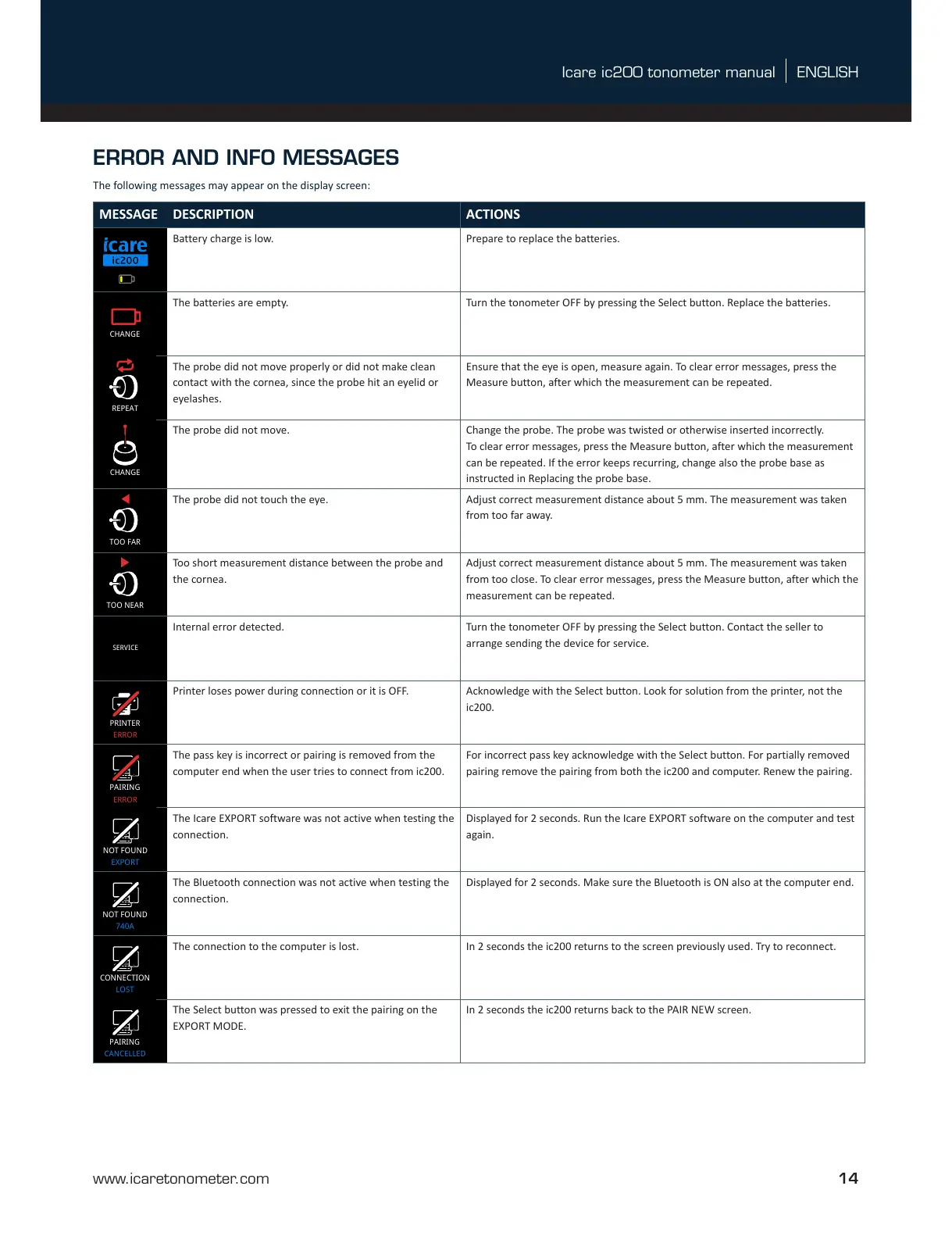
MESSAGE DESCRIPTION ACTIONS
Battery charge is low. Prepare to replace the batteries.
LIGHTLIGHT
ME21
RECEIPT
OFF
TOO FAR
REPEAT
TOO NEAR
CHANGE
CHANGE
calibration
Sensor
CHANGE
14.0
14.1
14.2
14.4
14.6
14.3
14.5
14.7
14.9
14.8
14.10
14.11
REPEAT
LOAD LOAD
mmHg
mmHg
mmHg
mmHg
mmHg
mmHg
14: ERRORs & ALERTs
14.13
1.0
1.9
1.10
1.11
1.12
1.13
1.15
12.0
12.2 13.0
13.1
13.2
13.5
13.1
13.6
13.7
13.8
13.9
13.3
13.3
13.412.3
12.4
12.6
12.7
12.8
12.9
12.10
12.4
12.6
12.8
12.8
12.5
12.5
12.1
IF PRINTER
CONNECTED
1.14
1.16
2.1
2.2
2.3
2.0
0.1
0.2
0.3
Document name: GUI Flowchart TA031
Document number: TA031-GUI
Revision: 04
Date: 11.14.2017
Author: Tomi Lonka (Desigence)
1.17 1.18
SERVICE
14.12
MEASURE
1.8
1.7
PATIENT IDHISTORY
INFO
ID 1mmHg
5.2
5.3
5.4
5.5
5.0
BLUETOOTH
740A
4.3
4.4
4.6
4.1
BLUETOOTH
OFF
4.2
BLUETOOTH
EXPORT
4.0
3.1
3.0
3.2
3.3
9.0
DATE
16.03.2017
TIME
17:15
10.0 11.0
10.1
10.2
10.3
8.0
8.1
8.3
8.4
LANGUAGE
ENGLISH
8.2
17.6
23.9
20.8
16.5
17.6
17.4
23.8
1.1 1.2
1.4
1.51.3
EYE EYE
OFF
PATIENT ID BLUETOOTH
BLUETOOTH
RETURN
2.4
BACK
ID 1
PATIENT ID
ID02
PATIENT ID
5.1
6.2
6.3
6.4
6.5
6.0
LIGHT
6.1
LIGHT
LIGHT
LIGHT
7.1
7.2
7.3
7.4
BRIGHTNESS
7.0
BRIGHTNESS
BRIGHTNESS
BRIGHTNESS
LANGUAGE
KIELI
SPRÅK
SPRACHE
BRIGHTNESS
EN
FI
SV
DE
9.1
9.3
9.4
9.2
FORMAT
YEAR
MONTH
DAY
DMY
2017
03
16
11.1
FORMAT
HOURS
MINUTES
24 H
SW
17
15
2.5
RETURN
17.2 17.817.4
---- ----18.2
PRINT
PRINTING...
ID 9
mmHg
ME21
RECEIPT
IF PRINTER
CONNECTED
PRINT
PRINTING...
12: PRINTER MENU
13: PC/ MOBILE MENU
13: PC/ MOBILE MENU
NEW
PAIR
FOUND 1
SEARCHING...
NOT FOUND
PRINTER
ME21
PAIR
ME21
PAIR
ME21
TEST
ME21
UNPAIR BACK
BACK
ME21
PAIRED
TEST
PRINTING...
REMOVED
CONNECTION
12: PRINTER MENU
If Printer is not found
If PC/ Mobile Device
is not found
If Printer is connected
If connection to PC/ Mobile device already exists
mmHg
17.4
ID 9
1/100
OD OS
OD
18/09/2017
07:37:45 AM
mmHg
12.6
OS
18/09/2017
07:37:45 AM
18/09/2017
07:37:45 AM
2/100 TO MENU
ME21
4.5
TO MENU
ENGLISH
SOUMI
SVENSKA
DEUTSCH
1733RM001
1.00 A
SN
1733RM001
hh:mm
17:mm
17:15
DD.MM.YYYY
DD.MM.2017
DD.03.2017
16.03.2017
ERROR
PRINTER
ERROR
CONNECTION
RESTORED
CONNECTION
ME21
PAIRED
TEST
PRINTING...
PAIR
NEW
PAIR
740A
TEST
740A
UNPAIR
740A
WAITING...
DEVICE
WAITING...
DEVICE
PAIRED
740A
TBD
CONNECTION
CANCELLED
PAIRING
CANCELLED
012345
740A
PAIRED
740A
BLUETOOTH
Icare EXPORT
OD OS
1.6
EYE
OD OS
OD
OD
OD
OD
OD
OD
EYE
OD OS
ID 9
ID 9
ID 9 ID 9
ID 9
ID 9
ID 9
ID 9
ID 9
ID 9
2/100
3/100
SOUND
SOUND
SOUND
SOUND
SOUNDSOUND
16:36:10
16/03/2017
EYE
OD
OS
EYE
OS
OD
mmHg
16.6
OD
mmHg
mmHg
17.4
16.5
mmHg
16.5
ID 9
OD
The batteries are empty. Turn the tonometer OFF by pressing the Select button. Replace the batteries.
LIGHTLIGHT
ME21
RECEIPT
OFF
TOO FAR
TOO NEAR
CHANGE
CHANGE
calibration
Sensor
CHANGE
CHANGE
14.0
14.1
14.2
14.4
14.6
14.3
14.5
14.7
14.9
14.8
14.10
14.11
REPEAT
LOAD LOAD
mmHg
mmHg
mmHg
mmHg
mmHg
mmHg
14: ERRORs & ALERTs
14.13
1.0
1.9
1.10
1.11
1.12
1.13
1.15
12.0
12.2 13.0
13.1
13.2
13.5
13.1
13.6
13.7
13.8
13.9
13.3
13.3
13.412.3
12.4
12.6
12.7
12.8
12.9
12.10
12.4
12.6
12.8
12.8
12.5
12.5
12.1
IF PRINTER
CONNECTED
1.14
1.16
2.1
2.2
2.3
2.0
0.1
0.2
0.3
Document name: GUI Flowchart TA031
Document number: TA031-GUI
Revision: 04
Date: 11.14.2017
Author: Tomi Lonka (Desigence)
1.17 1.18
SERVICE
14.12
MEASURE
1.8
1.7
PATIENT IDHISTORY
INFO
ID 1mmHg
5.2
5.3
5.4
5.5
5.0
BLUETOOTH
740A
4.3
4.4
4.6
4.1
BLUETOOTH
OFF
4.2
BLUETOOTH
EXPORT
4.0
3.1
3.0
3.2
3.3
9.0
DATE
16.03.2017
TIME
17:15
10.0 11.0
10.1
10.2
10.3
8.0
8.1
8.3
8.4
LANGUAGE
ENGLISH
8.2
17.6
23.9
20.8
16.5
17.6
17.4
23.8
1.1 1.2
1.4
1.51.3
EYE EYE
OFF
PATIENT ID BLUETOOTH
BLUETOOTH
RETURN
2.4
BACK
ID 1
PATIENT ID
ID02
PATIENT ID
5.1
6.2
6.3
6.4
6.5
6.0
LIGHT
6.1
LIGHT
LIGHT
LIGHT
7.1
7.2
7.3
7.4
BRIGHTNESS
7.0
BRIGHTNESS
BRIGHTNESS
BRIGHTNESS
LANGUAGE
KIELI
SPRÅK
SPRACHE
BRIGHTNESS
EN
FI
SV
DE
9.1
9.3
9.4
9.2
FORMAT
YEAR
MONTH
DAY
DMY
2017
03
16
11.1
FORMAT
HOURS
MINUTES
24 H
SW
17
15
2.5
RETURN
17.2 17.817.4
---- ----18.2
PRINT
PRINTING...
ID 9
mmHg
ME21
RECEIPT
IF PRINTER
CONNECTED
PRINT
PRINTING...
12: PRINTER MENU
13: PC/ MOBILE MENU
13: PC/ MOBILE MENU
NEW
PAIR
FOUND 1
SEARCHING...
NOT FOUND
PRINTER
ME21
PAIR
ME21
PAIR
ME21
TEST
ME21
UNPAIR BACK
BACK
ME21
PAIRED
TEST
PRINTING...
REMOVED
CONNECTION
12: PRINTER MENU
If Printer is not found
If PC/ Mobile Device
is not found
If Printer is connected
If connection to PC/ Mobile device already exists
mmHg
17.4
ID 9
1/100
OD OS
OD
18/09/2017
07:37:45 AM
mmHg
12.6
OS
18/09/2017
07:37:45 AM
18/09/2017
07:37:45 AM
2/100 TO MENU
ME21
4.5
TO MENU
ENGLISH
SOUMI
SVENSKA
DEUTSCH
1733RM001
1.00 A
SN
1733RM001
hh:mm
17:mm
17:15
DD.MM.YYYY
DD.MM.2017
DD.03.2017
16.03.2017
ERROR
PRINTER
ERROR
CONNECTION
RESTORED
CONNECTION
ME21
PAIRED
TEST
PRINTING...
PAIR
NEW
PAIR
740A
TEST
740A
UNPAIR
740A
WAITING...
DEVICE
WAITING...
DEVICE
PAIRED
740A
TBD
CONNECTION
CANCELLED
PAIRING
CANCELLED
012345
740A
PAIRED
740A
BLUETOOTH
Icare EXPORT
OD OS
1.6
EYE
OD OS
OD
OD
OD
OD
OD
OD
EYE
OD OS
ID 9
ID 9
ID 9 ID 9
ID 9
ID 9
ID 9
ID 9
ID 9
ID 9
2/100
3/100
SOUND
SOUND
SOUND
SOUND
SOUNDSOUND
16:36:10
16/03/2017
EYE
OD
OS
EYE
OS
OD
mmHg
16.6
OD
mmHg
mmHg
17.4
16.5
mmHg
16.5
ID 9
OD
The probe did not move properly or did not make clean
contact with the cornea, since the probe hit an eyelid or
eyelashes.
Ensure that the eye is open, measure again. To clear error messages, press the
Measure button, after which the measurement can be repeated.
LIGHTLIGHT
ME21
RECEIPT
OFF
TOO FAR
REPEAT
TOO NEAR
CHANGE
calibration
Sensor
CHANGE
CHANGE
14.0
14.1
14.2
14.4
14.6
14.3
14.5
14.7
14.9
14.8
14.10
14.11
REPEAT
LOAD LOAD
mmHg
mmHg
mmHg
mmHg
mmHg
mmHg
14: ERRORs & ALERTs
14.13
1.0
1.9
1.10
1.11
1.12
1.13
1.15
12.0
12.2 13.0
13.1
13.2
13.5
13.1
13.6
13.7
13.8
13.9
13.3
13.3
13.412.3
12.4
12.6
12.7
12.8
12.9
12.10
12.4
12.6
12.8
12.8
12.5
12.5
12.1
IF PRINTER
CONNECTED
1.14
1.16
2.1
2.2
2.3
2.0
0.1
0.2
0.3
Document name: GUI Flowchart TA031
Document number: TA031-GUI
Revision: 04
Date: 11.14.2017
Author: Tomi Lonka (Desigence)
1.17 1.18
SERVICE
14.12
MEASURE
1.8
1.7
PATIENT IDHISTORY
INFO
ID 1mmHg
5.2
5.3
5.4
5.5
5.0
BLUETOOTH
740A
4.3
4.4
4.6
4.1
BLUETOOTH
OFF
4.2
BLUETOOTH
EXPORT
4.0
3.1
3.0
3.2
3.3
9.0
DATE
16.03.2017
TIME
17:15
10.0 11.0
10.1
10.2
10.3
8.0
8.1
8.3
8.4
LANGUAGE
ENGLISH
8.2
17.6
23.9
20.8
16.5
17.6
17.4
23.8
1.1 1.2
1.4
1.51.3
EYE EYE
OFF
PATIENT ID BLUETOOTH
BLUETOOTH
RETURN
2.4
BACK
ID 1
PATIENT ID
ID02
PATIENT ID
5.1
6.2
6.3
6.4
6.5
6.0
LIGHT
6.1
LIGHT
LIGHT
LIGHT
7.1
7.2
7.3
7.4
BRIGHTNESS
7.0
BRIGHTNESS
BRIGHTNESS
BRIGHTNESS
LANGUAGE
KIELI
SPRÅK
SPRACHE
BRIGHTNESS
EN
FI
SV
DE
9.1
9.3
9.4
9.2
FORMAT
YEAR
MONTH
DAY
DMY
2017
03
16
11.1
FORMAT
HOURS
MINUTES
24 H
SW
17
15
2.5
RETURN
17.2 17.817.4
---- ----18.2
PRINT
PRINTING...
ID 9
mmHg
ME21
RECEIPT
IF PRINTER
CONNECTED
PRINT
PRINTING...
12: PRINTER MENU
13: PC/ MOBILE MENU
13: PC/ MOBILE MENU
NEW
PAIR
FOUND 1
SEARCHING...
NOT FOUND
PRINTER
ME21
PAIR
ME21
PAIR
ME21
TEST
ME21
UNPAIR BACK
BACK
ME21
PAIRED
TEST
PRINTING...
REMOVED
CONNECTION
12: PRINTER MENU
If Printer is not found
If PC/ Mobile Device
is not found
If Printer is connected
If connection to PC/ Mobile device already exists
mmHg
17.4
ID 9
1/100
OD OS
OD
18/09/2017
07:37:45 AM
mmHg
12.6
OS
18/09/2017
07:37:45 AM
18/09/2017
07:37:45 AM
2/100 TO MENU
ME21
4.5
TO MENU
ENGLISH
SOUMI
SVENSKA
DEUTSCH
1733RM001
1.00 A
SN
1733RM001
hh:mm
17:mm
17:15
DD.MM.YYYY
DD.MM.2017
DD.03.2017
16.03.2017
ERROR
PRINTER
ERROR
CONNECTION
RESTORED
CONNECTION
ME21
PAIRED
TEST
PRINTING...
PAIR
NEW
PAIR
740A
TEST
740A
UNPAIR
740A
WAITING...
DEVICE
WAITING...
DEVICE
PAIRED
740A
TBD
CONNECTION
CANCELLED
PAIRING
CANCELLED
012345
740A
PAIRED
740A
BLUETOOTH
Icare EXPORT
OD OS
1.6
EYE
OD OS
OD
OD
OD
OD
OD
OD
EYE
OD OS
ID 9
ID 9
ID 9 ID 9
ID 9
ID 9
ID 9
ID 9
ID 9
ID 9
2/100
3/100
SOUND
SOUND
SOUND
SOUND
SOUNDSOUND
16:36:10
16/03/2017
EYE
OD
OS
EYE
OS
OD
mmHg
16.6
OD
mmHg
mmHg
17.4
16.5
mmHg
16.5
ID 9
OD
The probe did not move. Change the probe. The probe was twisted or otherwise inserted incorrectly.
To clear error messages, press the Measure button, after which the measurement
can be repeated. If the error keeps recurring, change also the probe base as
instructed in Replacing the probe base.
REPEAT
TOO NEAR
CHANGE
CHANGE
calibration
Sensor
CHANGE
CHANGE
14.0
14.1
14.2
14.4
14.6
14.3
14.5
14.7
14.9
14.8
14.10
14.11
REPEAT
LOAD LOAD
mmHg
mmHg
mmHg
mmHg
mmHg
mmHg
14: ERRORs & ALERTs
14.13
1.0
1.9
1.10
1.11
1.12
1.13
1.15
12.0
12.2 13.0
13.1
13.2
13.5
13.1
13.6
13.7
13.8
13.9
13.3
13.3
13.412.3
12.4
12.6
12.7
12.8
12.9
12.10
12.4
12.6
12.8
12.8
12.5
12.5
12.1
IF PRINTER
CONNECTED
1.14
1.16
2.1
2.2
2.3
2.0
0.1
0.2
0.3
Document name: GUI Flowchart TA031
Document number: TA031-GUI
Revision: 04
Date: 11.14.2017
Author: Tomi Lonka (Desigence)
1.17 1.18
SERVICE
14.12
MEASURE
1.8
1.7
PATIENT IDHISTORY
INFO
ID 1mmHg
5.2
5.3
5.4
5.5
5.0
BLUETOOTH
740A
4.3
4.4
4.6
4.1
BLUETOOTH
OFF
4.2
BLUETOOTH
EXPORT
4.0
3.1
3.0
3.2
3.3
9.0
DATE
16.03.2017
TIME
17:15
10.0 11.0
10.1
10.2
10.3
8.0
8.1
8.3
8.4
LANGUAGE
ENGLISH
8.2
17.6
23.9
20.8
16.5
17.6
17.4
23.8
1.1 1.2
1.4
1.51.3
EYE EYE
OFF
PATIENT ID BLUETOOTH
BLUETOOTH
RETURN
2.4
BACK
ID 1
PATIENT ID
ID02
PATIENT ID
5.1
6.2
6.3
6.4
6.5
6.0
LIGHT
6.1
LIGHT
LIGHT
LIGHT
7.1
7.2
7.3
7.4
BRIGHTNESS
7.0
BRIGHTNESS
BRIGHTNESS
BRIGHTNESS
LANGUAGE
KIELI
SPRÅK
SPRACHE
BRIGHTNESS
EN
FI
SV
DE
9.1
9.3
9.4
9.2
FORMAT
YEAR
MONTH
DAY
DMY
2017
03
16
11.1
FORMAT
HOURS
MINUTES
24 H
SW
17
15
2.5
RETURN
17.2 17.817.4
---- ----18.2
PRINT
PRINTING...
ID 9
mmHg
ME21
RECEIPT
IF PRINTER
CONNECTED
PRINT
PRINTING...
12: PRINTER MENU
13: PC/ MOBILE MENU
13: PC/ MOBILE MENU
NEW
PAIR
FOUND 1
SEARCHING...
NOT FOUND
PRINTER
ME21
PAIR
ME21
PAIR
ME21
TEST
ME21
UNPAIR BACK
BACK
ME21
PAIRED
TEST
PRINTING...
REMOVED
CONNECTION
12: PRINTER MENU
If Printer is not found
If PC/ Mobile Device
is not found
If Printer is connected
If connection to PC/ Mobile device already exists
mmHg
17.4
ID 9
1/100
OD OS
OD
18/09/2017
07:37:45 AM
mmHg
12.6
OS
18/09/2017
07:37:45 AM
18/09/2017
07:37:45 AM
2/100 TO MENU
ME21
4.5
TO MENU
ENGLISH
SOUMI
SVENSKA
DEUTSCH
1733RM001
1.00 A
SN
1733RM001
hh:mm
17:mm
17:15
DD.MM.YYYY
DD.MM.2017
DD.03.2017
16.03.2017
ERROR
PRINTER
ERROR
CONNECTION
RESTORED
CONNECTION
ME21
PAIRED
TEST
PRINTING...
PAIR
NEW
PAIR
740A
TEST
740A
UNPAIR
740A
WAITING...
DEVICE
WAITING...
DEVICE
PAIRED
740A
TBD
CONNECTION
CANCELLED
PAIRING
CANCELLED
012345
740A
PAIRED
740A
BLUETOOTH
Icare EXPORT
OD OS
1.6
EYE
OD OS
OD
OD
OD
OD
OD
OD
EYE
OD OS
ID 9
ID 9
ID 9 ID 9
ID 9
ID 9
ID 9
ID 9
ID 9
ID 9
2/100
3/100
SOUND
SOUND
SOUND
SOUND
SOUNDSOUND
16:36:10
16/03/2017
EYE
OD
OS
EYE
OS
OD
mmHg
16.6
OD
mmHg
mmHg
17.4
16.5
mmHg
16.5
ID 9
OD
The probe did not touch the eye. Adjust correct measurement distance about 5 mm. The measurement was taken
from too far away.
LIGHTLIGHT
ME21
RECEIPT
OFF
TOO FAR
REPEAT
CHANGE
CHANGE
calibration
Sensor
CHANGE
CHANGE
14.0
14.1
14.2
14.4
14.6
14.3
14.5
14.7
14.9
14.8
14.10
14.11
REPEAT
LOAD LOAD
mmHg
mmHg
mmHg
mmHg
mmHg
mmHg
14: ERRORs & ALERTs
14.13
1.0
1.9
1.10
1.11
1.12
1.13
1.15
12.0
12.2 13.0
13.1
13.2
13.5
13.1
13.6
13.7
13.8
13.9
13.3
13.3
13.412.3
12.4
12.6
12.7
12.8
12.9
12.10
12.4
12.6
12.8
12.8
12.5
12.5
12.1
IF PRINTER
CONNECTED
1.14
1.16
2.1
2.2
2.3
2.0
0.1
0.2
0.3
Document name: GUI Flowchart TA031
Document number: TA031-GUI
Revision: 04
Date: 11.14.2017
Author: Tomi Lonka (Desigence)
1.17 1.18
SERVICE
14.12
MEASURE
1.8
1.7
PATIENT IDHISTORY
INFO
ID 1mmHg
5.2
5.3
5.4
5.5
5.0
BLUETOOTH
740A
4.3
4.4
4.6
4.1
BLUETOOTH
OFF
4.2
BLUETOOTH
EXPORT
4.0
3.1
3.0
3.2
3.3
9.0
DATE
16.03.2017
TIME
17:15
10.0 11.0
10.1
10.2
10.3
8.0
8.1
8.3
8.4
LANGUAGE
ENGLISH
8.2
17.6
23.9
20.8
16.5
17.6
17.4
23.8
1.1 1.2
1.4
1.51.3
EYE EYE
OFF
PATIENT ID BLUETOOTH
BLUETOOTH
RETURN
2.4
BACK
ID 1
PATIENT ID
ID02
PATIENT ID
5.1
6.2
6.3
6.4
6.5
6.0
LIGHT
6.1
LIGHT
LIGHT
LIGHT
7.1
7.2
7.3
7.4
BRIGHTNESS
7.0
BRIGHTNESS
BRIGHTNESS
BRIGHTNESS
LANGUAGE
KIELI
SPRÅK
SPRACHE
BRIGHTNESS
EN
FI
SV
DE
9.1
9.3
9.4
9.2
FORMAT
YEAR
MONTH
DAY
DMY
2017
03
16
11.1
FORMAT
HOURS
MINUTES
24 H
SW
17
15
2.5
RETURN
17.2 17.817.4
---- ----18.2
PRINT
PRINTING...
ID 9
mmHg
ME21
RECEIPT
IF PRINTER
CONNECTED
PRINT
PRINTING...
12: PRINTER MENU
13: PC/ MOBILE MENU
13: PC/ MOBILE MENU
NEW
PAIR
FOUND 1
SEARCHING...
NOT FOUND
PRINTER
ME21
PAIR
ME21
PAIR
ME21
TEST
ME21
UNPAIR BACK
BACK
ME21
PAIRED
TEST
PRINTING...
REMOVED
CONNECTION
12: PRINTER MENU
If Printer is not found
If PC/ Mobile Device
is not found
If Printer is connected
If connection to PC/ Mobile device already exists
mmHg
17.4
ID 9
1/100
OD OS
OD
18/09/2017
07:37:45 AM
mmHg
12.6
OS
18/09/2017
07:37:45 AM
18/09/2017
07:37:45 AM
2/100 TO MENU
ME21
4.5
TO MENU
ENGLISH
SOUMI
SVENSKA
DEUTSCH
1733RM001
1.00 A
SN
1733RM001
hh:mm
17:mm
17:15
DD.MM.YYYY
DD.MM.2017
DD.03.2017
16.03.2017
ERROR
PRINTER
ERROR
CONNECTION
RESTORED
CONNECTION
ME21
PAIRED
TEST
PRINTING...
PAIR
NEW
PAIR
740A
TEST
740A
UNPAIR
740A
WAITING...
DEVICE
WAITING...
DEVICE
PAIRED
740A
TBD
CONNECTION
CANCELLED
PAIRING
CANCELLED
012345
740A
PAIRED
740A
BLUETOOTH
Icare EXPORT
OD OS
1.6
EYE
OD OS
OD
OD
OD
OD
OD
OD
EYE
OD OS
ID 9
ID 9
ID 9 ID 9
ID 9
ID 9
ID 9
ID 9
ID 9
ID 9
2/100
3/100
SOUND
SOUND
SOUND
SOUND
SOUNDSOUND
16:36:10
16/03/2017
EYE
OD
OS
EYE
OS
OD
mmHg
16.6
OD
mmHg
mmHg
17.4
16.5
mmHg
16.5
ID 9
OD
Too short measurement distance between the probe and
the cornea.
Adjust correct measurement distance about 5 mm. The measurement was taken
from too close. To clear error messages, press the Measure button, after which the
measurement can be repeated.
SERVICE
Internal error detected. Turn the tonometer OFF by pressing the Select button. Contact the seller to
arrange sending the device for service.
LIGHTLIGHT
ME21
RECEIPT
OFF
TOO FAR
REPEAT
TOO NEAR
CHANGE
CHANGE
calibration
Sensor
CHANGE
CHANGE
14.0
14.1
14.2
14.4
14.6
14.3
14.5
14.7
14.9
14.8
14.10
14.11
REPEAT
LOAD LOAD
mmHg
mmHg
mmHg
mmHg
mmHg
mmHg
14: ERRORs & ALERTs
14.13
1.0
1.9
1.10
1.11
1.12
1.13
1.15
12.0
12.2 13.0
13.1
13.2
13.5
13.1
13.6
13.7
13.8
13.9
13.3
13.3
13.412.3
12.4
12.6
12.7
12.8
12.9
12.10
12.4
12.6
12.8
12.8
12.5
12.5
12.1
IF PRINTER
CONNECTED
1.14
1.16
2.1
2.2
2.3
2.0
0.1
0.2
0.3
Document name: GUI Flowchart TA031
Document number: TA031-GUI
Revision: 04
Date: 11.14.2017
Author: Tomi Lonka (Desigence)
1.17 1.18
SERVICE
14.12
MEASURE
1.8
1.7
PATIENT IDHISTORY
INFO
ID 1mmHg
5.2
5.3
5.4
5.5
5.0
BLUETOOTH
740A
4.3
4.4
4.6
4.1
BLUETOOTH
OFF
4.2
BLUETOOTH
EXPORT
4.0
3.1
3.0
3.2
3.3
9.0
DATE
16.03.2017
TIME
17:15
10.0 11.0
10.1
10.2
10.3
8.0
8.1
8.3
8.4
LANGUAGE
ENGLISH
8.2
17.6
23.9
20.8
16.5
17.6
17.4
23.8
1.1 1.2
1.4
1.51.3
EYE EYE
OFF
PATIENT ID BLUETOOTH
BLUETOOTH
RETURN
2.4
BACK
ID 1
PATIENT ID
ID02
PATIENT ID
5.1
6.2
6.3
6.4
6.5
6.0
LIGHT
6.1
LIGHT
LIGHT
LIGHT
7.1
7.2
7.3
7.4
BRIGHTNESS
7.0
BRIGHTNESS
BRIGHTNESS
BRIGHTNESS
LANGUAGE
KIELI
SPRÅK
SPRACHE
BRIGHTNESS
EN
FI
SV
DE
9.1
9.3
9.4
9.2
FORMAT
YEAR
MONTH
DAY
DMY
2017
03
16
11.1
FORMAT
HOURS
MINUTES
24 H
SW
17
15
2.5
RETURN
17.2 17.817.4
---- ----18.2
PRINT
PRINTING...
ID 9
mmHg
ME21
RECEIPT
IF PRINTER
CONNECTED
PRINT
PRINTING...
12: PRINTER MENU
13: PC/ MOBILE MENU
13: PC/ MOBILE MENU
NEW
PAIR
FOUND 1
SEARCHING...
NOT FOUND
PRINTER
ME21
PAIR
ME21
PAIR
ME21
TEST
ME21
UNPAIR BACK
BACK
ME21
PAIRED
TEST
PRINTING...
REMOVED
CONNECTION
12: PRINTER MENU
If Printer is not found
If PC/ Mobile Device
is not found
If Printer is connected
If connection to PC/ Mobile device already exists
mmHg
17.4
ID 9
1/100
OD OS
OD
18/09/2017
07:37:45 AM
mmHg
12.6
OS
18/09/2017
07:37:45 AM
18/09/2017
07:37:45 AM
2/100 TO MENU
ME21
4.5
TO MENU
ENGLISH
SOUMI
SVENSKA
DEUTSCH
1733RM001
1.00 A
SN
1733RM001
hh:mm
17:mm
17:15
DD.MM.YYYY
DD.MM.2017
DD.03.2017
16.03.2017
ERROR
CONNECTION
RESTORED
CONNECTION
ME21
PAIRED
TEST
PRINTING...
PAIR
NEW
PAIR
740A
TEST
740A
UNPAIR
740A
WAITING...
DEVICE
WAITING...
DEVICE
PAIRED
740A
TBD
CONNECTION
CANCELLED
PAIRING
CANCELLED
012345
740A
PAIRED
740A
BLUETOOTH
Icare EXPORT
OD OS
1.6
EYE
OD OS
OD
OD
OD
OD
OD
OD
EYE
OD OS
ID 9
ID 9
ID 9 ID 9
ID 9
ID 9
ID 9
ID 9
ID 9
ID 9
2/100
3/100
SOUND
SOUND
SOUND
SOUND
SOUNDSOUND
16:36:10
16/03/2017
EYE
OD
OS
EYE
OS
OD
mmHg
16.6
OD
mmHg
mmHg
17.4
16.5
mmHg
16.5
ID 9
OD
Printer loses power during connection or it is OFF. Acknowledge with the Select button. Look for solution from the printer, not the
ic200.
Document name: GUI Flowchart TA031
Document number: TA031-GUI
Revision: 05- Pikamuutokset
Date: 17.8.2018
Author: Tomi Lonka (Desigence)
TURN
OFF
PAIRING
ERROR
The pass key is incorrect or pairing is removed from the
computer end when the user tries to connect from ic200.
For incorrect pass key acknowledge with the Select button. For partially removed
pairing remove the pairing from both the ic200 and computer. Renew the pairing.
LIGHTLIGHT
ME21
RECEIPT
OFF
TOO FAR
REPEAT
TOO NEAR
CHANGE
CHANGE
calibration
Sensor
CHANGE
CHANGE
14.0
14.1
14.2
14.4
14.6
14.3
14.5
14.7
14.9
14.8
14.10
14.11
REPEAT
LOAD LOAD
mmHg
mmHg
mmHg
mmHg
mmHg
mmHg
14: ERRORs & ALERTs
14.13
1.0
1.9
1.10
1.11
1.12
1.13
1.15
12.0
12.2 13.0
13.1
13.2
13.5
13.1
13.6
13.7
13.8
13.9
13.3
13.3
13.412.3
12.4
12.6
12.7
12.8
12.9
12.10
12.4
12.6
12.8
12.8
12.5
12.5
12.1
IF PRINTER
CONNECTED
1.14
1.16
2.1
2.2
2.3
2.0
0.1
0.2
0.3
Document name: GUI Flowchart TA031
Document number: TA031-GUI
Revision: 04
Date: 11.14.2017
Author: Tomi Lonka (Desigence)
1.17 1.18
SERVICE
14.12
MEASURE
1.8
1.7
PATIENT IDHISTORY
INFO
ID 1mmHg
5.2
5.3
5.4
5.5
5.0
BLUETOOTH
740A
4.3
4.4
4.6
4.1
BLUETOOTH
OFF
4.2
BLUETOOTH
EXPORT
4.0
3.1
3.0
3.2
3.3
9.0
DATE
16.03.2017
TIME
17:15
10.0 11.0
10.1
10.2
10.3
8.0
8.1
8.3
8.4
LANGUAGE
ENGLISH
8.2
17.6
23.9
20.8
16.5
17.6
17.4
23.8
1.1 1.2
1.4
1.51.3
EYE EYE
OFF
PATIENT ID BLUETOOTH
BLUETOOTH
RETURN
2.4
BACK
ID 1
PATIENT ID
ID02
PATIENT ID
5.1
6.2
6.3
6.4
6.5
6.0
LIGHT
6.1
LIGHT
LIGHT
LIGHT
7.1
7.2
7.3
7.4
BRIGHTNESS
7.0
BRIGHTNESS
BRIGHTNESS
BRIGHTNESS
LANGUAGE
KIELI
SPRÅK
SPRACHE
BRIGHTNESS
EN
FI
SV
DE
9.1
9.3
9.4
9.2
FORMAT
YEAR
MONTH
DAY
DMY
2017
03
16
11.1
FORMAT
HOURS
MINUTES
24 H
SW
17
15
2.5
RETURN
17.2 17.817.4
---- ----18.2
PRINT
PRINTING...
ID 9
mmHg
ME21
RECEIPT
IF PRINTER
CONNECTED
PRINT
PRINTING...
12: PRINTER MENU
13: PC/ MOBILE MENU
13: PC/ MOBILE MENU
NEW
PAIR
FOUND 1
SEARCHING...
NOT FOUND
PRINTER
ME21
PAIR
ME21
PAIR
ME21
TEST
ME21
UNPAIR BACK
BACK
ME21
PAIRED
TEST
PRINTING...
REMOVED
CONNECTION
12: PRINTER MENU
If Printer is not found
If PC/ Mobile Device
is not found
If Printer is connected
If connection to PC/ Mobile device already exists
mmHg
17.4
ID 9
1/100
OD OS
OD
18/09/2017
07:37:45 AM
mmHg
12.6
OS
18/09/2017
07:37:45 AM
18/09/2017
07:37:45 AM
2/100 TO MENU
ME21
4.5
TO MENU
ENGLISH
SOUMI
SVENSKA
DEUTSCH
1733RM001
1.00 A
SN
1733RM001
hh:mm
17:mm
17:15
DD.MM.YYYY
DD.MM.2017
DD.03.2017
16.03.2017
ERROR
PRINTER
ERROR
CONNECTION
RESTORED
CONNECTION
ME21
PAIRED
TEST
PRINTING...
PAIR
NEW
PAIR
740A
TEST
740A
UNPAIR
740A
WAITING...
DEVICE
WAITING...
DEVICE
PAIRED
740A
TBD
CONNECTION
CANCELLED
012345
740A
PAIRED
740A
BLUETOOTH
Icare EXPORT
OD OS
1.6
EYE
OD OS
OD
OD
OD
OD
OD
OD
EYE
OD OS
ID 9
ID 9
ID 9 ID 9
ID 9
ID 9
ID 9
ID 9
ID 9
ID 9
2/100
3/100
SOUND
SOUND
SOUND
SOUND
SOUNDSOUND
16:36:10
16/03/2017
EYE
OD
OS
EYE
OS
OD
mmHg
16.6
OD
mmHg
mmHg
17.4
16.5
mmHg
16.5
ID 9
OD
NOT FOUND
EXPORT
The Icare EXPORT software was not active when testing the
connection.
Displayed for 2 seconds. Run the Icare EXPORT software on the computer and test
again.
LIGHTLIGHT
ME21
RECEIPT
OFF
TOO FAR
REPEAT
TOO NEAR
CHANGE
CHANGE
calibration
Sensor
CHANGE
CHANGE
14.0
14.1
14.2
14.4
14.6
14.3
14.5
14.7
14.9
14.8
14.10
14.11
REPEAT
LOAD LOAD
mmHg
mmHg
mmHg
mmHg
mmHg
mmHg
14: ERRORs & ALERTs
14.13
1.0
1.9
1.10
1.11
1.12
1.13
1.15
12.0
12.2 13.0
13.1
13.2
13.5
13.1
13.6
13.7
13.8
13.9
13.3
13.3
13.412.3
12.4
12.6
12.7
12.8
12.9
12.10
12.4
12.6
12.8
12.8
12.5
12.5
12.1
IF PRINTER
CONNECTED
1.14
1.16
2.1
2.2
2.3
2.0
0.1
0.2
0.3
Document name: GUI Flowchart TA031
Document number: TA031-GUI
Revision: 04
Date: 11.14.2017
Author: Tomi Lonka (Desigence)
1.17 1.18
SERVICE
14.12
MEASURE
1.8
1.7
PATIENT IDHISTORY
INFO
ID 1mmHg
5.2
5.3
5.4
5.5
5.0
BLUETOOTH
740A
4.3
4.4
4.6
4.1
BLUETOOTH
OFF
4.2
BLUETOOTH
EXPORT
4.0
3.1
3.0
3.2
3.3
9.0
DATE
16.03.2017
TIME
17:15
10.0 11.0
10.1
10.2
10.3
8.0
8.1
8.3
8.4
LANGUAGE
ENGLISH
8.2
17.6
23.9
20.8
16.5
17.6
17.4
23.8
1.1 1.2
1.4
1.51.3
EYE EYE
OFF
PATIENT ID BLUETOOTH
BLUETOOTH
RETURN
2.4
BACK
ID 1
PATIENT ID
ID02
PATIENT ID
5.1
6.2
6.3
6.4
6.5
6.0
LIGHT
6.1
LIGHT
LIGHT
LIGHT
7.1
7.2
7.3
7.4
BRIGHTNESS
7.0
BRIGHTNESS
BRIGHTNESS
BRIGHTNESS
LANGUAGE
KIELI
SPRÅK
SPRACHE
BRIGHTNESS
EN
FI
SV
DE
9.1
9.3
9.4
9.2
FORMAT
YEAR
MONTH
DAY
DMY
2017
03
16
11.1
FORMAT
HOURS
MINUTES
24 H
SW
17
15
2.5
RETURN
17.2 17.817.4
---- ----18.2
PRINT
PRINTING...
ID 9
mmHg
ME21
RECEIPT
IF PRINTER
CONNECTED
PRINT
PRINTING...
12: PRINTER MENU
13: PC/ MOBILE MENU
13: PC/ MOBILE MENU
NEW
PAIR
FOUND 1
SEARCHING...
NOT FOUND
PRINTER
ME21
PAIR
ME21
PAIR
ME21
TEST
ME21
UNPAIR BACK
BACK
ME21
PAIRED
TEST
PRINTING...
REMOVED
CONNECTION
12: PRINTER MENU
If Printer is not found
If PC/ Mobile Device
is not found
If Printer is connected
If connection to PC/ Mobile device already exists
mmHg
17.4
ID 9
1/100
OD OS
OD
18/09/2017
07:37:45 AM
mmHg
12.6
OS
18/09/2017
07:37:45 AM
18/09/2017
07:37:45 AM
2/100 TO MENU
ME21
4.5
TO MENU
ENGLISH
SOUMI
SVENSKA
DEUTSCH
1733RM001
1.00 A
SN
1733RM001
hh:mm
17:mm
17:15
DD.MM.YYYY
DD.MM.2017
DD.03.2017
16.03.2017
ERROR
PRINTER
ERROR
CONNECTION
RESTORED
CONNECTION
ME21
PAIRED
TEST
PRINTING...
PAIR
NEW
PAIR
740A
TEST
740A
UNPAIR
740A
WAITING...
DEVICE
WAITING...
DEVICE
PAIRED
740A
TBD
CONNECTION
CANCELLED
012345
740A
PAIRED
740A
BLUETOOTH
Icare EXPORT
OD OS
1.6
EYE
OD OS
OD
OD
OD
OD
OD
OD
EYE
OD OS
ID 9
ID 9
ID 9 ID 9
ID 9
ID 9
ID 9
ID 9
ID 9
ID 9
2/100
3/100
SOUND
SOUND
SOUND
SOUND
SOUNDSOUND
16:36:10
16/03/2017
EYE
OD
OS
EYE
OS
OD
mmHg
16.6
OD
mmHg
mmHg
17.4
16.5
mmHg
16.5
ID 9
OD
NOT FOUND
740A
The Bluetooth connection was not active when testing the
connection.
Displayed for 2 seconds. Make sure the Bluetooth is ON also at the computer end.
LIGHTLIGHT
ME21
RECEIPT
OFF
TOO FAR
REPEAT
TOO NEAR
CHANGE
CHANGE
calibration
Sensor
CHANGE
CHANGE
14.0
14.1
14.2
14.4
14.6
14.3
14.5
14.7
14.9
14.8
14.10
14.11
REPEAT
LOAD LOAD
mmHg
mmHg
mmHg
mmHg
mmHg
mmHg
14: ERRORs & ALERTs
14.13
1.0
1.9
1.10
1.11
1.12
1.13
1.15
12.0
12.2 13.0
13.1
13.2
13.5
13.1
13.6
13.7
13.8
13.9
13.3
13.3
13.412.3
12.4
12.6
12.7
12.8
12.9
12.10
12.4
12.6
12.8
12.8
12.5
12.5
12.1
IF PRINTER
CONNECTED
1.14
1.16
2.1
2.2
2.3
2.0
0.1
0.2
0.3
Document name: GUI Flowchart TA031
Document number: TA031-GUI
Revision: 04
Date: 11.14.2017
Author: Tomi Lonka (Desigence)
1.17 1.18
SERVICE
14.12
MEASURE
1.8
1.7
PATIENT IDHISTORY
INFO
ID 1mmHg
5.2
5.3
5.4
5.5
5.0
BLUETOOTH
740A
4.3
4.4
4.6
4.1
BLUETOOTH
OFF
4.2
BLUETOOTH
EXPORT
4.0
3.1
3.0
3.2
3.3
9.0
DATE
16.03.2017
TIME
17:15
10.0 11.0
10.1
10.2
10.3
8.0
8.1
8.3
8.4
LANGUAGE
ENGLISH
8.2
17.6
23.9
20.8
16.5
17.6
17.4
23.8
1.1 1.2
1.4
1.51.3
EYE EYE
OFF
PATIENT ID BLUETOOTH
BLUETOOTH
RETURN
2.4
BACK
ID 1
PATIENT ID
ID02
PATIENT ID
5.1
6.2
6.3
6.4
6.5
6.0
LIGHT
6.1
LIGHT
LIGHT
LIGHT
7.1
7.2
7.3
7.4
BRIGHTNESS
7.0
BRIGHTNESS
BRIGHTNESS
BRIGHTNESS
LANGUAGE
KIELI
SPRÅK
SPRACHE
BRIGHTNESS
EN
FI
SV
DE
9.1
9.3
9.4
9.2
FORMAT
YEAR
MONTH
DAY
DMY
2017
03
16
11.1
FORMAT
HOURS
MINUTES
24 H
SW
17
15
2.5
RETURN
17.2 17.817.4
---- ----18.2
PRINT
PRINTING...
ID 9
mmHg
ME21
RECEIPT
IF PRINTER
CONNECTED
PRINT
PRINTING...
12: PRINTER MENU
13: PC/ MOBILE MENU
13: PC/ MOBILE MENU
NEW
PAIR
FOUND 1
SEARCHING...
NOT FOUND
PRINTER
ME21
PAIR
ME21
PAIR
ME21
TEST
ME21
UNPAIR BACK
BACK
ME21
PAIRED
TEST
PRINTING...
REMOVED
CONNECTION
12: PRINTER MENU
If Printer is not found
If PC/ Mobile Device
is not found
If Printer is connected
If connection to PC/ Mobile device already exists
mmHg
17.4
ID 9
1/100
OD OS
OD
18/09/2017
07:37:45 AM
mmHg
12.6
OS
18/09/2017
07:37:45 AM
18/09/2017
07:37:45 AM
2/100 TO MENU
ME21
4.5
TO MENU
ENGLISH
SOUMI
SVENSKA
DEUTSCH
1733RM001
1.00 A
SN
1733RM001
hh:mm
17:mm
17:15
DD.MM.YYYY
DD.MM.2017
DD.03.2017
16.03.2017
ERROR
PRINTER
ERROR
CONNECTION
RESTORED
CONNECTION
ME21
PAIRED
TEST
PRINTING...
PAIR
NEW
PAIR
740A
TEST
740A
UNPAIR
740A
WAITING...
DEVICE
WAITING...
DEVICE
PAIRED
740A
TBD
CONNECTION
CANCELLED
012345
740A
PAIRED
740A
BLUETOOTH
Icare EXPORT
OD OS
1.6
EYE
OD OS
OD
OD
OD
OD
OD
OD
EYE
OD OS
ID 9
ID 9
ID 9 ID 9
ID 9
ID 9
ID 9
ID 9
ID 9
ID 9
2/100
3/100
SOUND
SOUND
SOUND
SOUND
SOUNDSOUND
16:36:10
16/03/2017
EYE
OD
OS
EYE
OS
OD
mmHg
16.6
OD
mmHg
mmHg
17.4
16.5
mmHg
16.5
ID 9
OD
CONNECTION
LOST
The connection to the computer is lost. In 2 seconds the ic200 returns to the screen previously used. Try to reconnect.
LIGHTLIGHT
ME21
RECEIPT
OFF
TOO FAR
REPEAT
TOO NEAR
CHANGE
CHANGE
calibration
Sensor
CHANGE
CHANGE
14.0
14.1
14.2
14.4
14.6
14.3
14.5
14.7
14.9
14.8
14.10
14.11
REPEAT
LOAD LOAD
mmHg
mmHg
mmHg
mmHg
mmHg
mmHg
14: ERRORs & ALERTs
14.13
1.0
1.9
1.10
1.11
1.12
1.13
1.15
12.0
12.2 13.0
13.1
13.2
13.5
13.1
13.6
13.7
13.8
13.9
13.3
13.3
13.412.3
12.4
12.6
12.7
12.8
12.9
12.10
12.4
12.6
12.8
12.8
12.5
12.5
12.1
IF PRINTER
CONNECTED
1.14
1.16
2.1
2.2
2.3
2.0
0.1
0.2
0.3
Document name: GUI Flowchart TA031
Document number: TA031-GUI
Revision: 04
Date: 11.14.2017
Author: Tomi Lonka (Desigence)
1.17 1.18
SERVICE
14.12
MEASURE
1.8
1.7
PATIENT IDHISTORY
INFO
ID 1mmHg
5.2
5.3
5.4
5.5
5.0
BLUETOOTH
740A
4.3
4.4
4.6
4.1
BLUETOOTH
OFF
4.2
BLUETOOTH
EXPORT
4.0
3.1
3.0
3.2
3.3
9.0
DATE
16.03.2017
TIME
17:15
10.0 11.0
10.1
10.2
10.3
8.0
8.1
8.3
8.4
LANGUAGE
ENGLISH
8.2
17.6
23.9
20.8
16.5
17.6
17.4
23.8
1.1 1.2
1.4
1.51.3
EYE EYE
OFF
PATIENT ID BLUETOOTH
BLUETOOTH
RETURN
2.4
BACK
ID 1
PATIENT ID
ID02
PATIENT ID
5.1
6.2
6.3
6.4
6.5
6.0
LIGHT
6.1
LIGHT
LIGHT
LIGHT
7.1
7.2
7.3
7.4
BRIGHTNESS
7.0
BRIGHTNESS
BRIGHTNESS
BRIGHTNESS
LANGUAGE
KIELI
SPRÅK
SPRACHE
BRIGHTNESS
EN
FI
SV
DE
9.1
9.3
9.4
9.2
FORMAT
YEAR
MONTH
DAY
DMY
2017
03
16
11.1
FORMAT
HOURS
MINUTES
24 H
SW
17
15
2.5
RETURN
17.2 17.817.4
---- ----18.2
PRINT
PRINTING...
ID 9
mmHg
ME21
RECEIPT
IF PRINTER
CONNECTED
PRINT
PRINTING...
12: PRINTER MENU
13: PC/ MOBILE MENU
13: PC/ MOBILE MENU
NEW
PAIR
FOUND 1
SEARCHING...
NOT FOUND
PRINTER
ME21
PAIR
ME21
PAIR
ME21
TEST
ME21
UNPAIR BACK
BACK
ME21
PAIRED
TEST
PRINTING...
REMOVED
CONNECTION
12: PRINTER MENU
If Printer is not found
If PC/ Mobile Device
is not found
If Printer is connected
If connection to PC/ Mobile device already exists
mmHg
17.4
ID 9
1/100
OD OS
OD
18/09/2017
07:37:45 AM
mmHg
12.6
OS
18/09/2017
07:37:45 AM
18/09/2017
07:37:45 AM
2/100 TO MENU
ME21
4.5
TO MENU
ENGLISH
SOUMI
SVENSKA
DEUTSCH
1733RM001
1.00 A
SN
1733RM001
hh:mm
17:mm
17:15
DD.MM.YYYY
DD.MM.2017
DD.03.2017
16.03.2017
ERROR
PRINTER
ERROR
CONNECTION
RESTORED
CONNECTION
ME21
PAIRED
TEST
PRINTING...
PAIR
NEW
PAIR
740A
TEST
740A
UNPAIR
740A
WAITING...
DEVICE
WAITING...
DEVICE
PAIRED
740A
TBD
CONNECTION
CANCELLED
012345
740A
PAIRED
740A
BLUETOOTH
Icare EXPORT
OD OS
1.6
EYE
OD OS
OD
OD
OD
OD
OD
OD
EYE
OD OS
ID 9
ID 9
ID 9 ID 9
ID 9
ID 9
ID 9
ID 9
ID 9
ID 9
2/100
3/100
SOUND
SOUND
SOUND
SOUND
SOUNDSOUND
16:36:10
16/03/2017
EYE
OD
OS
EYE
OS
OD
mmHg
16.6
OD
mmHg
mmHg
17.4
16.5
mmHg
16.5
ID 9
OD
The Select button was pressed to exit the pairing on the
EXPORT MODE.
In 2 seconds the ic200 returns back to the PAIR NEW screen.
ERROR AND INFO MESSAGES
The following messages may appear on the display screen:
All manuals and user guides at all-guides.com


 To Next Page
 Loading...