ENGLISH
ENGLISH
3. HOW TO DOWNLOAD & CONNECT TO APP
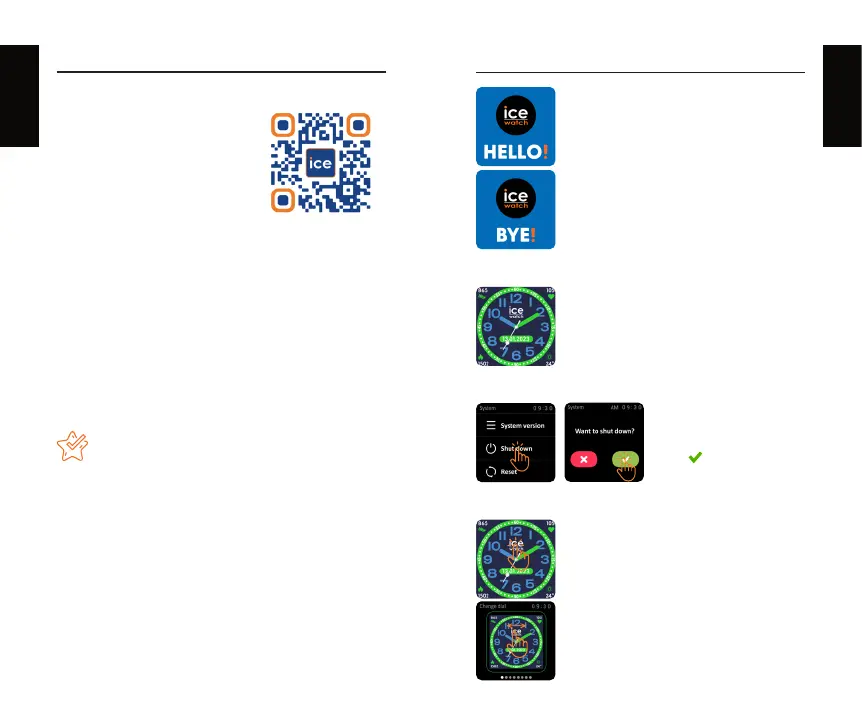
Scan “ICE” QR code to
download and install “ICE
JUNIOR” APP.
OR Search “ICE JUNIOR” in App Store or Play Store to
download and install the “ICE JUNIOR” App.
b. How to connect to the App :
Open the “ICE JUNIOR” App and press the “connect”
icon. Make sure the Bluetooth and Location functions
on your phone are turned on. Select the device “ICE
TIPS
1. The first time you connect with an iPhone, the
“Pair” reminder will pop-up. Click to pair to allow
notifications.
2. The first time you connect with an Android phone,
a “Permissions” reminder will pop-up, please follow
the guide and allow the required permissions to
ensure all functions can work properly.
3. Don’t connect the watch directly under the
Bluetooth setting on your phone.
4. OPERATING INSTRUCTIONS
Power on/off : When the watch is
Off, press and hold the crown (power
button) for 5 seconds to turn it on.
The Home Screen of the watch will be
displayed.
4. OPERATING INSTRUCTIONS
Power on/off : When the watch is
Off, press and hold the crown (power
button) for 5 seconds to turn it on.
The Home Screen of the watch will be
displayed.
Always press the crown to return to
the Home Screen. Press and hold the
crown for 5 seconds to power off the
watch.
Wake up screen : When the watch
screen is Off, you can press the crown
to wake up the screen. If the Gesture
control button is turned on in the App,
you can also wake up the screen by
turning the wrist.
Change Watch Faces : Keep your
finger pressed on the Home screen
for 3 seconds to enter the watch face
selection interface. Then swipe left
and right to choose the desired watch
face.
Shutdown : Click the
Setting icon, click
click to shut down.



 To Next Page