EasyManua.ls Logo

Icom IC-M400BB - User Manual

Icom IC-M400BB
24 pages
Print Icon
To Next Page IconTo Next Page
Loading...
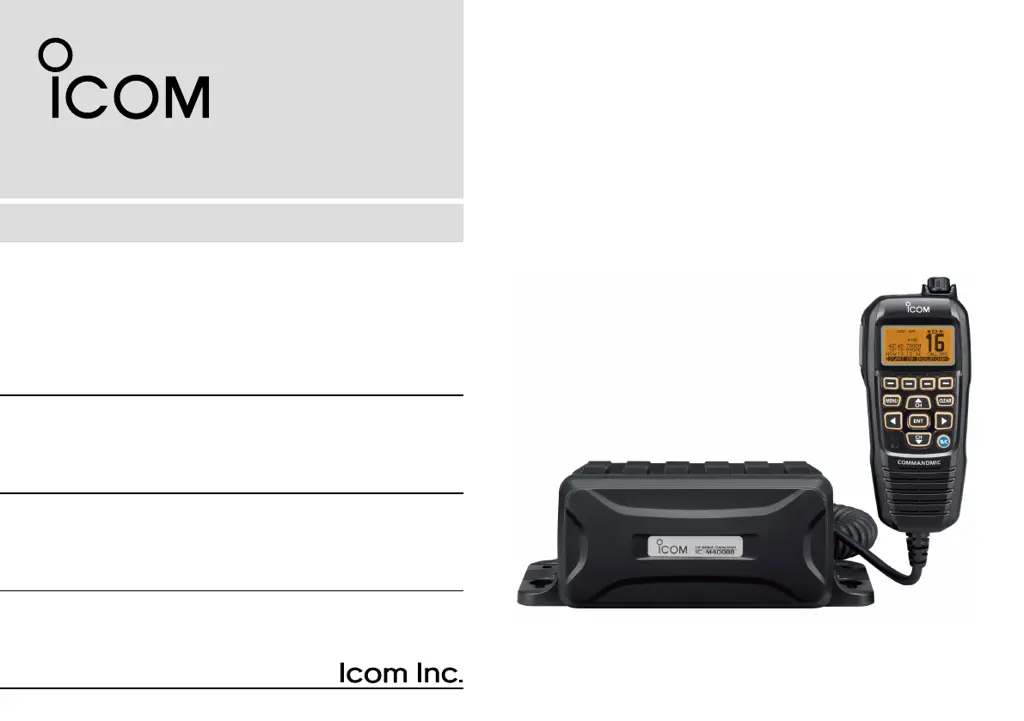
INSTRUCTION MANUAL
iM400BB
VHF MARINE TRANSCEIVER
This device complies with Part 15 of the FCC Rules. Opera-
tion is subject to the condition that this device does not cause
harmful interference.
COMMANDMIC
IV
(HM-195)
may not be supplied, depending
on the transceiver version.

Other manuals for Icom IC-M400BB

Questions and Answers

  • R
    Robert BensonJul 26, 2025
    Why is there little or no sound coming from the Icom Transceiver speaker?
    • J
      Joseph GregoryJul 26, 2025
      If you're experiencing little to no sound from your Icom Transceiver's speaker, there are a few potential causes. First, the squelch level might be set too high; try adjusting it to the threshold point. Second, the volume level could be too low; increase it to a suitable level. Finally, if the speaker has been exposed to water, use the AquaQuake function to remove it.
  • A
    Angela BarnettJul 31, 2025
    How to fix Icom Transceiver that does not turn on?
    • W
      wendymasonJul 31, 2025
      If your Icom Transceiver isn't turning on, the most likely cause is a bad connection to the power supply. Check the connection to both the transceiver and the power supply to ensure they are properly connected.
  • M
    melissalynchAug 5, 2025
    What to do if Icom Transceiver transmitting is impossible or high power cannot be selected?
    • J
      Joshua HarrisAug 5, 2025
      If you cannot transmit or select high power on your Icom Transceiver, it could be due to a couple of reasons. Some channels might be programmed for low power or receive only due to regulations, so try changing to a different channel. Alternatively, the output power might be set to low; push the [HI/LO] button to select high power.
  • V
    vyoungAug 10, 2025
    How to turn on beep sounds on Icom Transceiver?
    • M
      Megan RamirezAug 10, 2025
      If your Icom Transceiver is not producing any beep sounds, it's likely that the beep tones are turned OFF. You can turn them ON in the CONFIGURATION menu.
  • S
    Stefanie TurnerAug 15, 2025
    Why scan does not start on Icom Transceiver?
    • A
      Alex BurkeAug 15, 2025
      If the scan function on your Icom Transceiver does not start, it could be because no favorite channels are programmed. Set the channels you want to scan as Favorite channels in the settings.
  • S
    smithrandyAug 20, 2025
    What to do if distress calls cannot be transmitted on Icom Transceiver?
    • K
      Kimberly LinAug 20, 2025
      If distress calls cannot be transmitted on your Icom Transceiver, it is likely because the MMSI (DSC self ID) code is not programmed. Program the MMSI (DSC self ID) code in the settings.

Summary

Foreword and Important Information

Product Features Overview

Highlights key features of the IC-M400BB transceiver.

Explicit Definitions for Operation

Defines terms like WARNING, CAUTION, and NOTE for user guidance.

Emergency Procedures and Installation Notes

Distress Call Procedures

Step-by-step guide for making distress calls via VHF Channel 16 and DSC Channel 70.

Installation and Operation Guidance

Recommendations for mounting, antenna placement, and RF exposure during operation.

Radio Operator Warnings

RF Exposure Safety Guidelines

Safety guidelines for radio operators regarding RF exposure and MPE distances.

FCC Information and Country Codes

FCC Class A Compliance

Specific FCC compliance limits for Class A unintentional radiators.

ISO 3166-1 Country Codes

A list of country codes according to the ISO 3166-1 standard.

Precautions for Safe Use

Safety and Handling Precautions

Covers electrical safety, environmental limits, cleaning, and physical handling of the transceiver.

Operating Rules and Licensing

Priorities and Privacy Guidelines

Guidelines on call priorities, distress calls, and information privacy during operation.

Radio Licensing Requirements

Details on necessary ship station licenses and operator permits.

Preparation and Initial Setup

MMSI Code Programming

Instructions for programming the 9-digit Maritime Mobile Service Identity (MMSI) code.

ATIS Code Programming

Procedure for programming the 10-digit Automatic Transmitter Identification System (ATIS) code.

AIS Transponder Functionality

Making an Individual DSC Call with AIS Transponder

Step-by-step guide to transmitting individual DSC calls via the AIS transponder.

Connections and Maintenance

External Connector Identification

Diagram and descriptions of antenna, NMEA, and AF leads connectors.

Power and Microphone Connections

Connecting power, ground, microphone, and accessory ports.

Accessories, Fuse, Mounting, and Cleaning

Covers supplied accessories, fuse replacement, transceiver mounting, and cleaning procedures.

Microphone Installation Details

Detailed steps for installing the COMMANDMIC microphone mounting base.

Specifications and Options

General Technical Specifications

Detailed technical parameters for frequency, mode, temperature, and dimensions.

Transmitter and Receiver Specs

Performance data for the transmitter and receiver sections of the transceiver.

Unit Dimensions and Optional Equipment

Physical dimensions and list of optional accessories for the transceiver.

Channel List

International Channel Frequencies

Frequency assignments for standard international VHF marine channels.

USA and WX Channel Frequencies

Frequency assignments for USA VHF marine channels and Weather (WX) channels.

Troubleshooting Common Issues

Problem Diagnosis and Solutions

Guides users through diagnosing and fixing issues like no power, no sound, or failed transmissions.

Icom IC-M400BB Specifications

General IconGeneral
Waterproof RatingIPX7
Battery Voltage13.8 V DC
TypeMarine VHF Radio
Power Output25W (High), 1W (Low)
Channels55
NMEA InterfaceNMEA 0183
Operating Temperature Range-15°C to +55°C