47
8
MAINTENANCE
New2001
1
2
3
4
5
6
7
8
9
10
11
12
13
14
15
16
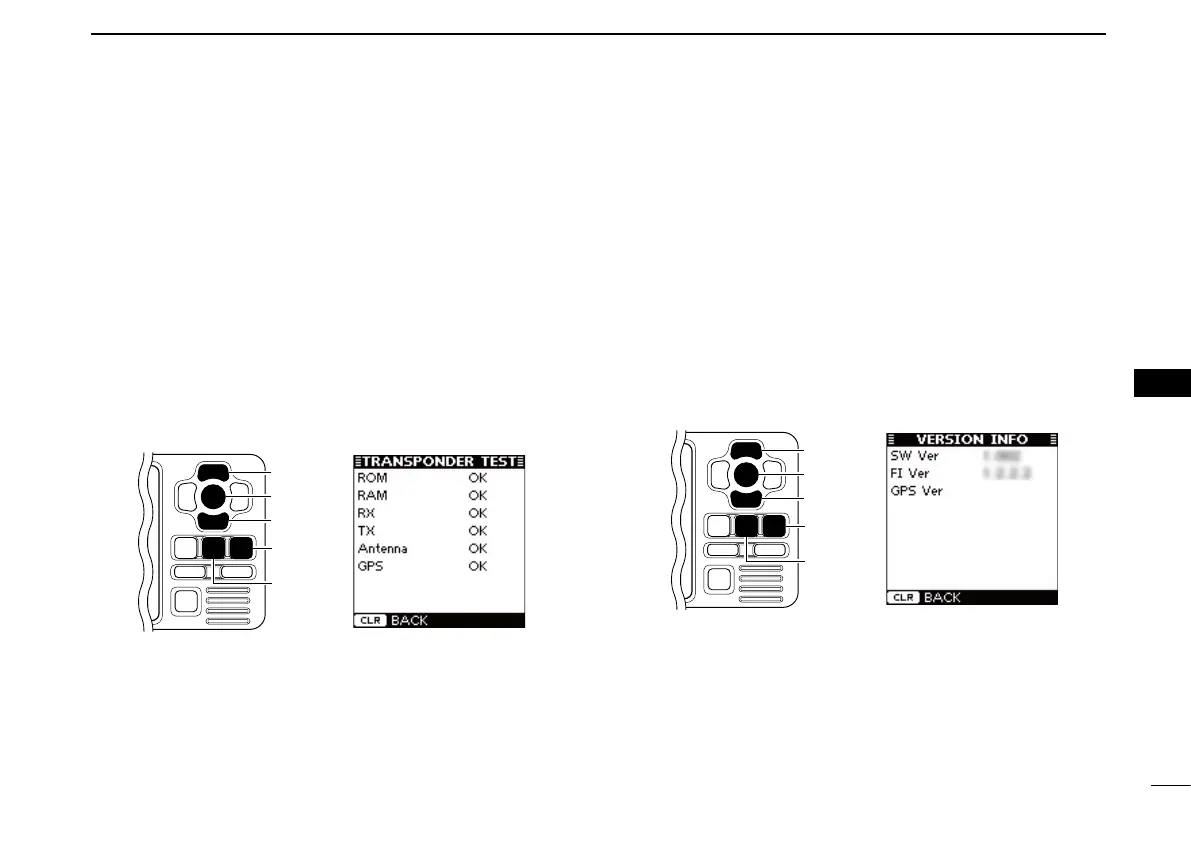
• Transponder Test
You can check whether the transponder units work properly.
q Push [MENU] to enter the Menu mode.
w Push [∫] or [√] to select “Diagnostics,”
then push [ENT].
e Push [∫] or [√] to select “Transponder Test,”
then push
[ENT].
r The screen shows the results of the ROM, RAM, RX/TX
unit, antenna and GPS receiver tests; “OK” or “NG” (No
Good).
t Push [CLEAR] to return to the “DIAGNOSTICS” screen.
y Push [CLEAR] twice to exit the Menu mode.
• Version Information
You can check the version information of SW (Software), FI
(Function Image) and the Internal GPS receiver.
q Push [MENU] to enter the Menu mode.
w Push [∫] or [√] to select “Diagnostics,”
then push [ENT].
e Push [∫] or [√] to select “Version Information,”
then push
[ENT].
r The screen shows the version information of each item.
t Push [CLEAR] to return to the “DIAGNOSTICS” screen.
y Push [CLEAR] twice to exit the Menu mode.


 To Next Page