TM
Assigning MIDI functions with iMap
TM
You can use iMap to assign the MIDI functions of your Qcon Lite easily.
Note: If your Qcon Lite is not connected to
your Mac/PC, a message of "There are no
MIDI input devices" will appear. Please
connect Qcon Lite to your Mac/PC with
the provided USB cable.
TM
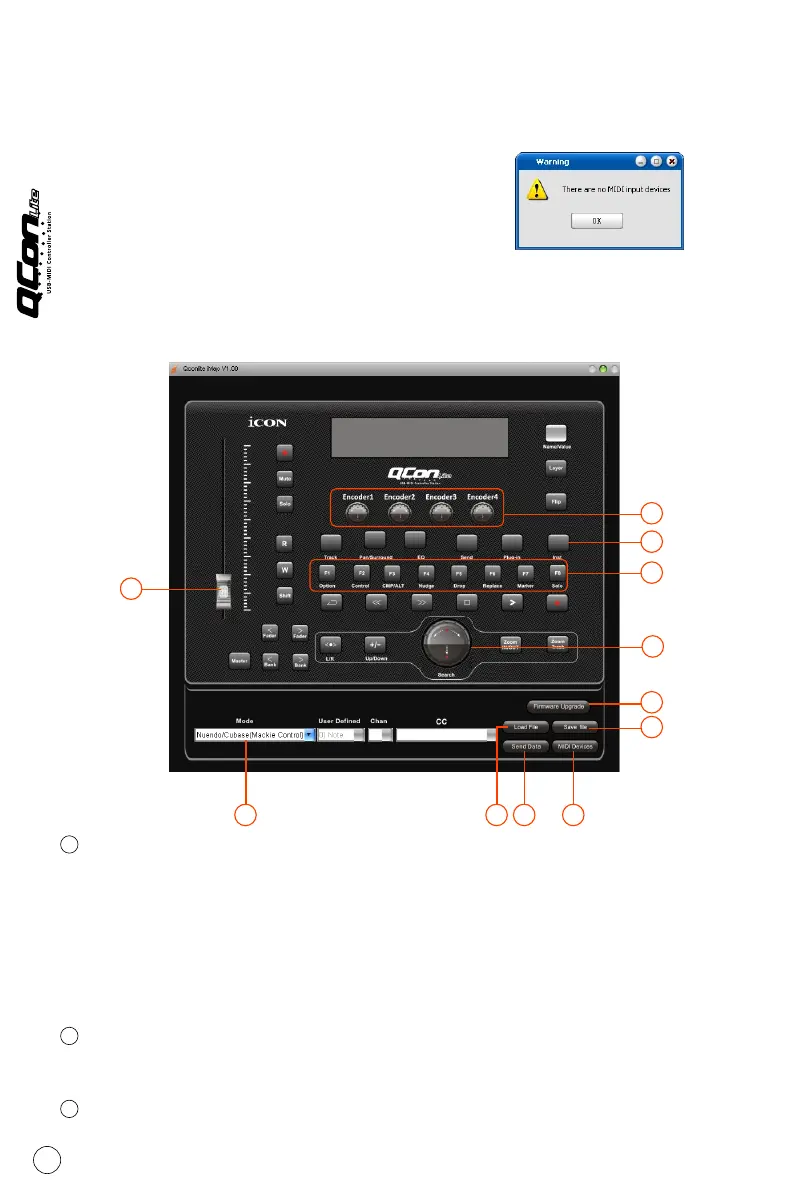
iMap Qcon Lite software panel
Mode selector
Select the Mackie Control/HUI mode according to your DAW or User Defined
mode for self midi assignment from the pull-down menu.
Tip: Select User Defined mode for self midi mapping. Or use Mackie Control/HUI mode
for convenient setup. Depending on your selected DAW Mackie Control mode, some
allow you to change the function of F1-F8.
Assign MIDI functions to the fader (User define mode only)
Select your desired MIDI functions for the fader.
Assign MIDI functions to the control buttons (User define mode only)
Select your desired MIDI functions for the control button.
1
2
3
9
1 8 9 10
7
6
4
3
5
2
11



 To Next Page