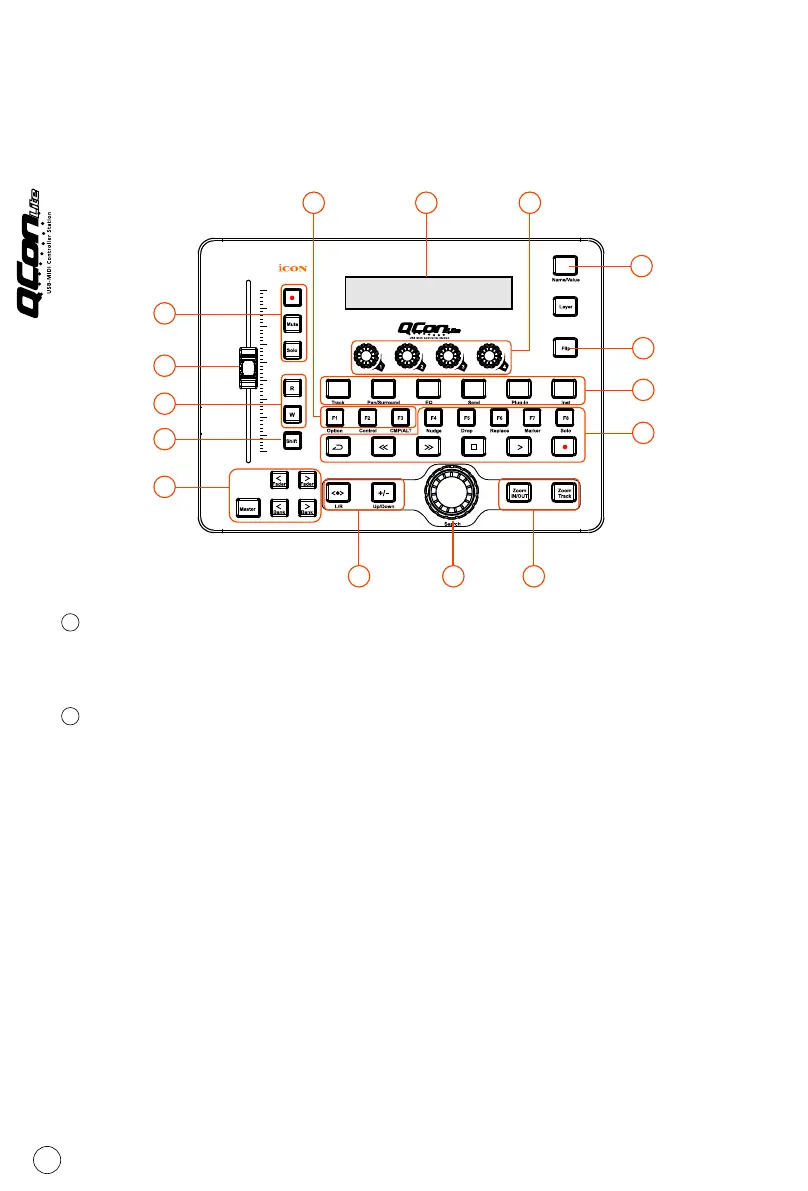
Top Panel Layout
Note: Function operates slightly difference between DAWs. Please refer to your DAW
manual for each function and overlap the provided labeling template according to your
current using DAW. The following description is based on the functions that operate in
TM
Apple Logic .
LCD backlit display
The four-line backlit LCD display shows the parameter values as you adjust them
and also provides feedback about channel selections, operating modes, and more.
Channel/Master faders
The touch sensitive motorised fader could be used to adjust the parameter of
different channels. Press the two “Fader” shifting buttons to shift between
channels. Also, by pressing the “Master” button, the fader will turn to control
the parameter of the master channel.
Channel Fader
The 100mm motorised fader is generally used for controlling the track volume of
your DAW. Depending on your DAW, you may use the “Flip” button to switch the
function of these faders to change other settings. It is touch-sensitive to allow
override automation the moment you touch a fader. Also, it is motorised; it will
automatically move to reflect the current level of the selected channels in your
DAW application. Any automation recorded in a project will be reflected by the
fader positions. Any parameter adjustments made with these faders will be
displayed directly above on the LCD display.
Master fader
It controls your DAW software's master channel fader. Any parameter adjustments
made with this fader will be displayed directly above on the LCD display.
1
2
3
1
2
3
8
4b
7a
4a
4b
5a5b 5b
6
7b
7c
7c



 To Next Page