PlayAUDIO
12
User Guide v1.0
Hardware Connections
Front Panel
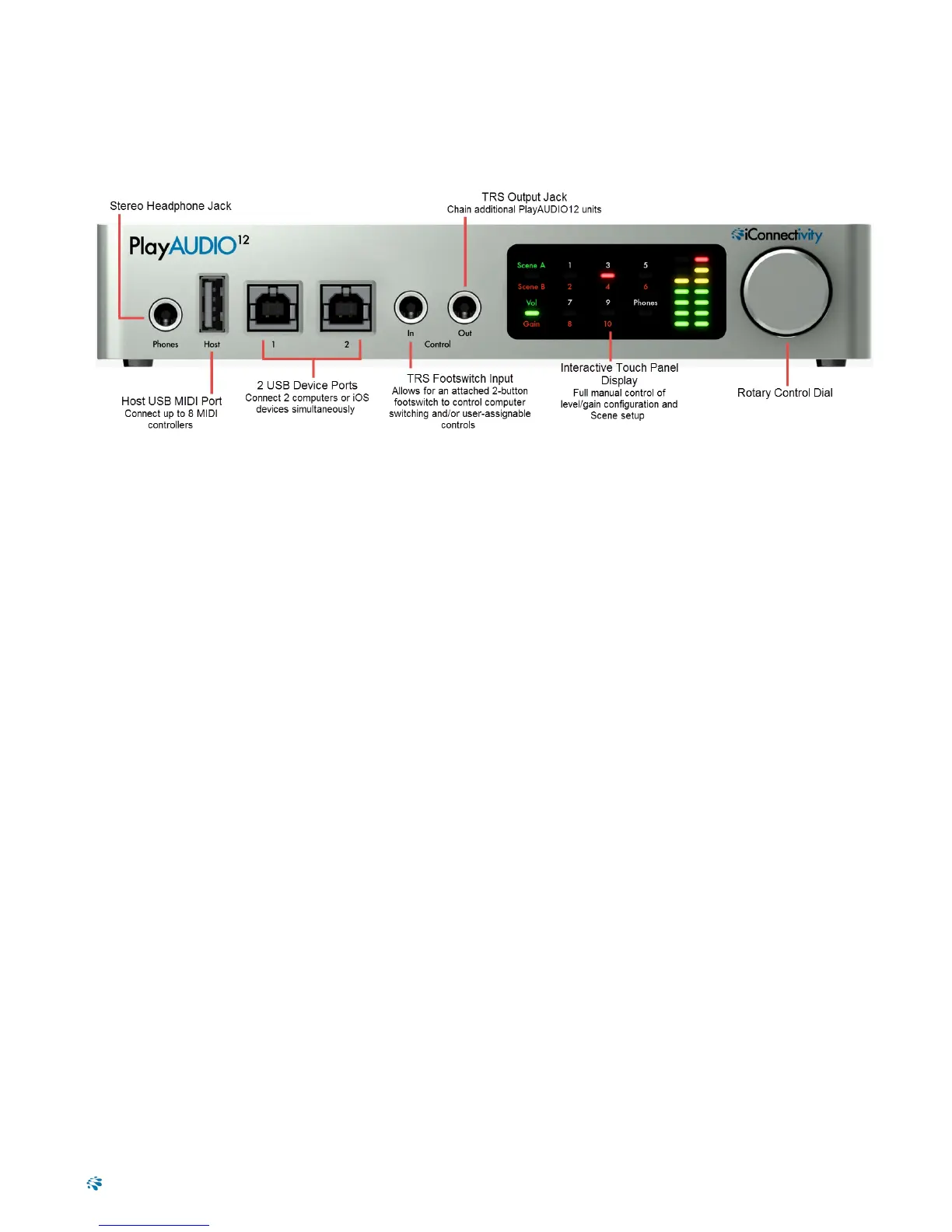
l Stereo Headphone Jack
l USB-A Host MIDI port. This USB 2.0 jack supports up to eight 16-channel MIDI Ports from eight USB
MIDI class-compliant devices.
l USB-B Device Ports. Use these ports to connect up to two computers or iOS devices simultaneously.
l Control In Jack. Use this TRSinput to attach a footswitch for manual failover switching.
l Control Out Jack. Use this TRS output to chain additional PlayAUDIO12 units.
l Interactive touch panel display. The PlayAUDIO12's touch panel makes it easy to set output levels/-
gain and to create audio/MIDI Scenes that can be recalled later.
l Rotary Control Dial. For manual adjustment of volume/gain levels, saving settings to memory, and
powering the unit ON and OFF.
6


 To Next Page