Bluetooth Mode
1. Hold for 2 seconds to turn on and it enters Bluetooth pairing mode, the blue
indicator ligh
2. Turn on your smartphone/tablet’s Bluetooth, search and click the device "ACDC Classic",
to connect. Open the music player and start playing music.
Line-in Mode
Use Aux cable to connect the device with your phone, it will automa cally enter Line-
in Mode.
Press t etooth mode/Line-in mode.
Specifica
Unit Size: 200*120*60mm
ty: Bluetooth/
Output power: 3.0W x 2
Built in 3.7V 1200mah Ba
ery
3.
Charging Input: microUSB DC5V 2000mA
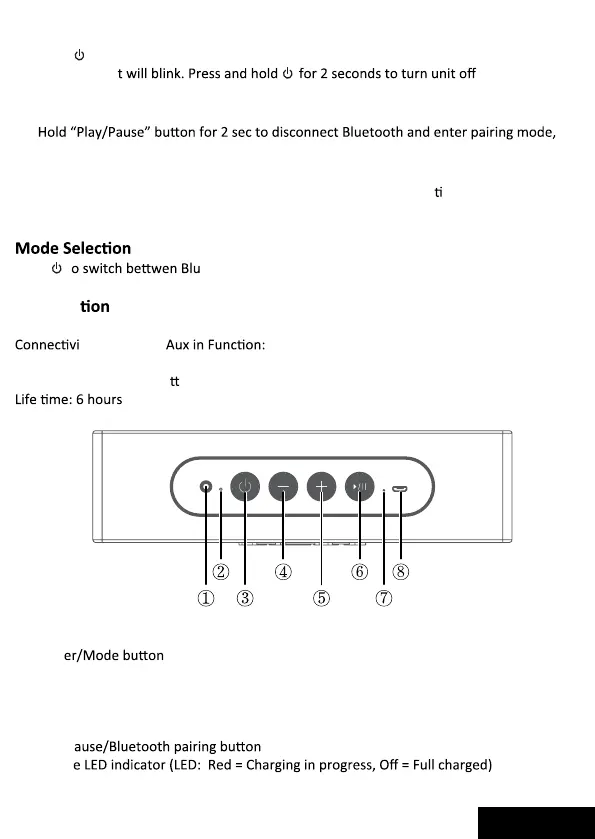
①.
3.5mm mini jack Aux- in
②.
Bluetooth indicator LED
③.
Pow
④.
Volume –
Press or hold to decrease volume
⑤.
Volume +
Press or hold to increase volume
⑥.
Play,P
⑦.
Charg
⑧.
Micro USB Charge Port
Connect micro USB cable to this port to a minimum 2A USB charger.
ENGLISH
UNIT Size: 225x120x60mm
Output Powe:20W


 To Next Page