
 Need help?
Do you have a question about the iDance CYCLONE 6000 and is the answer not in the manual?
Covers essential safety guidelines for operation, placement, and maintenance.
Switch to control the LED lighting status.
Button for turning the unit ON or OFF.
Port for connecting an external 12V power source.
Activates standby mode for the unit.
Knob to adjust volume levels.
Selects audio input source (Line/FM/Bluetooth/USB).
Adjusts the treble frequency response.
Connects wired microphones and guitars.
Connects USB drives or external audio devices.
Controls the overall output volume.
Connects the provided 15V power adapter.
Initial and subsequent charging procedures for the unit's battery.
Important notes and guidelines for battery maintenance and safety.
Steps for pairing devices and wireless audio playback.
Instructions for tuning and listening to FM radio stations.
How to play MP3 files from a USB drive.
Buttons for powering the unit and selecting input sources.
Controls for adjusting volume and accessing unit menus.
Buttons to cycle through different LED lighting modes.
Functions for mute, repeat, and play/pause operations.
Buttons for skipping tracks or channels.
 General
| Type | Home audio tower system |
|---|---|
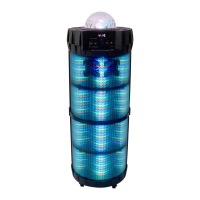
| Illumination | Yes |
| Product color | Black |
| Optical disc player | No |
| Speaker type | 5-way |
| Frequency range | 200 - 20000 Hz |
| RMS rated power | 1000 W |
| Woofer diameter | 254 mm |
| Number of speakers | 1 |
| LED indicators | Stand-by |
| Audio formats supported | MP3 |
| USB 2.0 ports quantity | USB 2.0 ports have a data transmission speed of 480 Mbps, and are backwards compatible with USB 1.1 ports. You can connect all kinds of peripheral devices to them. |
| Volume control | Rotary |
| Frequency band | 50/60 GHz |
| Battery life (max) | 8 h |
| Illumination location | Top |
| AC adapter input voltage | 100 - 240 V |
| Power source | AC/Battery |
| Supported radio bands | FM |
 Weight and Dimensions
| Width | 445 mm |
|---|---|
| Height | 1120 mm |
| Weight | 14750 g |
| Package depth | 430 mm |
| Package width | 433 mm |
| Package height | 1160 mm |
| Package weight | 18500 g |



 To Next Page