TROUBESHOOTING
SPECIFICATIONS
If you have followed the instrucons and are having difficulty operang the unit, locate the
PROBLEM in the le column below. Check the corresponding POSSIBLE CAUSE AND SOLUTION
column to locate and fix the problem.
E8
PROBLEM
Noise on speaker output when
microphone is connected and turn on
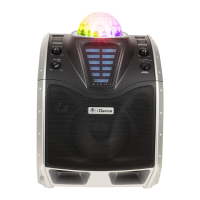
XD200
Make sure your microphone or microphone cable is in good
condion, grounded and shielded. Internal gain of voice
processing could cause vibraon from poor ground noise.
The wireless Bluetooth distance of XD200 is about 7-l0
meter in open area. Below condions could block you
Bluetooth signal and please ensure you would get rid of
those:
Make sure no other device from your friend or family is
connected to XD200. When XD200 Bluetooth is connected,
press BLUETOOTH buon would stay ON. So make sure
XD200 indicang Bluetooth is ready to connect. Also make
sure your smartphone / tablet is located close to XD200
less than 2 meters when pairing.
Hold the BLUETOOTH buon to reconnect again.
Metal protecon on case for your phone/tablet
Metal or wall is blocking in between your phone / tablet
and XD200
Another Bluetooth device is working close toXD200
Ensure that the XD200 is powered ON
Check the master volume on the XD200
Check the volume level on paired Bluetooth device
Remove the power adapter and reconnect again.
Intermient Bluetooth music streaming
No sound on selected source
AC ADAPTER
SOUND SOURCE INPUT
Total Harmonic Distoron
Signal to Noise Rao
Speaker Size
Speaker Power Output
AC Input :AC~ 100-240V 50/60Hz
DC Output = 15V , 2000mA
Bluetooth, 1/4 ” Microphone, Aux-In
Below 10% at Standard Output
Over 45dB
6.5 ”Full range driver X1 + 1.5” Tweeter driver X1
100 Was
Specificaons are typical, individual units might vary. They are subject to connuous improvement without
noce and without incurring any obligaon.
Bluetooth cannot connect to XD200
POSSIBLE CAUSE AND SOLUTION


 To Next Page