
 To Next Page
S
smithchristineAug 5, 2025
What to do if idatastart TR2650A Remote Starter doesn't work and the hood is open?
- DdmoralesAug 6, 2025
If the hood is open, the idatastart Remote Starter will not work. Close the hood.

What to do if idatastart TR2650A Remote Starter doesn't work and the hood is open?
If the hood is open, the idatastart Remote Starter will not work. Close the hood.
What to do if idatastart TR2650A doesn't work and the trunk is open?
If the trunk is open, the idatastart Remote Starter will not work. Close the trunk.
What to do if idatastart Remote Starter doesn't work and the foot brake is ON?
If the foot brake is engaged, the idatastart Remote Starter will not work. Release the foot brake.
What to do if idatastart TR2650A doesn't work and the engine is already running?
If the engine is already running, turn the engine OFF.
What to do if idatastart TR2650A Remote Starter doesn't work and the key is in ignition?
If the key is in the ignition at the ON position, remove the key from the ignition for the idatastart Remote Starter to function correctly.
Secures and accesses the vehicle by locking/unlocking doors and arming/disarming the alarm.
Query vehicle voltage, temperature, and utilize panic, trunk release, and auxiliary functions.
Manage auxiliary functions, 2nd car mode, silent modes, valet mode, and runtime extension.
Configure mute, shock sensor, ignition lock, passive lock/arm, and turbo cooling features.
Utilize weather start, query remote tech/firmware, lock/unlock remote, and manage takeover toggle.
Configure remote settings and check the remote's battery level.
 General
| Operating Range | Up to 3000 feet |
|---|---|
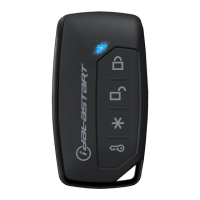
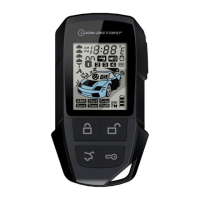
| Number of Buttons on Remote | 5 |
| Antenna Range | Up to 3000 feet |
| Engine Start | Yes |
| Engine Stop | Yes |
| Door Lock/Unlock | Yes |
| Trunk Release | Yes |
| System Type | 2-Way |
| Remote Type | LCD Remote |
| Installation | Professional installation |