- 28 -
IDEAL 4855 • IDEAL 5255 • IDEAL 6655
•
Operation
•
•
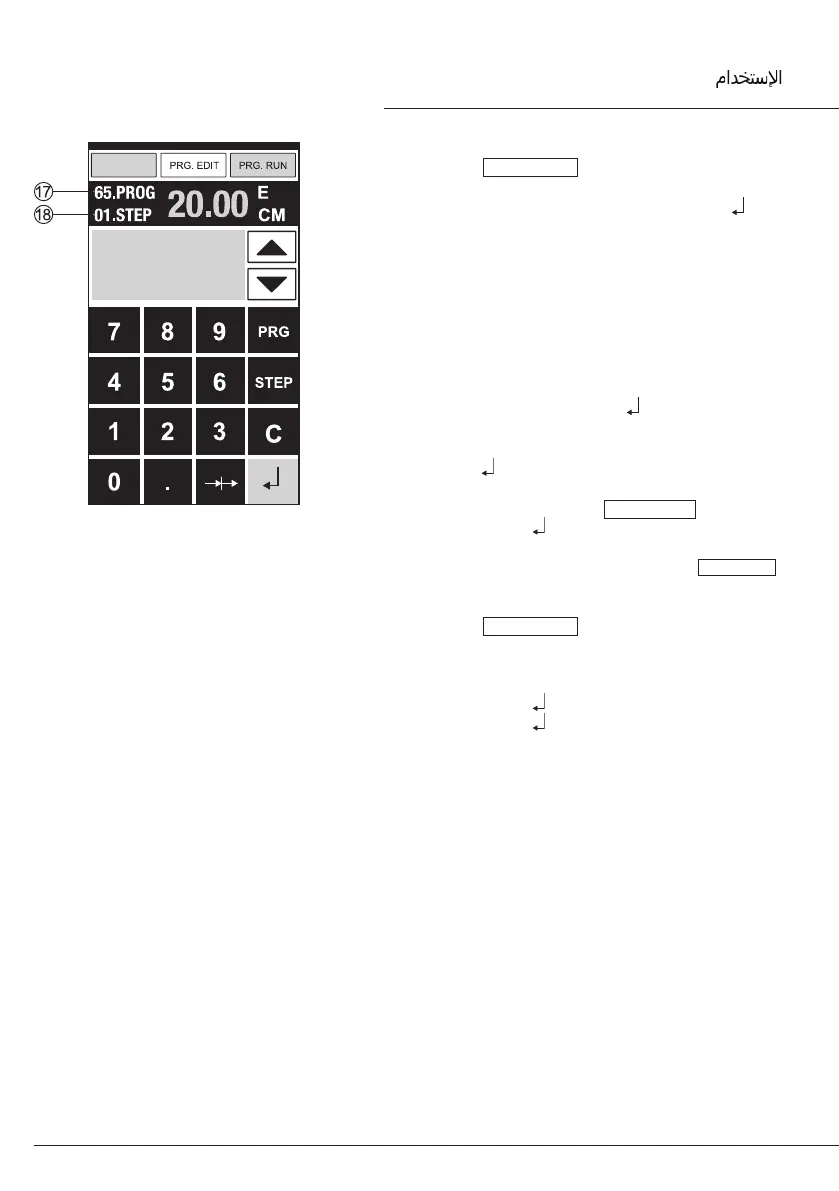
Entering a program
• Press PRG. EDIT "Load program no."
appears.
• Enter program number 01 ... 99, with
(Top number
Q
on display = program
number).
• If measurement is shown on the display the
program is reserved, select another program.
• Program step "01 Step" 00.00
R
appears.
(Second gure on display
R
= program step.
• Enter dimension, or move the backgau-
ge to the desired measurement with the
hand-wheel
E
.
• Store the measurement , next program
step appears.
• Enter the next measurement and with
Enter store the measurement etc.
• Should the entered program be required
immediately press PRG. RUN .
• Press Enter .
• Press START.
• Escape the program mode press MANUAL .
Cancel a program
• Press PRG. EDIT
• Scroll with PRG until "Delete program no."
appears.
• Enter Program number.
• Press Enter .
• Press Enter .



 To Next Page