EasyManua.ls Logo

iDPRT SP310 - Important Safety Instructions; Safety Warning; Instructions

iDPRT SP310
20 pages
Print Icon
To Next Page IconTo Next Page
To Previous Page IconTo Previous Page
Loading...



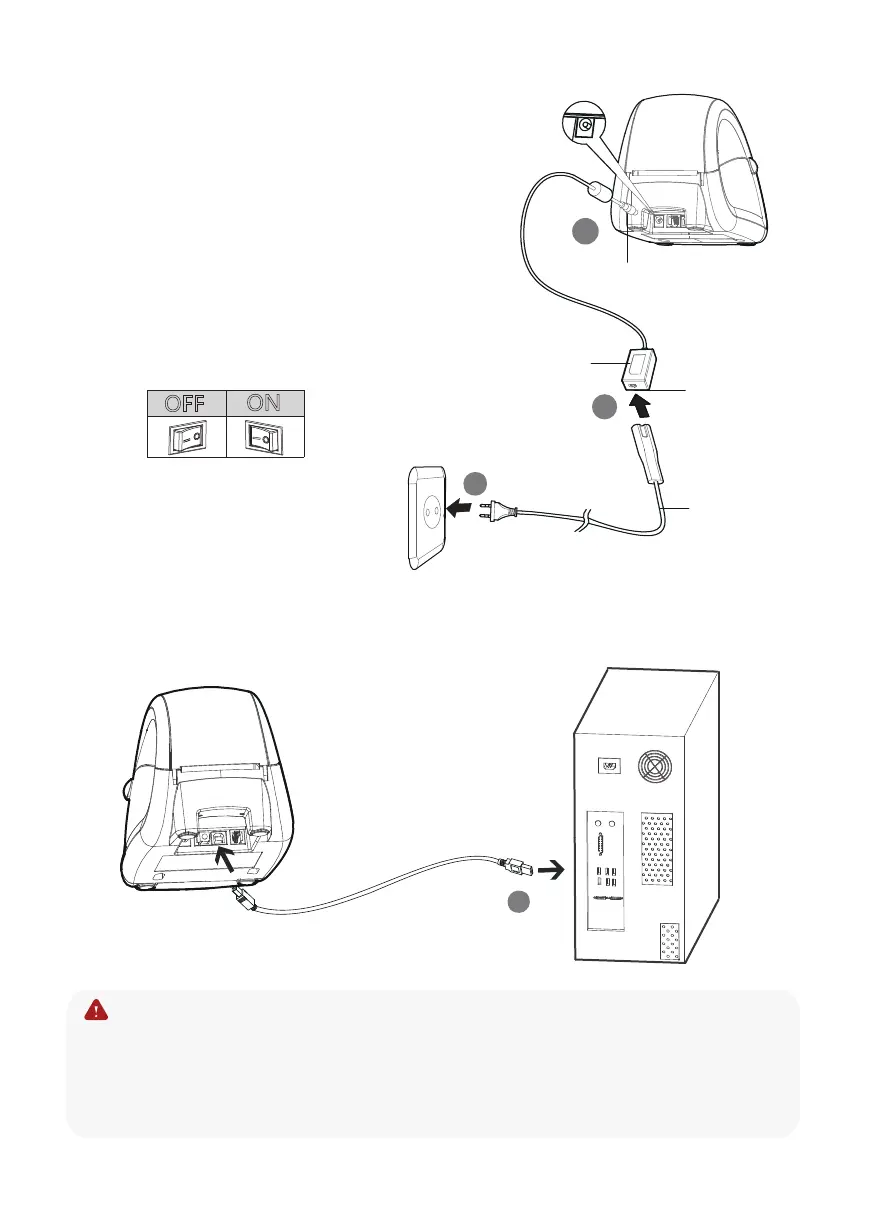
2. Connect the AC adapter to the cable connector.
3. Connect the AC power cord to the outlet.
4. Connect the other end of the AC power cord
into the socket outlet.
5. Connect the USB cable to the printer and PC.
OFF
ON


Note:
Use the original power adapter only, in case the damage caused by
charging improperly.

-3-
AC power cord

AC adapter
Cable connector
Varies by local or region
2
3
4
5

Other manuals for iDPRT SP310

Related product manuals