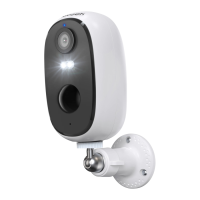
Need help?
Do you have a question about the ieGeek DD201 and is the answer not in the manual?
Download the CloudEdge app from the App Store or Google Play.
Register by email. Follow the steps to complete account registration.
Insert Micro SD card for recording videos and playback.
Press and hold the power button for 5 seconds to turn on the camera.
Follow Wi-Fi connection steps to connect the camera.
Overview of the CloudEdge app interface elements and functions.
Share camera access with other users via the CloudEdge app.
Configure motion detection sensitivity and alarm plans.
Receive alarm notifications and playback recorded events.
 General
| Resolution | 1080p |
|---|---|
| Two-Way Audio | Yes |
| Weather Resistance | IP65 |
| Motion Detection | Yes |
| Wireless | Yes |
| Night Vision | Up to 65ft |
| Storage | MicroSD card (up to 128GB) |
| Connectivity | Wi-Fi (2.4GHz) |
| Power Source | Battery-powered |
| Compatibility | iOS & Android |
| Field of View | 130 degrees |

 To Next Page