11
Start and End a Workout Manually
The activity tracker will detect your workouts automatically. You can also start and end a workout manually on the activity
tracker.
To start and end a workout manually, follow the steps below.
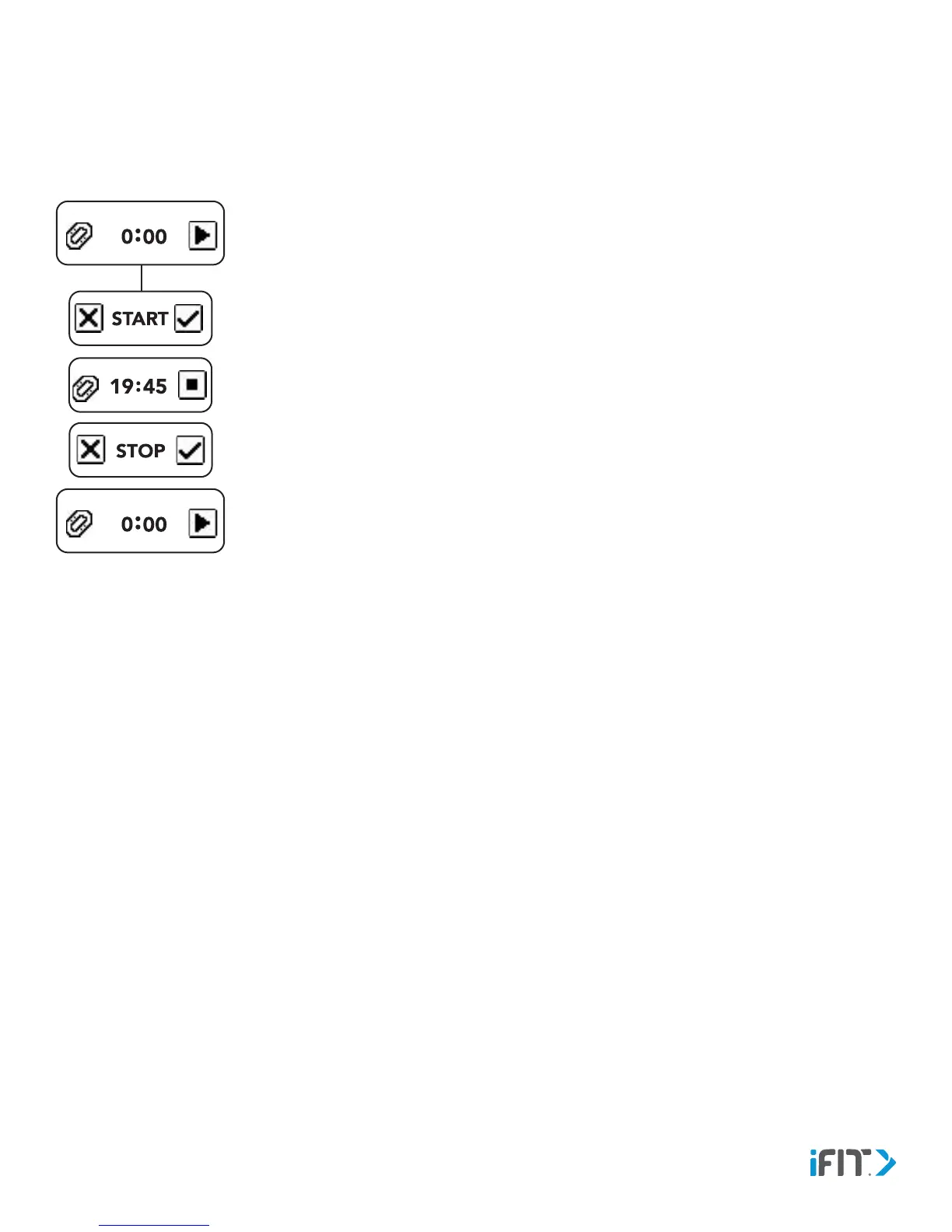
1. Navigate to the Workout screen, and then tap the play icon.
2. To start the workout, tap the checkbox icon. To cancel, tap the x-box icon.
During the workout, the elapsed time will appear and heart rate readings will be taken at
regular intervals. The activity tracker will remain in workout mode until you end the workout.
Information recorded during the workout will be displayed in your workout history (news
feed) in the iFit app.
3. To end the workout, first tap the stop icon. Then, to confirm the end of the workout, tap the
checkbox icon. To cancel and remain in workout mode, tap the x-box icon.
Note: If you are performing a workout in which you are continuously active, such as running,
it is recommended that you allow the activity tracker to detect your workout automatically
(see DETECT ACTIVITY on page 10. If you are performing a workout in which you are
intermittently active, such as yoga, it is recommended that you start and end your workout
manually as described above.


 To Next Page