16
Pair the Activity Tracker
To pair the activity tracker to your device, follow the steps below:
1. Place the activity tracker near your device.
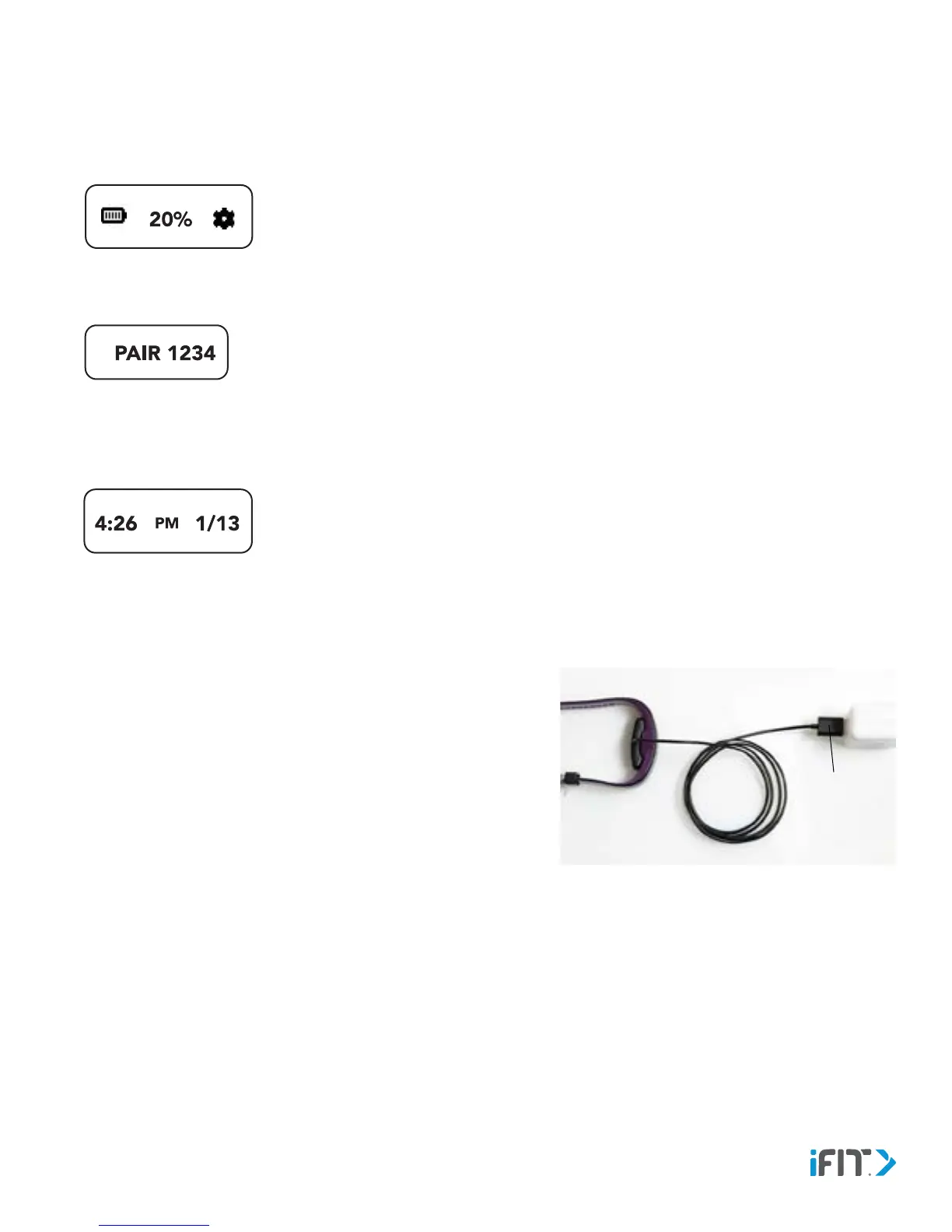
2. Swipe the screen left or right repeatedly until the gear icon appears.
3. Tap the gear icon. The version number of the activity tracker will appear.
4. Tap the screen. The word PAIR and an identification number will appear.
5. In the iFit app or in the BLUETOOTH settings for your device, select the activity tracker from the list of discoverable
devices. The pairing process will then begin.
6. If the pairing is successful, the Time and Date screen will appear.
Hard Reset the Activity Tracker
To hard reset the activity tracker, follow the steps below.
1. Locate the reset hole in the USB connector on the charger.
2. Attach the activity tracker to the charger.
3. Plug the charger into a USB port on your computer, wall adapter, or
car charger.
4. Press a pin or the end of a paper clip into the reset hole for several
seconds. When you release the pin, the words IFIT AXIS will appear.
Then, the word AXIS and the pairing identification number will
appear.
5. See PAIR THE ACTIVITY TRACKER on page 16 and re-pair the
activity tracker to your device.
Reset
Hole


 To Next Page