To stop the flywheel, push the resistance knob downward. The flywheel should quickly come to a complete stop.
IMPORTANT: When the exercise bike is not in use, tighten the resistance knob completely.
HOW TO USE THE TABLET HOLDER
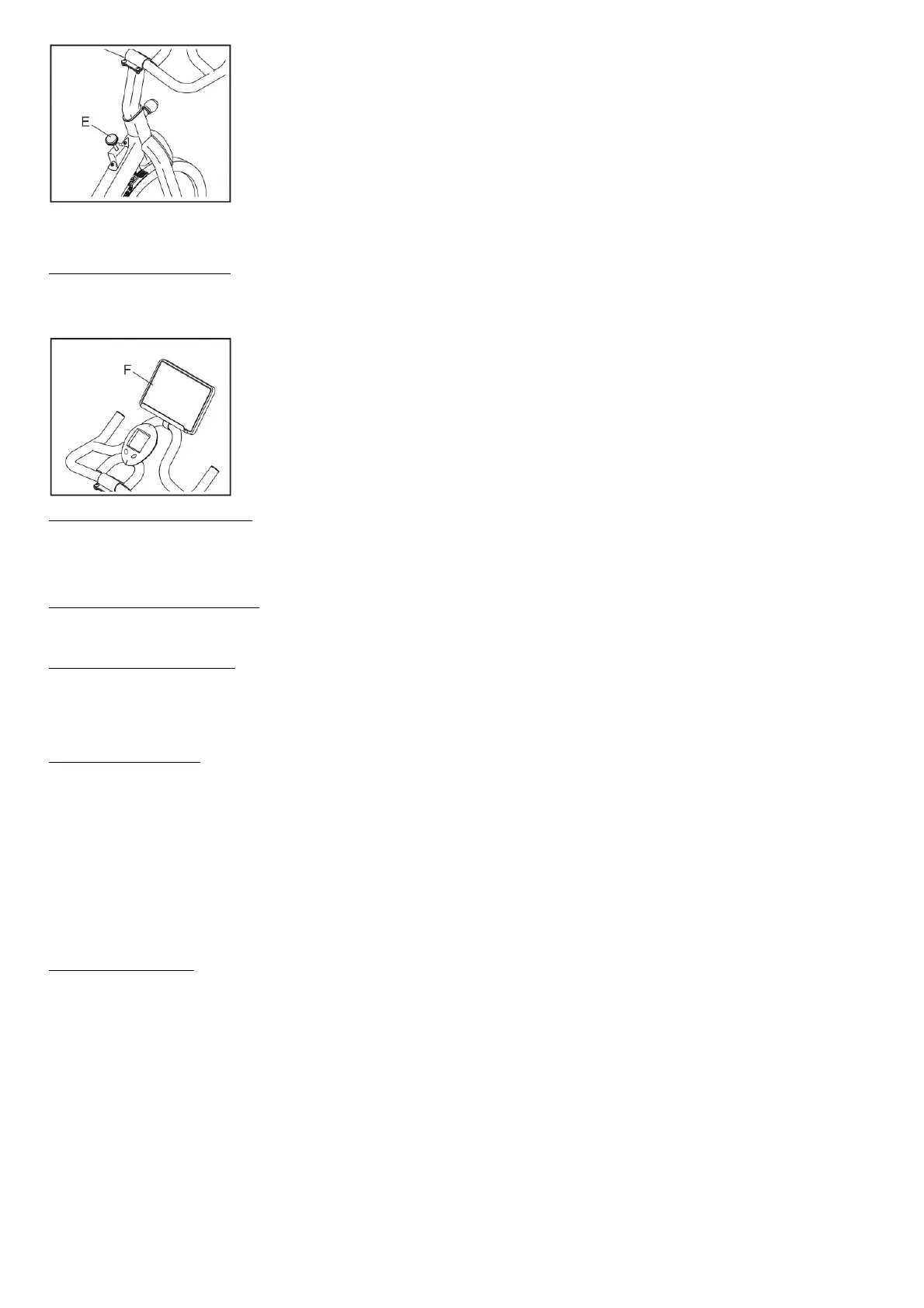
IMPORTANT: The tablet holder (F) is designed for use with most full-size tablets. Do not place any other electronic device or object in the tablet holder.
To insert a tablet into the tablet holder (F), set the bottom edge of the tablet in the tray. Make sure that the tablet is firmly secured in the tablet holder. To adjust the position of the
tablet holder, see assembly step 12 on page 12. Reverse these actions to remove the tablet from the tablet holder.
HOW TO MAINTAIN THE EXERCISE BIKE
Regular maintenance is important for optimal performance and to reduce wear. Inspect and properly tighten all parts each time the exercise bike is used.
Replace any worn parts immediately.
To clean the exercise bike, use a damp cloth and a small amount of mild detergent. IMPORTANT: To avoid damage to the console, keep liquids away from the console and
keep the console out of direct sunlight.
HOW TO TROUBLESHOOT THE CONSOLE
If the console display becomes dim, replace the batteries (see assembly step 8 on page 10); most console problems are the result of low batteries.
If the exercise bike will not be used for an extended period of time, remove the batteries from the console.
HOW TO ADJUST THE REED SWITCH
If the console does not display correct feedback, the reed switch should be adjusted.
To adjust the reed switch, see assembly step 11 above. Slide the Reed Switch (59) slightly closer to or away from the Magnet (20). Then, turn the Flywheel (37) for a moment.
Repeat these actions until the console displays correct feedback.
FEATURES OF THE CONSOLE
The easy-to-use console features six modes that provide instant exercise feedback during your workouts.
Scan (SCAN)— This mode displays the time, speed, distance, calories, and odometer modes, for a few seconds each, in a repeating cycle.
Time (TIME)—This mode displays the elapsed time.
Note: If you set a time goal (see step 2 on this page), this display will show the time remaining in your workout.
Speed (SPEED)— This mode displays your pedaling speed, in miles per hour.
Distance (DIS)— This mode displays the distance that you have pedaled during your workout, in miles.
Note: If you set a distance goal (see step 2 on this page), this display will show the distance remaining in your workout.
Calories (CAL)— This mode displays the approximate number of calories you have burned during your workout. Note: If you set a calorie-burning goal (see step 2 on this page), this
display will show the number of calories yet to be burned in your workout. Odometer (ODO)—This mode displays the total distance, in miles, that has been pedaled since the
odometer was last reset. Note: To reset the odometer, remove the batteries from the console and then reinsert them.
HOW TO USE THE CONSOLE
Make sure that batteries (not included) are installed in the console (see assembly step 8 above). If there is a sheet of plastic on the console, remove the plastic.
1. Turn on the console.
To turn on the console, press any button on the console or simply begin pedaling.
2. Set a workout goal if desired.
To set a time, distance, or calorie-burning goal for your workout, press the Mode button repeatedly until the word TIME, DIS, or CAL appears in the display. Make sure that the
word SCAN does not appear in the display.
Next, press the Set button repeatedly to set a goal.
To set a goal quickly, hold down the Set button. To reset the goal, press and hold the Mode button until zeros appear in the display.
3. Begin pedaling and follow your progress with the display.
Scan mode— To select the scan mode, press the Mode button repeatedly until the word SCAN appears in the display.
Time, speed, distance, calories, or odometer mode— To select one of these modes for continuous display, press the Mode button repeatedly until the name of the desired
mode appears in the display. Make sure that the word SCAN does not appear in the display.
As you exercise, the console will provide instant feedback about your workout.
When a workout goal is not set, an upward pointing arrow will appear in the display when the time, distance, or calories mode is selected. When a workout goal is set, a
downward-pointing arrow will appear in the display when the time, distance, or calories mode is selected.
If you have set a workout goal, the display will count down and show zeros when you reach your goal; if you continue to exercise, the display will begin to count upward.
4. When you are finished exercising, the console will turn off automatically.
If the pedals do not move for a few seconds, the console will pause.
The console has an auto-off feature. If the pedals do not move and the console buttons are not pressed for a few minutes, the power will turn off automatically to save the
batteries.


 To Next Page
 Loading...