Need help?
Do you have a question about the ifrogz PLUGZ WIRELESS and is the answer not in the manual?
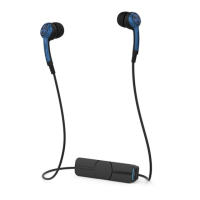
Explains the functions of the raised bump, middle, and recessed groove buttons.
Details how to enter pairing mode and automatic connection on subsequent uses.
Explanation of the LED indicator during charging and when fully charged.
How to adjust volume and skip tracks using the earbud buttons.
How to answer, send to voicemail, and disconnect calls using the earbud buttons.
Warning about modifications that could void user's authority to operate.
 General
| Brand | iFrogz |
|---|---|
| Model | Plugz Wireless |
| Connectivity | Wireless |
| Charging Time | 1.5 hours |
| Microphone | Yes |
| Colors | Black, Blue, Pink |

 To Next Page