MIG-DS SERIES PANEL INTRODUCTION
○
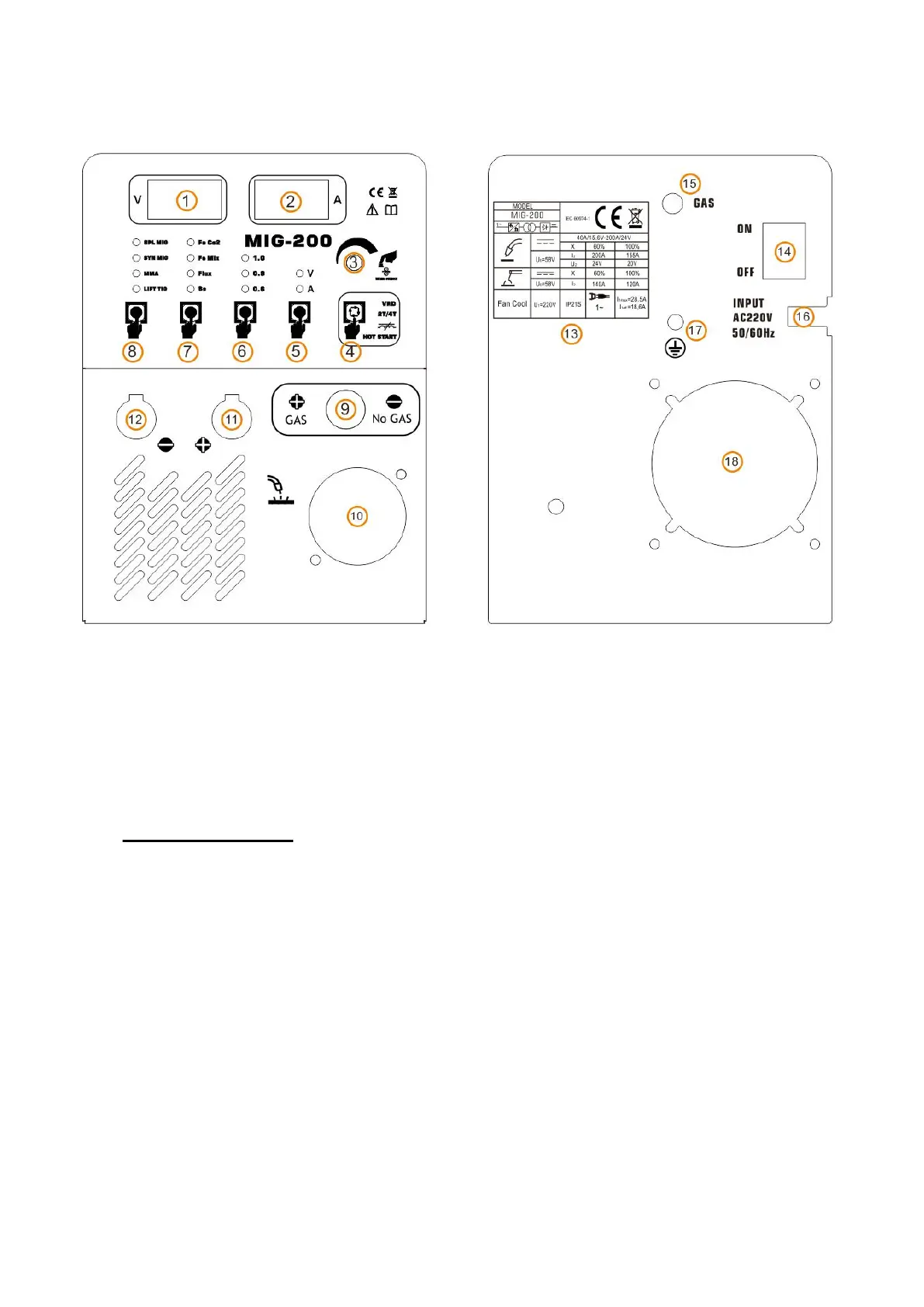
1 , MIG Welding Voltage Display
○
2 , Welding Current Display
○3 , to adjust parameter, Quick wire extension function to press button. ○4 , choose different
functions
.
○5 , welding voltage and current. ○6 , Welding Wire Diameter. ○7 ,
MIG welding material
and shielding gas.
○8 ,Welding Method. ○9 , Polarity Conversion Cable Connector,
Note: VERY IMPORTANT!
A), When use gas welding (solid wire), Install
○
9
into
○
11
, and install earth clamp with
cable into
○
12 . B), When use gasless welding (Flux wire), Install
○
9 into
○
12 , and install
earth clamp with cable into
○
11
.
○
10 ,MIG Welding Torch
○
11 ,ositive Polarity Connector (+)
○
12 ,Negative Polarity Connector(-)
○
13 , Parameter Table
○
14 , Power Switch for ON/OFF.
○
15 , Gas Hose Inlet Connector
○
16 ,
Power Cable with Plug.
○
17
, Ground Nut.
○
18
built-in cooling fan and ventilation.



 To Next Page