User Manual
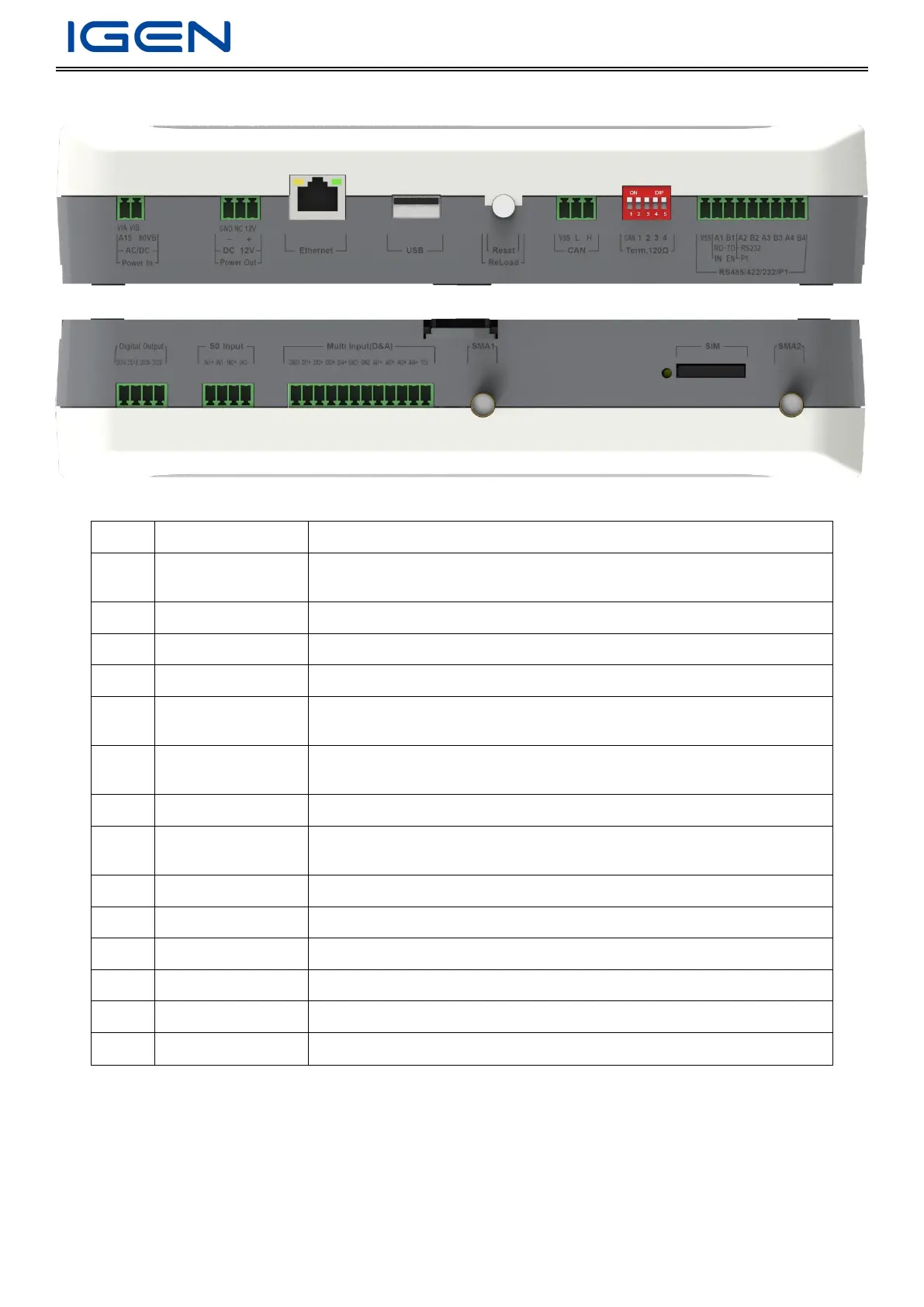
Interface Identification
Installation
Preparation
Before unpacking, please carry out visual inspection. After that, please check the product list below and confirm if there
is any damage or missing accessory.
Product List
Voltage Input: DC 15V~60V/Power: <10W (Make no distinction between
positive and negative electrode)
Voltage Output: DC 12V 500mA
Ethernet: 10/100M (adaptive)/RJ45/max. communication distance: <100m
1 mini USB/USB2.0 protocol/<60MBps/max. conductor length<5m
Reboot (Press for 3s)
Restore factory settings (Press for 10s)
9600bps (4800~115200bps configurable)/max. connected number: 256
(configurable)
4-way sending&receiving interfaces/9600bps (4800~115200bps
configurable)/conductor length<1000m
4Gmodule SIM card slot (big)


 To Next Page