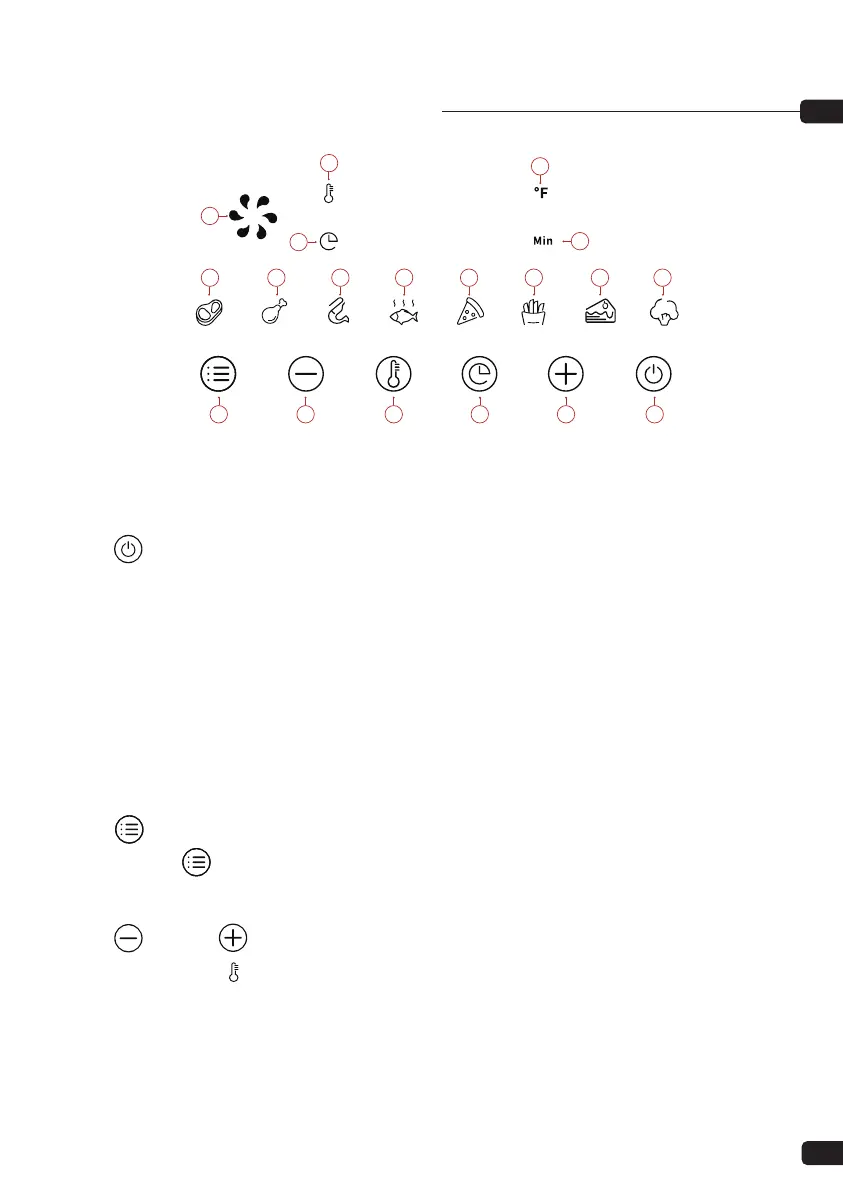
CONTROL PANEL INSTRUCTIONS
Key 1 Power Key
Once the basket and pot are placed correctly in the main housing, the Power light will be
illuminated. Selecting the power key for 1 seconds will make the unit default temperature
400°F, while the cooking time will be set to 15 minutes. Selecting the Power key a second time
will start the cooking process. Pressing the power key for 1 seconds to close the entire device
during cooking, “OFF” will show on the screen. The “OFF ” light goes out, and the fan stops
working 20 seconds later, and the entire device stops working.
Note:During cooking, you can touch the keys to control the pause and start of cooking.
Key 2 Preset Key
Selecting the “ ” Preset key enables you to scroll through the 8 popular food choices. Once
selected, the predetermined time and cooking temperature function begins.
7
8
10
12
2 3 5 6 4 1
13 14 15 16 17 18 19
11
9
Operation Instructions:
12
Key 3 & Key 4 Timer/Temperature Control Keys
Selecting the Key 5“ ” The Key 3 and Key 4 symbols enable you to add or decrease cooking
temperature 10°F at a time. Keeping the Key held down will rapidly change the temperature.
Temperature Control range: 170°F—400°F.


 To Next Page