BLUETO OTH
sonicB incognito
3
5
s
5
s
WIRELESS HEADPHONES - B • INCOGNITO
WIRELESS HEADPHONES - B • INCOGNITO
3 Quick Stat Guide
3.2 Bluetooth Pairing
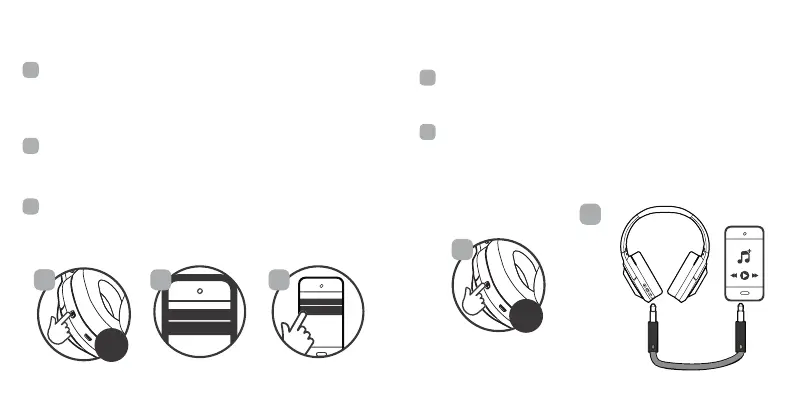
Ensure the headphones are turned o, then press and hold
the Power buton (D) for about 5 seconds to turn the
headphones ON. The headphones will enter Bluetooth
pairing mode automatically and emit a tone as the LED
indicator light (G) will lash BLUE and RED.
Ensure Bluetooth is enabled on your smatphone or music
device. Your device will stat searching for wireless devices.
The headphones will appear as “sonicB incognito” in the list of
available Bluetooth devices.
Select “sonicB incognito” The LED will begin to slowly blink
blue, and the headphones will emit a tone to indicate that is
has been successfully paired with your device.
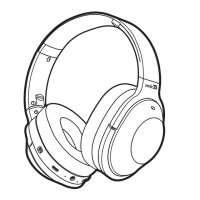
NOTE: please refer to the diagram on 2.2
1
2
3
221
BLUETOOTH
sonicB incognito
NOTE: please refer to the diagram on 2.2
3 Quick Stat Guide
3.3 Auxiliay Mode
Ensure the headphones are powered OFF by pressing and
holding the Power buton (D) for about 5 seconds to make
sure the headphones are now OFF.
Connect one end of the auxiliay cable to your headphones
right earcup- line-in input jack (F) and the other end into your
compatible audio device. the headphones will power o
automatically when the auxiliay cable is inseted. Note:
Butons and microphone may not work in AUX-in mode.
1
2
1
2


 To Next Page