Using the Unit
Snooze Operation
1. Press and hold the Snooze/Dimmer Button for a few seconds to set snooze time. Press and release the or Button
to set the snooze timer from 1 to 30 minutes.
2. Press and release the Snooze/Dimmer Button after the alarm sounds. The alarm will be silenced and come on again
after the set snooze time. Snooze can be pressed several times during the 1 hour alarm cycle.
Sure Alarm
The unit has a sure alarm feature. If backup batteries are installed, the buzzer alarm will still sound in the event of power
failure.
Charging your iPod
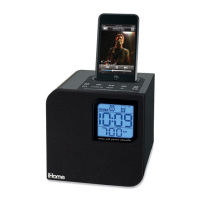
Note: Please make sure that the iPod is properly docked into the unit. Inserts are provided for currently popular iPod models.
If you do not have an insert, you can safely dock it provided you always do so gently and carefully.
1. While your iPod is docked in the unit and the unit is connected to AC power, it recharges (until fully charged). Back up
batteries will NOT charge iPod. Note that non-docking iPod models will NOT charge.
Listening to your iPod
1. Dock your already playing iPod. The unit will automatically turn on and in a moment you will hear the music playing from
your iPod.
Note: If the volume on the playing track is too low,unit may not detect that your iPod is in play mode. If this happens,
press and release the Button on the main unit to play it.
2. When the iPod is docked and in standby mode, press the Button on the unit to play it. The will appear on the
display, indicating iPod play mode.
3. Press and release the Button again to pause play; press again to resume it.
4. Press and release the or Button to adjust the system volume.
5. Press and release the or Button on the unit to go to the next or previous track. Press and hold while a track is
playing for high speed forward or reverse music search of the current track.
6. To turn off the unit, press and release the Button. The iPod will continue charging while in the dock.
5



 To Next Page